

Welcome first-time buyers differently from repeat customers
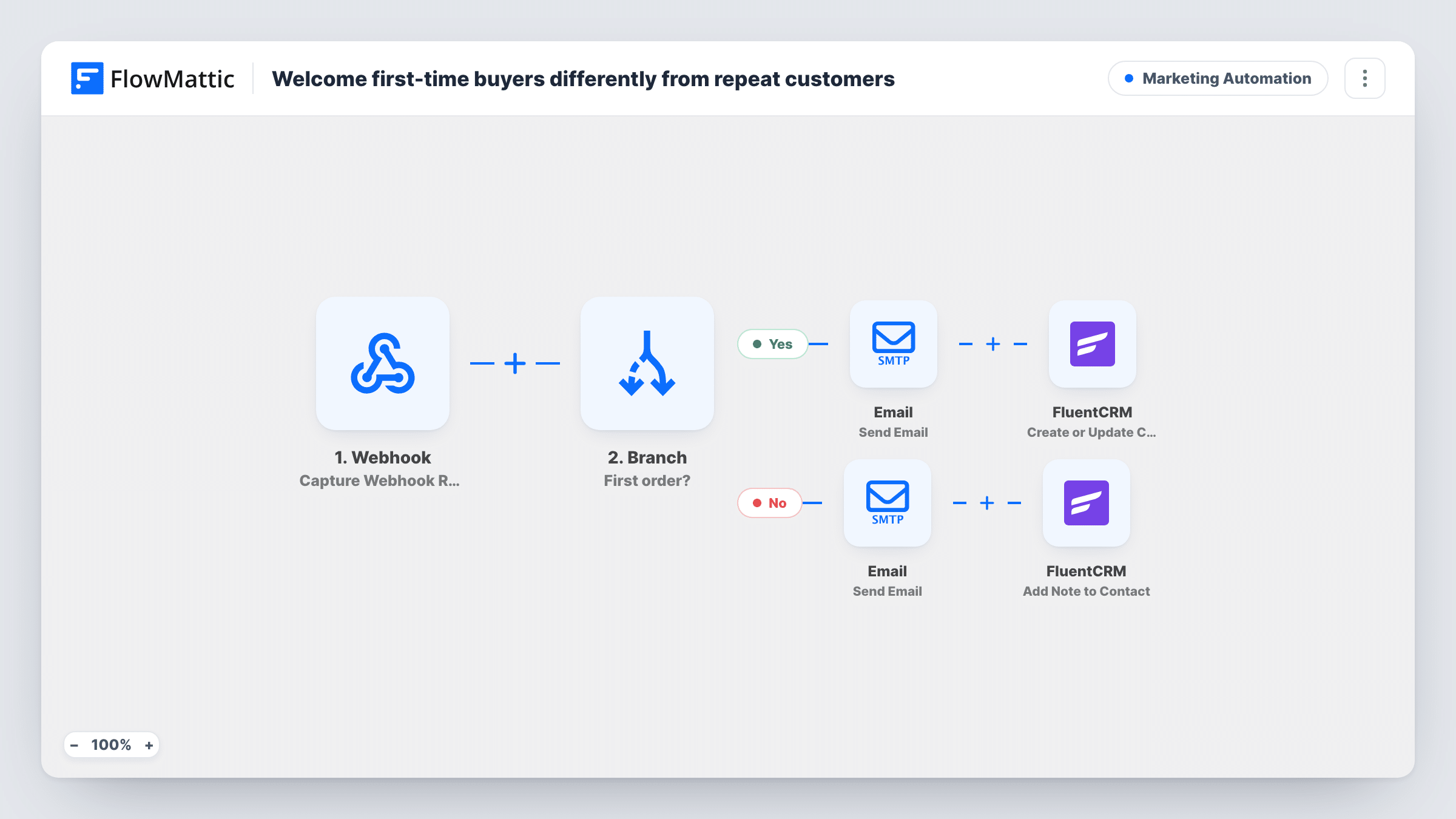
When an order arrives at a webhook, a Branch checks whether it is the customer’s first. First-time buyers get a welcome email and a FluentCRM contact; repeat buyers get a thank-you email and a loyalty note on their contact.
 Webhook
 Branch
 Email
Email
 FluentCRM
6 steps Setup ~12 min Used on 1.6k sites Marketing Free to import
What this workflow does
A first order and a fifth order call for different messages. A new buyer needs a welcome and some help getting started, while a regular deserves to hear that you noticed they came back. This workflow reads the order count your store sends and picks the right email.
Your shop or checkout tool posts each order to a FlowMattic Webhook, including the customer's email, name and order count. A Branch labelled First order? checks whether order_count equals 1.
On the yes path, the Email step sends a welcome addressed by name, and then FluentCRM creates the contact, or updates it if the email is already there. On the no path, the Email step sends a thanks-for-coming-back message that mentions a loyalty reward, and FluentCRM adds a note titled Loyalty to the contact with that email.
The template does not create a coupon or apply a tag. The repeat-buyer email says a reward is on you, so put a real code or offer in that message before you turn the workflow on. Also note that only the yes path creates contacts, so a returning buyer who was never added to FluentCRM has no contact for the note to land on.
Small online shop on a separate platform
Your store runs outside WordPress but can send order webhooks. First orders get a getting-started email and a FluentCRM contact you can nurture from your site.
Rewarding returning customers with a code
Add a discount code to the repeat-buyer email. The FluentCRM note records that the customer was sent the loyalty message, so staff can see it on the contact.
Courses or digital downloads
A first purchase triggers a welcome that explains how to access the product. Buyers coming back for a second product get a thank-you instead of the same instructions again.
How this workflow runs
What happens at each step once the workflow is on, and what you need before you import it.
 Webhook Capture Webhook Response
Gives you a webhook URL for your store or checkout. Send each order with fields for email, name and order_count, then capture a sample so they can be mapped.
- Branch First order?
Checks whether order_count equals 1. If yes, the first-time buyer path runs. If not, including any missing or zero count, the repeat-buyer path runs.
 Email Send Email
First-time path: emails the buyer with a subject that welcomes them by name and a short note about getting the most from their purchase. Edit the body to match your product.
- FluentCRM Create or Update Contact
First-time path: creates the buyer as a FluentCRM contact using the webhook email and name, or updates the contact if that email already exists. The last name is left blank.
- Email Send Email
Repeat path: emails the buyer a thank-you for coming back that offers a loyalty reward. The template doesn't generate a reward, so add your code or offer to the body.
- FluentCRM Add Note to Contact
Repeat path: adds a note titled Loyalty to the FluentCRM contact matching the buyer's email, recording that they are a repeat buyer and were offered a reward.
What you need
- FlowMatticCore
- FluentCRM PluginPlugin
After importing, map your own data. To keep the template universal, not every step is pre-filled. Open each step in the builder and connect your accounts and fields (channels, lists, sheets, recipients) before you switch the workflow on.
Make it yours
Changes worth making after you import it.
- Add a FluentCRM Create or Update Contact step before the note on the repeat path, so returning buyers who were never added still get a contact and the note has somewhere to go.
- Put a real discount code in the repeat-buyer email, or the message promises a reward the customer can't use.
- Add a Delay before the first-time welcome if your store already sends an order confirmation, so the two emails don't arrive at once.
- If your store sends a last name, map it into the FluentCRM step instead of leaving it blank.
Questions about this workflow
Does the repeat-buyer path give FluentCRM contacts a tag?
No. It adds a note titled Loyalty to the contact. If you want a tag for segmenting, check what the FluentCRM actions in FlowMattic offer and add a step for it.
What if my store doesn't send an order count in the webhook?
The Branch compares order_count with 1, so without it every order takes the repeat path. You need a source that sends the count, or a step before the Branch that looks it up.
Does the workflow create a loyalty reward or coupon?
No. The email mentions a reward, but nothing in the flow creates one. Add a code to the email body or a step in your store app that issues it.
Which service sends the welcome and thank-you emails?
The Email step, through the SMTP connection you set up in FlowMattic. Both emails go to the address in the webhook payload.
More Marketing Automation workflows
Other ready-to-import templates from the same category.






Import this workflow into your WordPress site
Download the JSON, import it from the Workflows screen and connect your accounts. Every run stays on your server, with no per-task fees.
30-day money-back guarantee Unlimited workflows and runs Self-hosted