

Escalate big value changes and quietly log small ones
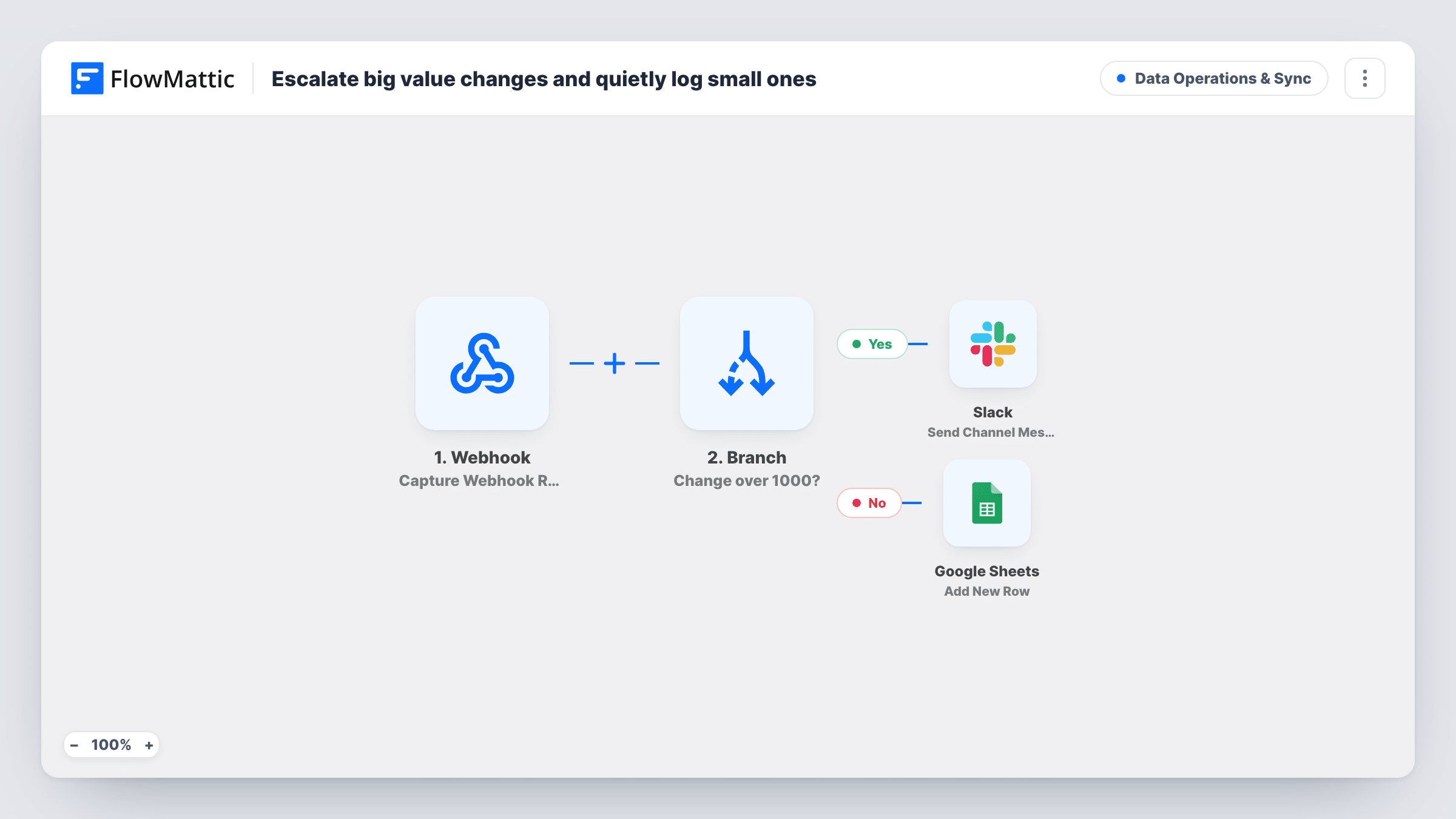
A webhook reports a change in some value. If the change is more than 1000, your team gets a Slack message. Anything smaller is written to a Google Sheets row without a ping.
 Webhook
 Branch
 Slack
Slack
 Google Sheets
4 steps Setup ~8 min Used on 1.6k sites Data Ops Free to import
What this workflow does
When every change to a number sends an alert, people stop reading the alerts. When none do, a big jump can sit unnoticed for days. This workflow splits the two: large changes reach a person, and small ones go to a log you can check when you need to.
Your system posts the change to a Webhook URL that FlowMattic gives you. The sample payload has two values: field, the name of what changed, and delta, the size of the change. A Branch then asks one question: is delta greater than 1000? On the Yes path, Slack posts Large change detected on followed by the field name and the delta. On the No path, a Google Sheets step adds a new row instead, and nobody is notified.
Each run takes exactly one path, so a change is either escalated or logged, never both. The Google Sheets step comes with nothing mapped, so you decide what goes in the row after import. Task History shows which path each run took.
Revenue swings from a reporting script
A nightly script compares today's revenue with yesterday's and posts the difference. A jump of more than 1000 lands in Slack, and the quiet days build up in the sheet.
Stock count corrections
Your inventory system posts each manual adjustment. Large corrections reach the warehouse lead in Slack, and minor ones stay in a sheet for the monthly audit.
Budget line changes
When a project budget is edited, the change amount is sent to the webhook. Big edits are raised with the team, small ones are kept as a record.
How this workflow runs
What happens at each step once the workflow is on, and what you need before you import it.
 Webhook Capture Webhook Response
Gives you a URL to send data to. Post the name of the changed value as field and the size of the change as delta, which is what the sample payload carries.
- Branch Change over 1000?
Checks whether delta is greater than 1000. Greater goes to the Yes path and the Slack alert. Equal to 1000 or less goes to the No path and the sheet.
- Slack Send Channel Message
On the Yes path, posts a message that reads Large change detected on, then the field name and the delta. Connect Slack and send a test to confirm it reaches the right channel.
- Google Sheets Add New Row
On the No path, adds a row to Google Sheets for the smaller change. Nothing is mapped as imported, so map field, delta and any other values you send into the row.
What you need
- FlowMatticCore
- Slack AccountAccount
- Google Sheets AccountAccount
After importing, map your own data. To keep the template universal, not every step is pre-filled. Open each step in the builder and connect your accounts and fields (channels, lists, sheets, recipients) before you switch the workflow on.
Make it yours
Changes worth making after you import it.
- Change 1000 in the Branch condition to the size of change your team actually cares about. The Slack text does not mention the threshold, so it needs no edit.
- If your system sends drops as negative numbers, a large fall will not pass a greater-than check. Add a condition that also catches deltas below -1000, or send the size of the change as a positive number.
- Want a record of large changes too? Add a second Google Sheets step after the Slack message on the Yes path, so the sheet holds every change and Slack only the big ones.
Questions about this workflow
What does my system need to send?
A request to the webhook URL with a field value and a delta value, matching the sample. Send one test request after import so FlowMattic captures your real payload, then remap if your names differ.
Are large drops escalated as well?
Only if they arrive as a number above 1000. The Branch checks greater than 1000, so a negative delta such as -5000 takes the No path and is logged. Adjust the condition if you need drops escalated.
Does a large change also get a row in the sheet?
No. A run follows one path. Large changes go to Slack only and the rest go to Google Sheets only, unless you add a sheet step to the Yes path.
What has to be in place to use this alert workflow?
A system that can send a request to a webhook, a Slack workspace, and a Google account with a spreadsheet for the log.
More Data Operations & Sync workflows
Other ready-to-import templates from the same category.




Import this workflow into your WordPress site
Download the JSON, import it from the Workflows screen and connect your accounts. Every run stays on your server, with no per-task fees.
30-day money-back guarantee Unlimited workflows and runs Self-hosted