

Fast-track tasks flagged rush and calendar-block the rest
A Fluent Forms task request marked rush becomes a ClickUp task with RUSH in its name; any other request is booked as a Google Calendar event using the start and end times from the form.
 Fluent Forms
 Branch
 ClickUp
 Google Calendar
4 steps Setup ~8 min Used on 2.9k sites Productivity Free to import
What this workflow does
Urgent work needs to land where the team looks first, while normal work needs protected time so it does not slip. When both come in through one request form, sorting and scheduling them by hand eats into the time you meant to save. This workflow does the sorting for each submission.
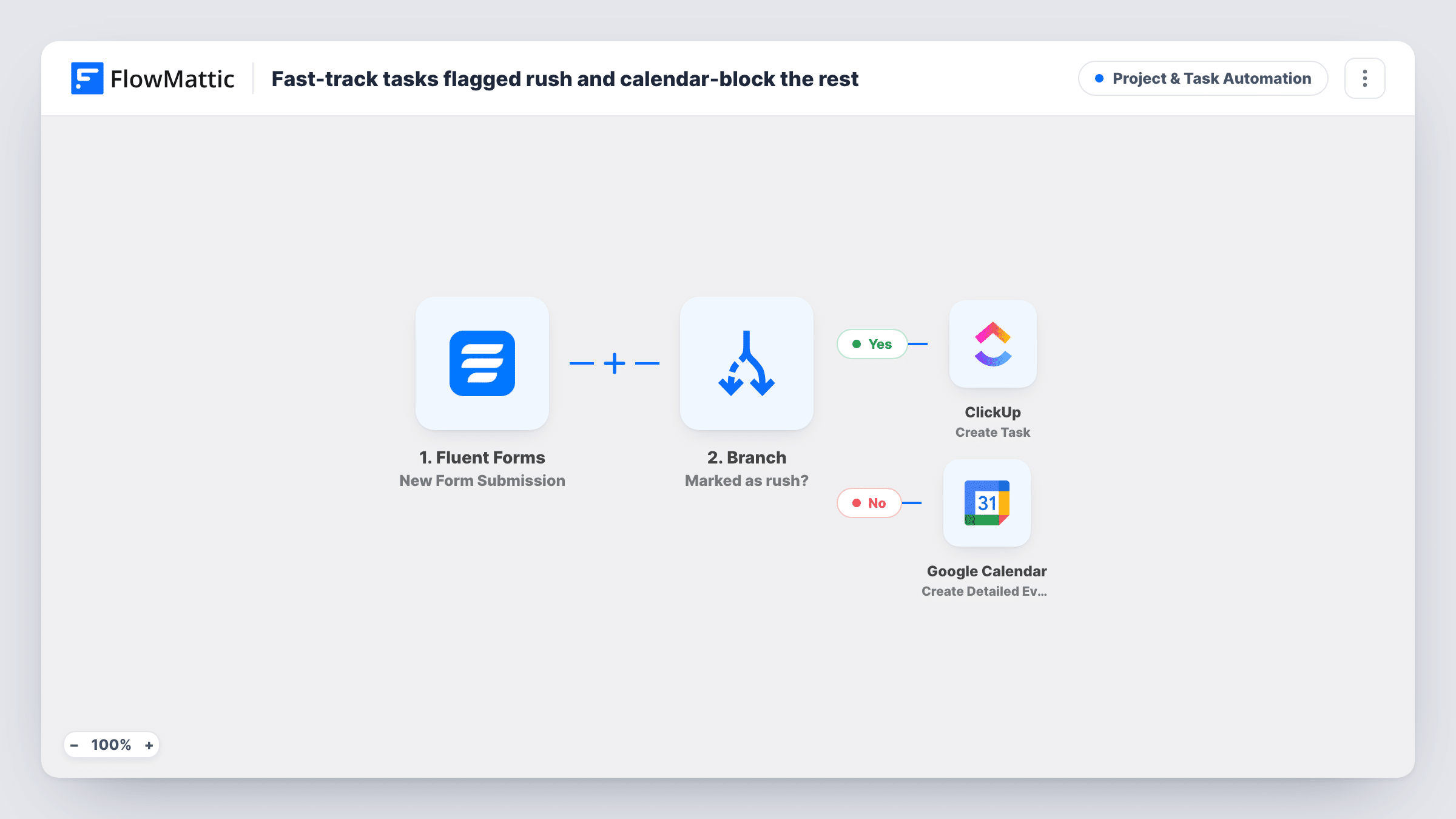
A Fluent Forms submission starts the run, carrying a subject, a message, a rush answer and start and end times. A Branch labelled Marked as rush? checks whether the rush field contains yes. Rush requests take the yes path, which creates a ClickUp task named RUSH: plus the subject, with the message as its description. Everything else takes the no path to Google Calendar, where a detailed event titled Work on plus the subject is created between the start and end times from the form.
The two paths do not overlap. A rush request gets no calendar block, and a normal request gets no ClickUp task. For the calendar path to work, your form must collect start and end values in a date and time format Google Calendar accepts, so test a submission before you rely on it.
A freelancer planning client requests
Clients send work through one form. A request marked rush becomes a ClickUp task with RUSH up front; standard jobs are booked into your calendar for the time slot the client picked.
In-house design requests
Colleagues ask the design team for assets. Same-day asks become RUSH tasks in ClickUp, and the rest appear as calendar blocks so designers can see their week.
Maintenance jobs for a facilities team
Urgent repairs reported through the form go to ClickUp right away, while routine jobs are scheduled as calendar events for the window given on the form.
How this workflow runs
What happens at each step once the workflow is on, and what you need before you import it.
 Fluent Forms New Form Submission
Runs when someone submits your Fluent Forms request form. The subject, message, rush, start and end answers are passed on, so the form needs fields with those names.
- Branch Marked as rush?
Checks whether the rush field contains yes. A match takes the yes path to ClickUp; any other answer, including a blank one, takes the no path to Google Calendar.
- ClickUp Create Task
On the yes path, creates a ClickUp task named RUSH: followed by the subject, with the message as its description. Run a test to confirm where the task lands.
- Google Calendar Create Detailed Event
On the no path, creates a Google Calendar event titled Work on followed by the subject, starting and ending at the times taken from the form's start and end fields.
What you need
- FlowMatticCore
- Fluent Forms PluginPlugin
- ClickUp AccountAccount
- Google Calendar AccountAccount
After importing, map your own data. To keep the template universal, not every step is pre-filled. Open each step in the builder and connect your accounts and fields (channels, lists, sheets, recipients) before you switch the workflow on.
Make it yours
Changes worth making after you import it.
- Use Fluent Forms date and time fields for start and end, and test one submission to confirm Google Calendar reads the values as you expect.
- Want rush jobs in the calendar too? Add a Google Calendar step after the ClickUp task on the yes path, with a short block starting at the submission time.
- Add more detail to the event title, such as the requester's name mapped from the form, so you know whose job each block is for at a glance.
Questions about this workflow
Do normal requests also go to ClickUp?
No. Requests not marked rush only become Google Calendar events. Add a ClickUp step to the no path if you want every request on your board.
What if the form has no start or end time?
The calendar step relies on those fields, so the event may fail to save. Make both fields required on your form, or set default times in the step.
Where do the calendar events show up?
In the Google account you connect to the step. Send a test request after import and check which calendar the event appears in before you share the form.
What do I install and connect?
Fluent Forms on the same WordPress site as FlowMattic, a ClickUp account for rush tasks, and a Google account for the calendar events.
More Project & Task Automation workflows
Other ready-to-import templates from the same category.



Import this workflow into your WordPress site
Download the JSON, import it from the Workflows screen and connect your accounts. Every run stays on your server, with no per-task fees.
30-day money-back guarantee Unlimited workflows and runs Self-hosted