

Send each sprint owner a personal recap of their open items
Once a day, this workflow reads your sprint sheet in Google Sheets and sends each item’s owner a Slack direct message naming the task and its due date, so nobody has to chase people one by one.
 Schedule
 Google Sheets
 Iterator
 Slack
4 steps Setup ~8 min Used on 395 sites Productivity Free to import
What this workflow does
A sprint sheet only helps if people look at it. Reminding each owner about their items by hand takes time every morning and is easy to skip on a busy day. This workflow does the reminding from the sheet itself.
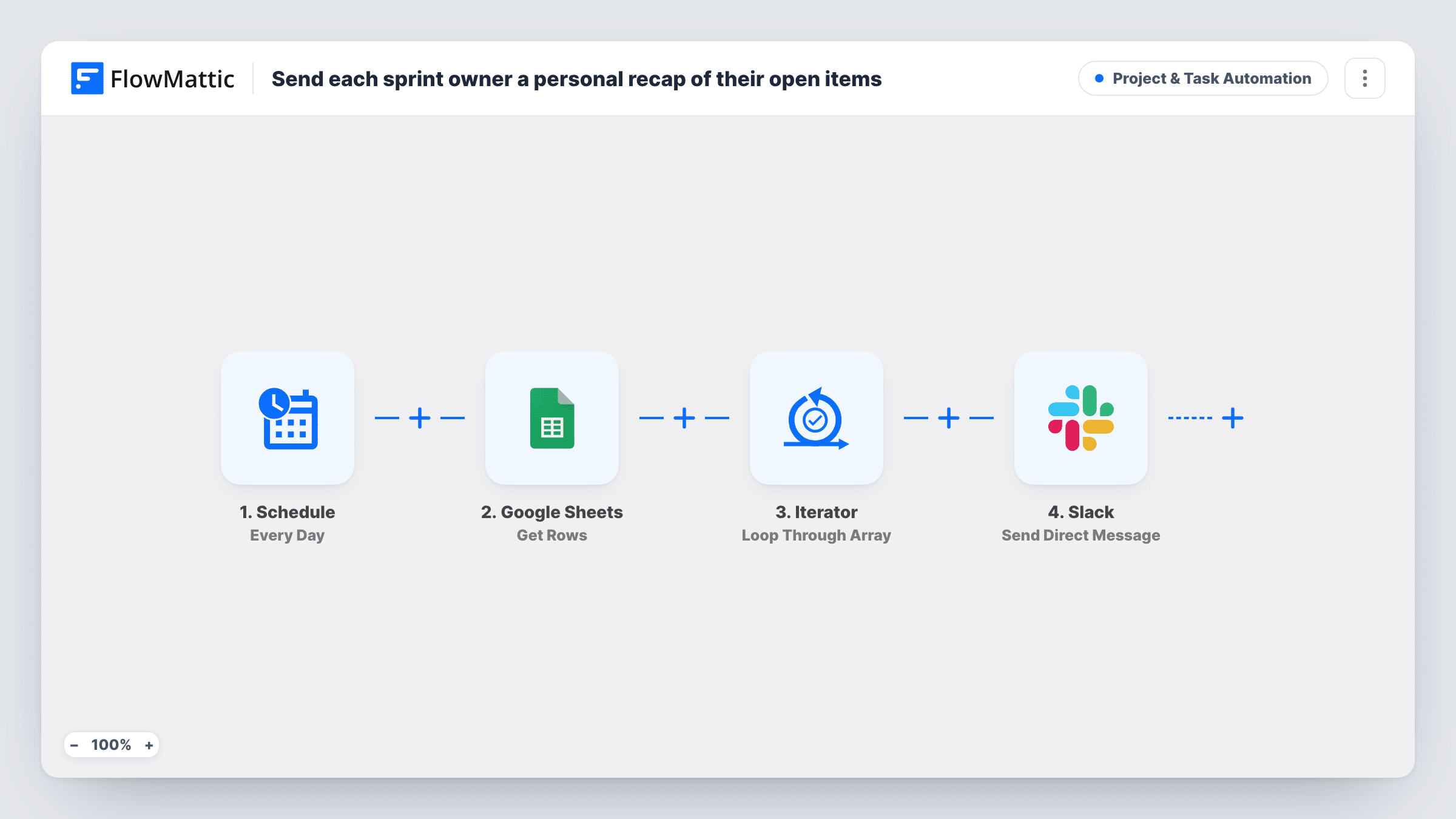
A Schedule trigger starts the run every day. The Get Rows action in Google Sheets then reads the rows of your sprint sheet. An Iterator loops through those rows one at a time, and for each row Slack's Send Direct Message step messages the person in the owner column. The text reads: Your open item, followed by the task name and its due date from that row.
Two things are worth knowing. First, the workflow sends one message per row, so an owner with three rows gets three messages rather than a single summary. Second, nothing checks a status column. Every row that Get Rows returns gets a reminder, so keep finished items off the sheet or add a Filter inside the loop. The template expects columns named task, due and owner; rename the mapped fields if your sheet uses other headings.
Daily stand-up prep
Each developer starts the day with a Slack DM listing what they own and when it's due, before the stand-up begins.
Content calendars
Writers and editors tracked in a shared sheet get a personal nudge about the piece they own and its deadline.
Event planning task lists
Volunteers named in the planning sheet are reminded each day about their task and the date it needs to be done by.
How this workflow runs
What happens at each step once the workflow is on, and what you need before you import it.
 Schedule Every Day
Starts the workflow once every day, with no event needed. Each run reads the sheet fresh, so changes you make to it show up in the next day's reminders.
- Google Sheets Get Rows
Reads the rows from your sprint sheet in Google Sheets and hands them to the Iterator. Connect your Google account and point the step at the sheet that holds the sprint items.
- Iterator Loop Through Array
Loops through the rows from Google Sheets so the Slack step runs once per row. The task, due and owner values of the current row are available to map.
- Slack Send Direct Message
Sends a Slack direct message to the person in the row's owner column, naming the task and its due date. Run a test with one row to confirm the owner value is one Slack accepts.
What you need
- FlowMatticCore
- Google Sheets AccountAccount
- Slack AccountAccount
After importing, map your own data. To keep the template universal, not every step is pre-filled. Open each step in the builder and connect your accounts and fields (channels, lists, sheets, recipients) before you switch the workflow on.
Make it yours
Changes worth making after you import it.
- Add a Filter between the Iterator and Slack that continues only when a status column is not Done, so finished items stop generating reminders.
- Run the workflow once with a single test row whose owner is you, and check the direct message and Task History before adding the whole team.
- Change the message text to include a link to the sheet, so the owner can update the item straight from the reminder.
Questions about this workflow
Does each owner get one combined message?
No. The Iterator handles one row at a time, so each row produces its own direct message. An owner with several items receives several messages.
Will it skip items that are already done?
Not as imported. It messages every row the sheet returns. Remove done items or add a Filter on a status column.
What should the owner column contain?
A value that identifies the person in Slack. The template maps it straight into the direct message step, so test with your own entry to see which form works.
Is anything needed besides Google Sheets and Slack?
No other apps. You connect a Google account with access to the sprint sheet and the Slack workspace your team uses.
More Project & Task Automation workflows
Other ready-to-import templates from the same category.





Import this workflow into your WordPress site
Download the JSON, import it from the Workflows screen and connect your accounts. Every run stays on your server, with no per-task fees.
30-day money-back guarantee Unlimited workflows and runs Self-hosted