

Alert Slack about tasks due soon and log the rest to a sheet
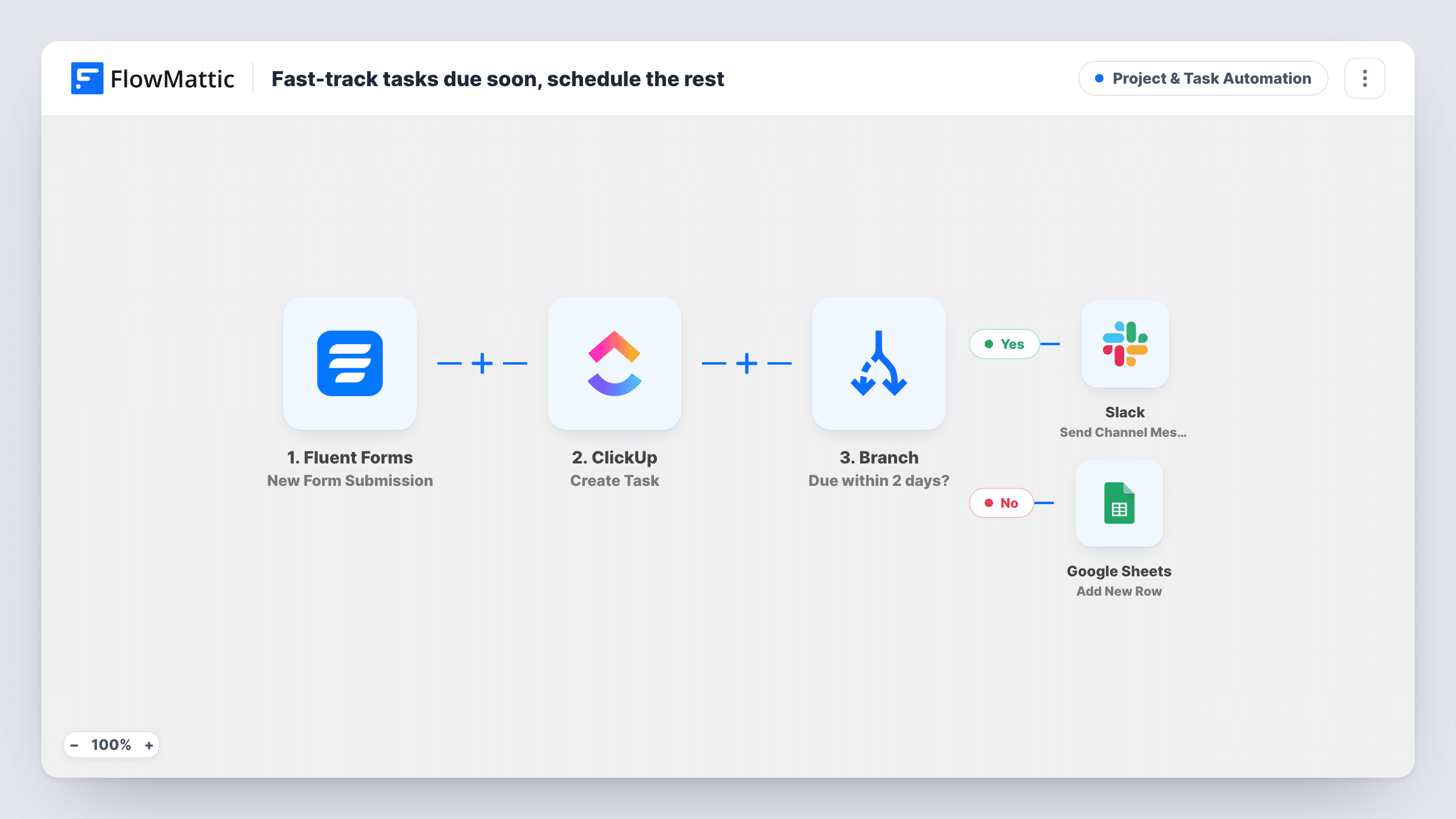
Each Fluent Forms task request becomes a ClickUp task. A Branch then reads how many days until it’s due: under 2 days posts an alert in Slack, everything else is logged as a row in Google Sheets.
 Fluent Forms
 ClickUp
 Branch
 Slack
 Google Sheets
5 steps Setup ~8 min Used on 619 sites Productivity Free to import
What this workflow does
When people request work through a form, the urgent requests get buried with the routine ones. This workflow creates every request as a ClickUp task, then splits the follow-up: the ones due almost immediately are flagged in Slack where someone will see them now, and the rest are recorded in a sheet for planning.
The Fluent Forms trigger runs whenever someone sends in the request form. The ClickUp step creates a task named after the form's subject field, with the message field as its description. Connect ClickUp after import and set where the tasks should be created.
A Branch then reads a form field called days_until_due and checks whether it is less than 2. FlowMattic compares the value as a whole number, so 0 or 1 takes the Yes path, and so does a blank answer, which counts as 0. Two days or more takes the No path. On Yes, Slack gets a message with the subject and the days left. On No, a row is added to Google Sheets. That step ships unmapped, so pick the sheet and map the columns you want.
Your form needs fields named subject, message and days_until_due, ideally with a number field for the days. If your names differ, remap them in the ClickUp, Branch and Slack steps.
Marketing request form
A marketing team takes design and copy requests through Fluent Forms. Requests needed by tomorrow ping the team's Slack channel, while longer jobs wait in a planning sheet.
IT help requests
An office's internal IT form puts every request into ClickUp, and anything due today or tomorrow is called out in Slack so it gets picked up first.
Client change requests
An agency's clients submit website changes with a deadline. Short-notice changes alert the developers in Slack, and the rest go into a sheet for the weekly review.
How this workflow runs
What happens at each step once the workflow is on, and what you need before you import it.
 Fluent Forms New Form Submission
Runs when your Fluent Forms request form is submitted. The subject, message and days_until_due fields are used by the later steps.
- ClickUp Create Task
Creates a ClickUp task for every request, using the form's subject as the task name and the message as the description. Set where the tasks go when you connect ClickUp.
- Branch Branch
Checks whether days_until_due is less than 2. Values of 0 or 1, and blank answers, take the Yes path to Slack. Two or more takes the No path to Google Sheets.
- Slack Send Channel Message
On the Yes path, posts a Slack message naming the request's subject and the number of days until it's due. Pick the channel your team watches.
- Google Sheets Add New Row
On the No path, adds a row to the Google Sheet you choose. The step ships unmapped, so map the subject, message, days until due or any other fields to your columns.
What you need
- FlowMatticCore
- Fluent Forms PluginPlugin
- ClickUp AccountAccount
- Slack AccountAccount
- Google Sheets AccountAccount
After importing, map your own data. To keep the template universal, not every step is pre-filled. Open each step in the builder and connect your accounts and fields (channels, lists, sheets, recipients) before you switch the workflow on.
Make it yours
Changes worth making after you import it.
- Make days_until_due a required number field in Fluent Forms. A blank or text answer counts as 0 and would send a routine request to Slack as urgent.
- To include requests due in exactly two days, change the Branch value from 2 to 3. The check is less than, so the number you enter is never included.
- Map the ClickUp task's URL from the ClickUp step into the Slack message, if a test run shows ClickUp returns one, so the team can open the task straight from the alert.
- Add a Google Sheets step on the Yes path too, after the Slack step, if you want urgent requests in the same sheet as the rest.
Questions about this workflow
Does every Fluent Forms request become a ClickUp task?
Yes. The ClickUp step runs before the Branch, so every submission creates a task. The Branch only decides whether Slack hears about it or a sheet row is added.
Do urgent requests also get a row in the Google Sheet?
No. The Yes path only posts to Slack and the No path only adds the row. Add a Google Sheets step after the Slack step on the Yes path to log both.
What if the form's days_until_due field is left empty?
FlowMattic counts an empty value as 0, which is less than 2, so the request is treated as urgent and goes to Slack. Make the field required to avoid that.
Does the workflow work out due dates from a date field?
No. It reads the number of days the person types in. Ask for a number of days on the form rather than a due date.
More Project & Task Automation workflows
Other ready-to-import templates from the same category.



Import this workflow into your WordPress site
Download the JSON, import it from the Workflows screen and connect your accounts. Every run stays on your server, with no per-task fees.
30-day money-back guarantee Unlimited workflows and runs Self-hosted