

Route new enrollments into beginner, intermediate, or advanced tracks
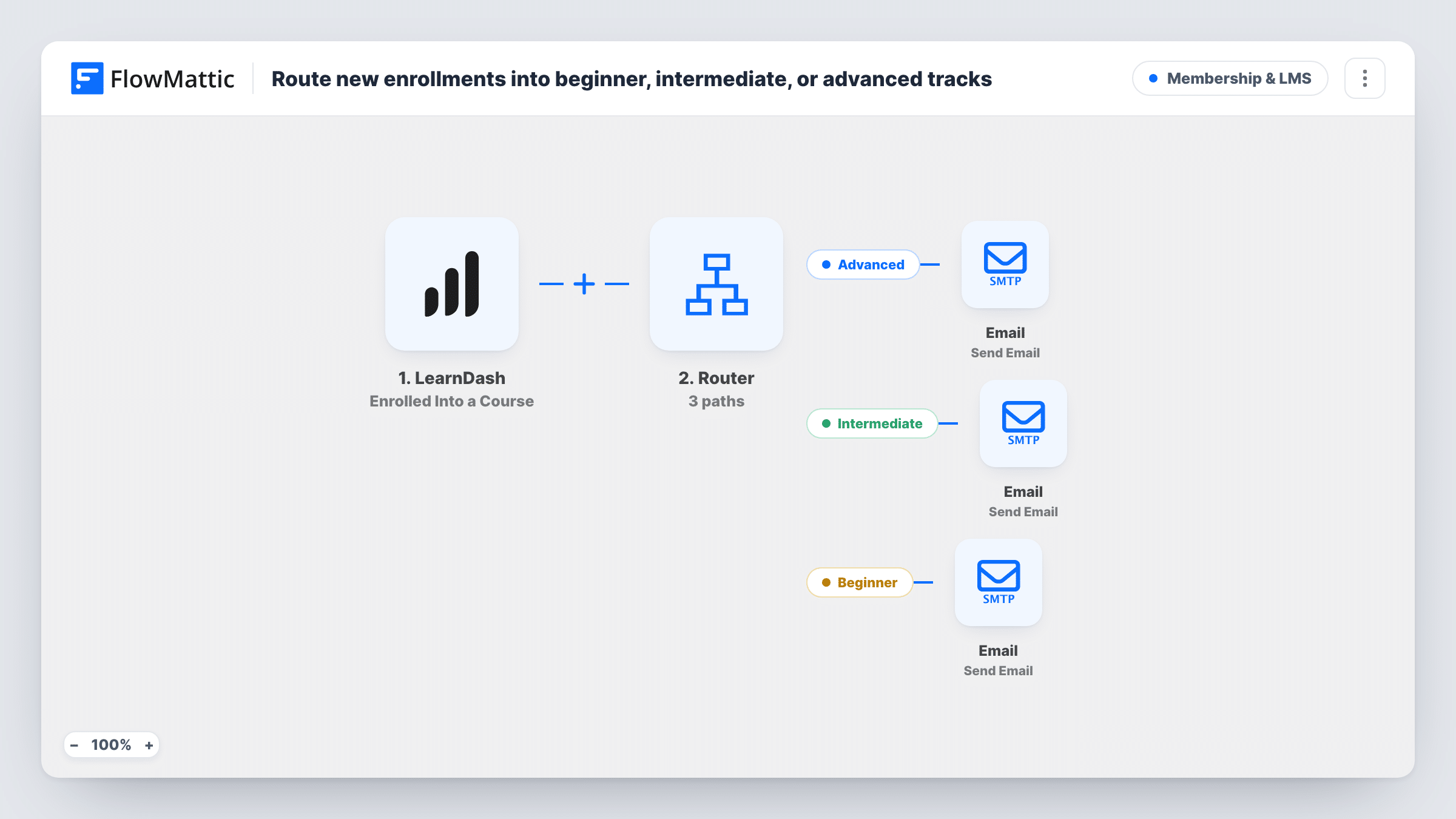
When someone enrolls in a LearnDash course, a Router reads the course name and sends an advanced, intermediate or beginner welcome email to match it.
 LearnDash
 Router
 Email
Email5 steps Setup ~8 min Used on 3.4k sites Community Free to import
What this workflow does
A learner starting an advanced course needs a different first message from someone joining the basics. If your LearnDash course names already say which level they belong to, this workflow uses that to send each new student the orientation email for their track, without separate workflows per course.
The LearnDash Enrolled Into a Course trigger fires when a user is enrolled in a course. It passes on the learner's email and the course name.
A Router then checks that course name. The Advanced route matches names that contain "Advanced". The Intermediate route matches names that contain "Intermediate". The Beginner route matches names that contain neither word. Each route ends in its own Email step with a short welcome for that track, sent to the learner.
The track comes from the course name, not from anything about the learner. A Router runs every route whose condition matches, so a course whose name contains both "Advanced" and "Intermediate" would send both emails. Keep only one of those words in each course name. Edit the three messages to add real first steps or links before going live, and use Task History to see which route each enrollment took.
A course catalog split by level
An online academy names its courses "Photography Basics", "Intermediate Lighting" and "Advanced Retouching", and each new student gets the welcome for that level.
Different prerequisites per track
A coding school reminds advanced enrollees which tools to install before the first lesson, while beginners get a gentler starting guide.
One workflow instead of one per course
A site owner adds new courses over time and only needs the level word in the course name for the right welcome to go out.
How this workflow runs
What happens at each step once the workflow is on, and what you need before you import it.
 LearnDash Enrolled Into a Course
Starts a run each time LearnDash enrolls a user into a course. The learner's email address and the course name go on to the Router and the email steps.
- Router 3 paths
Routes the run by course name. Advanced: the name contains "Advanced". Intermediate: it contains "Intermediate". Beginner: it contains neither. Every route whose condition matches runs.
 Email Send Email
On the Advanced route, emails the learner with the subject "Your advanced track" and a short note about getting started. Add your own links or first lesson before going live.
- Email Send Email
On the Intermediate route, sends the learner an email titled "Your intermediate track" with a welcome to that track. Replace the one-line body with real starting points.
- Email Send Email
On the Beginner route, used when the course name has neither level word, sends a welcome addressed to beginners with a line about learning the fundamentals first.
What you need
- FlowMatticCore
- LearnDash PluginPlugin
After importing, map your own data. To keep the template universal, not every step is pre-filled. Open each step in the builder and connect your accounts and fields (channels, lists, sheets, recipients) before you switch the workflow on.
Make it yours
Changes worth making after you import it.
- Check your LearnDash course names before importing. Each should contain "Advanced", "Intermediate" or neither, and never both words, or the learner gets two track emails.
- Change the words in the Router's route conditions if your courses use other level names, such as "Level 1" or "Pro". Keep the conditions so no course name can match two routes.
- Add a Delay on each route between the route's start and its Email step if you want the welcome to arrive a little after enrollment.
- Rewrite each email body with a link to the course's first lesson, so the message gives learners something to do right away.
Questions about this workflow
How does the workflow know a learner's LearnDash level?
It doesn't look at the learner. It reads the name of the course they enrolled in and matches the words "Advanced" and "Intermediate". Every other course counts as the beginner track.
Can one enrollment trigger more than one track email?
Only if the course name contains both "Advanced" and "Intermediate", because the Router runs every route that matches. The Beginner route requires neither word, so it never runs alongside the other two.
Does this run when an admin enrolls someone or a group enrollment happens?
It runs whenever LearnDash reports that a user was enrolled into a course. Test the ways your site enrolls people, such as a purchase or a manual add, and check Task History for each.
Can I add a fourth track, such as Expert?
Yes. Inside the existing Router, after the trigger, add a route whose condition checks that the course name contains "Expert", and give it its own Email step. Add "does not contain Expert" to the Beginner route so the two can't both match.
More Membership & LMS workflows
Other ready-to-import templates from the same category.






Import this workflow into your WordPress site
Download the JSON, import it from the Workflows screen and connect your accounts. Every run stays on your server, with no per-task fees.
30-day money-back guarantee Unlimited workflows and runs Self-hosted