

File new records into the right regional system
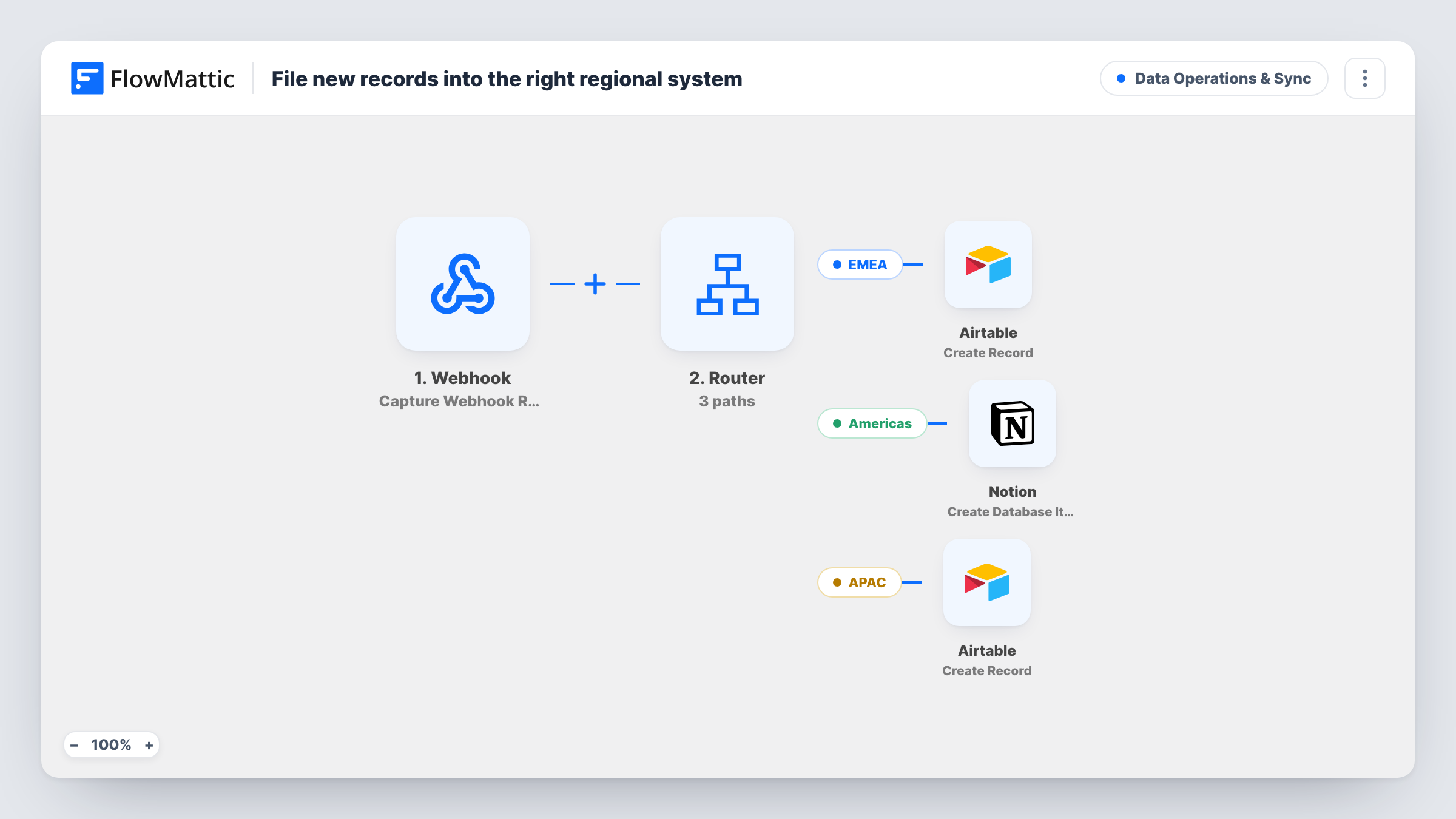
Records sent to a FlowMattic webhook are routed by their region field: EMEA records go to one Airtable base, Americas records to a Notion database and APAC records to another Airtable base.
 Webhook
 Router
 Airtable
 Notion
5 steps Setup ~8 min Used on 3.3k sites Data Ops Free to import
What this workflow does
Companies with regional teams often let each region keep its own tools. One central form or system still collects the records, though, and someone has to forward each one to the right team. This workflow reads a region value on every incoming record and files it where that region works.
The first step is a Webhook trigger: whatever system holds the records posts them to the workflow's webhook URL, and the payload needs a field called region. A Router then checks that field on three routes. If it contains emea, the EMEA route creates an Airtable record. If it contains americas, the Americas route creates a Notion database item. If it contains apac, the APAC route creates a record in a second Airtable step, which you can point at a different base or table.
The checks ignore upper and lower case, so EMEA and emea both match. Each region name is distinct, so a record with one region follows one route. A record whose region is blank or holds another value, such as Africa, matches none of the routes and nothing is created.
The three create steps ship unmapped. After import, send a test record for each region, then connect Airtable and Notion, choose the destinations and map the payload fields into them.
Regional sales teams with their own tools
A software company's website posts each enterprise inquiry to the webhook, and the EMEA, Americas and APAC sales teams each see only their region's requests in their own base or database.
Support escalations by territory
A central helpdesk sends escalated cases with a region field, so the Americas team gets them in Notion while the EMEA and APAC teams work from Airtable.
Partner applications per region
A partner program's application form tags each applicant with a region, and the regional partner managers review applications in the system their office already uses.
How this workflow runs
What happens at each step once the workflow is on, and what you need before you import it.
 Webhook Capture Webhook Response
Gives you a webhook URL that receives records from your source system. Send a test payload that includes a region field, so the Router and the create steps can use it.
- Router 3 paths
Checks the record's region on three routes: EMEA if the value contains emea, Americas if it contains americas, APAC if it contains apac. The check ignores case, and a record with any other region takes no route.
- Airtable Create Record
On the EMEA route, creates a record in Airtable. This step ships unmapped: connect Airtable, choose the base and table for EMEA, and map the payload fields into the record.
- Notion Create Database Item
On the Americas route, creates an item in a Notion database. Connect Notion, pick the Americas database and map the incoming fields into its properties after import.
- Airtable Create Record
On the APAC route, creates a record in Airtable. Point this step at the APAC base or table, which can differ from the EMEA one, and map the record's fields into it.
What you need
- FlowMatticCore
- Airtable AccountAccount
- Notion AccountAccount
After importing, map your own data. To keep the template universal, not every step is pre-filled. Open each step in the builder and connect your accounts and fields (channels, lists, sheets, recipients) before you switch the workflow on.
Make it yours
Changes worth making after you import it.
- Send only one region name per record. A value such as EMEA and APAC contains two route names, so both of those routes would run for it.
- If records without a known region shouldn't vanish, give the Router (between the Webhook trigger and the create steps) a fourth route with three conditions: region does not contain emea, americas or apac. End that route in a Google Sheets step that logs them.
- Turn on the Webhook trigger's Require authentication on incoming requests setting, so only your source system can start runs.
- Map a source record ID into every destination, so each regional team can trace an entry back to the system it came from.
Questions about this workflow
Does the region field need a particular spelling for the Router?
The value has to contain emea, americas or apac. Case doesn't matter, so EMEA, Emea and emea all reach the EMEA route. Spellings such as Europe or North America match nothing until you change the route conditions.
Can I send Americas records to Airtable instead of Notion?
Yes. Replace the Notion step on the Americas route with an Airtable Create Record step and map it like the other two routes. Notion is only needed if you keep that route as imported.
What happens to a webhook record with no region at all?
It matches none of the three routes, so no Airtable record or Notion item is created. The run still appears in Task History, where you can see the payload that arrived.
Do I need two Airtable bases for EMEA and APAC?
No. The two Airtable steps are configured separately, so they can point at different bases, or at two tables in the same base.
More Data Operations & Sync workflows
Other ready-to-import templates from the same category.





Import this workflow into your WordPress site
Download the JSON, import it from the Workflows screen and connect your accounts. Every run stays on your server, with no per-task fees.
30-day money-back guarantee Unlimited workflows and runs Self-hosted