

Send signups down a plan-specific onboarding track
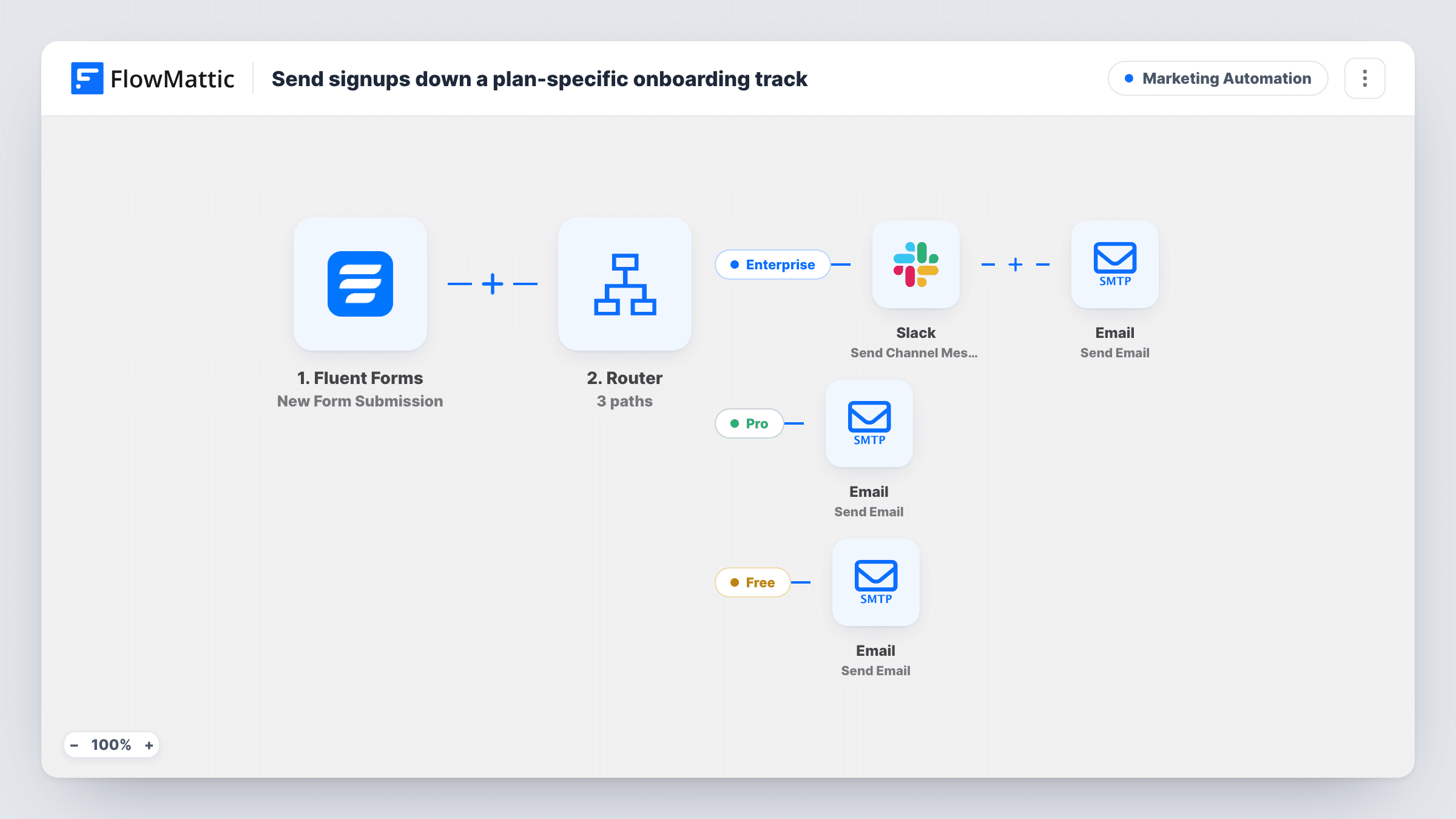
A Router reads the plan picked on your Fluent Forms signup form and sends Enterprise, Pro and Free signups their own welcome email, with a Slack alert to your team for Enterprise.
 Fluent Forms
 Router
 Slack
 Email
6 steps Setup ~12 min Used on 977 sites Marketing Free to import
What this workflow does
A free user and an enterprise buyer need different first messages. One wants a quick start, the other expects a person to plan the rollout with them. Sending everyone the same welcome either overwhelms small accounts or leaves big ones waiting. This workflow picks the right track from the plan the person chose on your form.
The Fluent Forms trigger runs on each new submission. The form needs fields named plan, name and email. A Router then compares the plan value on three routes: enterprise, pro and free. The comparison is an exact match that ignores case, so Pro and pro both count.
On the Enterprise route, a Slack message reading Enterprise signup and the person's name goes to a channel you pick, then the signup gets an email saying your team will reach out to plan onboarding. The Pro route sends a Welcome to Pro email about using the Pro features. The Free route sends a Welcome aboard email about getting started.
The three plan values can't match at once, so each signup follows one route. A submission whose plan is empty or spelled differently, such as Premium, matches none, and no email goes out. Emails are sent with FlowMattic's Email module.
SaaS trial signups by tier
A software company's pricing page links to a Fluent Forms signup with a plan dropdown, and enterprise prospects get a rollout email while the sales channel in Slack hears about them.
Agency service packages
A web agency's inquiry form offers free, pro and enterprise packages, and each choice triggers a welcome that matches what the client asked for.
Membership levels for a community
An online community sends free members a getting-started note and paid tiers a message about their extra features, with the founders alerted to enterprise sign-ups.
How this workflow runs
What happens at each step once the workflow is on, and what you need before you import it.
 Fluent Forms New Form Submission
Starts on each new Fluent Forms submission. The form's plan, name and email fields are what the Router, Slack message and emails read, so use those field names or remap after import.
- Router 3 paths
Sends the signup down one of three routes by its plan value: enterprise, pro or free, as an exact match that ignores case. Any other value, or an empty one, takes no route.
- Slack Send Channel Message
On the Enterprise route, posts Enterprise signup followed by the person's name to a Slack channel. Connect Slack and choose the channel after import; add the email to the text if your team needs it.
 Email Send Email
On the Enterprise route, emails the signup with the subject Welcome - let's set up your rollout, saying your team will reach out to plan onboarding.
- Email Send Email
On the Pro route, emails the signup with the subject Welcome to Pro and a line about how to use their Pro features. Expand the body with your own setup steps.
- Email Send Email
On the Free route, emails the signup with the subject Welcome aboard, inviting them to get started with their free account. Add links to your guides or dashboard.
What you need
- FlowMatticCore
- Fluent Forms PluginPlugin
- Slack AccountAccount
After importing, map your own data. To keep the template universal, not every step is pre-filled. Open each step in the builder and connect your accounts and fields (channels, lists, sheets, recipients) before you switch the workflow on.
Make it yours
Changes worth making after you import it.
- Use a dropdown or radio field for plan on the form, with the stored values enterprise, pro and free, so typed variations can't miss every route.
- In the Router between the Fluent Forms trigger and the routes, add a fourth route whose three conditions say plan does not exactly match enterprise, pro or free. It can't overlap the others; end it with an email asking the person to choose a plan.
- On the Enterprise route, map the signup's email, and a company field if your form has one, into the Slack message so the team can reply without opening the entry.
- Send through an SMTP account set in FlowMattic's Email settings if welcome emails from WordPress mail reach spam folders.
Questions about this workflow
Does the Fluent Forms plan value need exact wording?
Yes. It must be enterprise, pro or free, though upper or lower case doesn't matter. Values like Pro Plan or Premium match none of the routes until you edit their conditions.
Can one Fluent Forms signup get two welcome emails?
No. The three routes compare the plan field against different exact values, so only one of them can match a submission.
Which Slack channel gets the enterprise alert?
Whichever channel you set when you connect Slack in the Send Channel Message step. That action posts to a regular channel. Private channels need Slack's Send Private Channel Message action instead.
Does Fluent Forms still keep the entry?
Yes. Fluent Forms stores each submission as usual. The workflow only reads it to pick the route and fill the messages.
More Marketing Automation workflows
Other ready-to-import templates from the same category.







Import this workflow into your WordPress site
Download the JSON, import it from the Workflows screen and connect your accounts. Every run stays on your server, with no per-task fees.
30-day money-back guarantee Unlimited workflows and runs Self-hosted