

Let an AI agent label, assign and acknowledge new issues
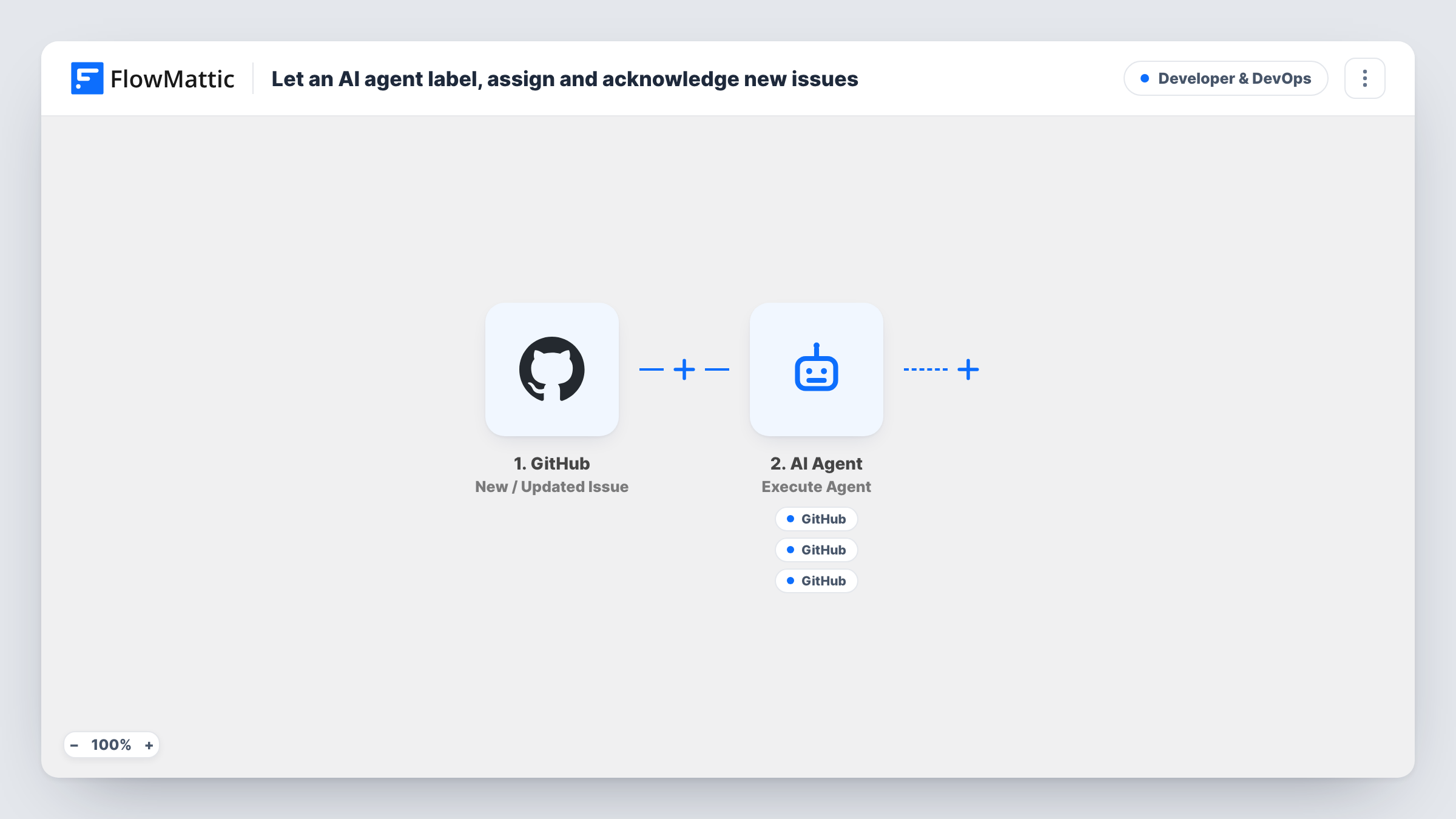
When someone opens a GitHub issue, an AI agent reads its title and body, then can add labels, assign a maintainer and post an acknowledgement comment using its three GitHub tools.
 GitHub
 Filter
 AI Agent
6 steps Setup ~12 min Used on 3.0k sites Developer & DevOps Free to import
What this workflow does
A busy repository collects issues faster than maintainers can sort them. Unlabelled, unassigned reports sit in the list until someone has time to read each one. This workflow hands that first pass to an AI agent, so a new issue gets labels, an owner and a reply to the reporter without waiting for a person.
The GitHub trigger, New / Updated Issue, runs on issue activity in the connected repository, not only on new issues. A Filter right after it continues only when GitHub's action exactly matches opened, ignoring case. Edits, label changes, closes and reopens stop there, so each issue is triaged once.
The AI Agent step runs the triage on OpenAI's GPT-4o. Its instructions tell it to read the issue, apply suitable labels, assign the most relevant maintainer and post a short acknowledgement. It receives the issue number, title and body as text. It is not given a list of your labels or maintainers, so add those to the instructions or it will guess.
The agent has three GitHub tools: Add Labels to Issue, Add Assignees to Issue and Create Comment on Issue. Each is already pointed at the triggering repository and issue number, and the labels, assignees and comment text are set to AI:, which means the agent fills them in. The agent decides which tools to call on each run, so read a few runs in Task History before you rely on it.
Open-source project with outside reporters
Maintainers of a public library get each new bug report labelled bug, question or enhancement and thanked in a comment, even when nobody is online.
Product team issue intake
A small team lists who owns the API, the dashboard and the mobile app in the agent's instructions, so new issues land with the right person as the assignee.
Consistent first reply to customers
A company that takes support requests as GitHub issues has the agent confirm receipt in the issue thread, so reporters know the report was seen.
How this workflow runs
What happens at each step once the workflow is on, and what you need before you import it.
 GitHub New / Updated Issue
Runs on issue activity in the connected GitHub repository, whether an issue is opened, edited, labelled, closed or reopened. The issue number, title, body, repository and action are passed on.
- Filter Continue If Condition Meet
Lets the run continue only when GitHub's action field exactly matches opened, ignoring case. Every other issue event stops here, so the agent never re-triages an issue that already exists.
- AI Agent Execute Agent
Runs an AI agent on GPT-4o that is told to triage the issue: add labels, assign a maintainer and post a brief acknowledgement. Its input is the issue number, title and body, and it needs an OpenAI connection after import.
- GitHub Add Labels to Issue
The agent's tool for adding labels. The repository and issue number come from the trigger, and the labels are left to the agent. List the labels you use in the instructions so it picks from them.
- GitHub Add Assignees to Issue
The agent's tool for assigning people to the issue. It targets the triggering issue, and the agent chooses the assignee. Name your maintainers and their areas in the instructions so it has someone to pick.
- GitHub Create Comment on Issue
The agent's tool for commenting on the issue, described as acknowledging the reporter. The agent writes the comment text. Check a test issue to see the wording before going live.
What you need
- FlowMatticCore
- GitHub AccountAccount
- AI ProviderAccount
After importing, map your own data. To keep the template universal, not every step is pre-filled. Open each step in the builder and connect your accounts and fields (channels, lists, sheets, recipients) before you switch the workflow on.
Make it yours
Changes worth making after you import it.
- Paste your label names into the agent's system prompt, with a line on when each applies, so it uses labels your repository already has instead of inventing new ones.
- Add a short list of maintainers' GitHub usernames and what each one owns to the instructions, since the agent has no other way to know who should be assigned.
- Give the comment a fixed shape in the instructions, such as a thank-you, the labels applied and when to expect a reply, so every acknowledgement reads the same.
- To leave issues from your own team alone, add a second condition to the existing Filter that the issue author is not one of your maintainers.
Questions about this workflow
Does the agent triage issues again when they are edited or reopened?
No. The GitHub trigger runs on those events, but the Filter continues only when the action is opened. Edits, closes and reopens stop at the Filter.
How does the agent know which labels and maintainers to use?
As imported, it only has the issue text and its instructions, which don't list labels or people. Add your label names and maintainers' usernames to the system prompt so its choices match your repository.
Will every new GitHub issue get labels, an assignee and a comment?
The instructions ask for all three, but the agent decides which tools to call on each run. Open Task History for a few issues to check what it did, and tighten the instructions if it skips a tool.
Which AI model triages the GitHub issues?
The template uses GPT-4o from OpenAI, so you connect an OpenAI account in the AI Agent step. You can pick a different provider or model there.
More Developer & DevOps workflows
Other ready-to-import templates from the same category.


Import this workflow into your WordPress site
Download the JSON, import it from the Workflows screen and connect your accounts. Every run stays on your server, with no per-task fees.
30-day money-back guarantee Unlimited workflows and runs Self-hosted