

Triage new issues into Notion, then comment back on the issue
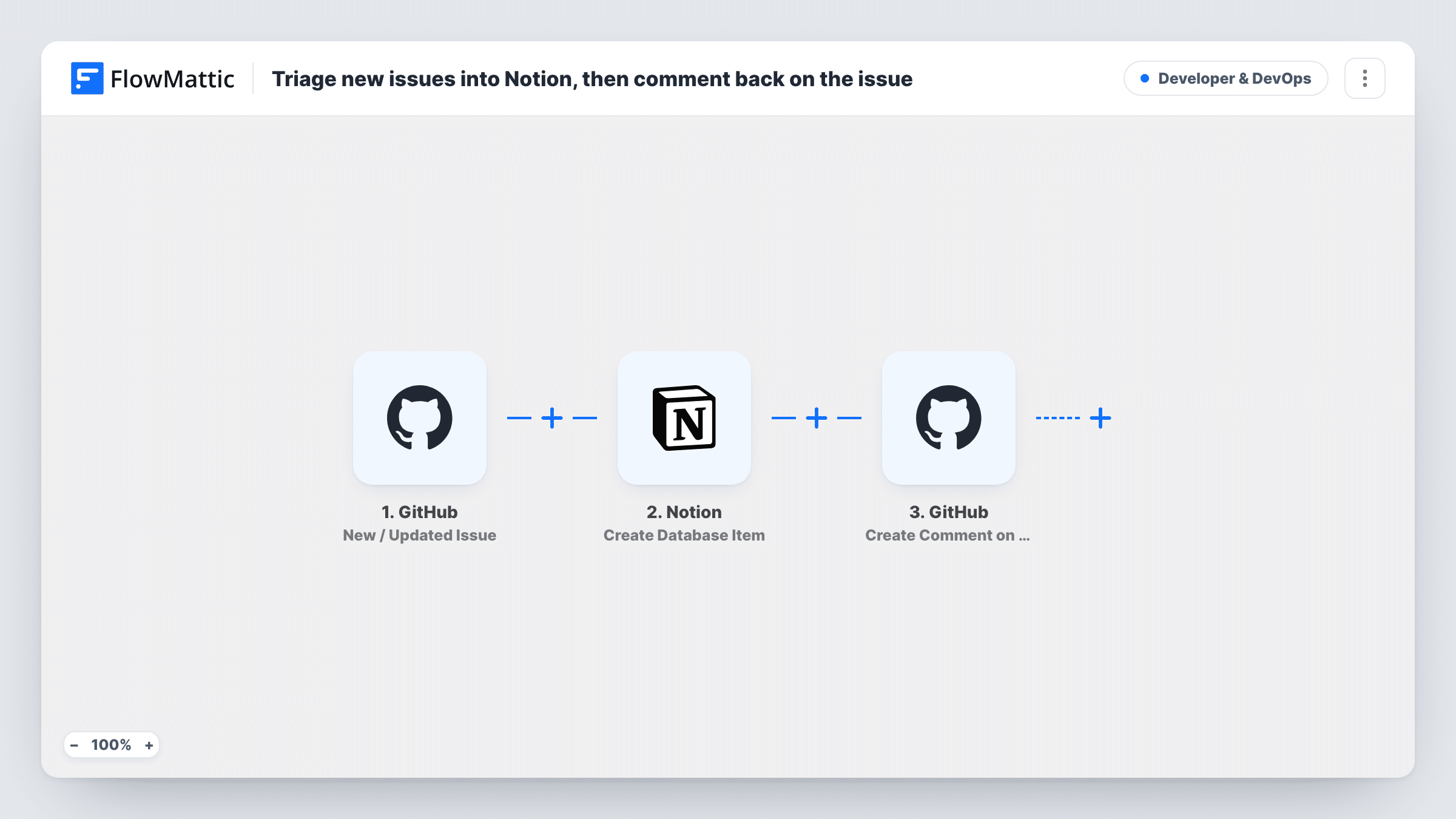
Each newly opened GitHub issue becomes an item in your Notion triage database, titled with the issue title and number, and the workflow then posts a comment on the issue telling the reporter it has been logged.
 GitHub
 Filter
 Notion
4 steps Setup ~8 min Used on 523 sites Developer & DevOps Free to import
What this workflow does
Teams that plan in Notion often triage GitHub issues by hand: copy the title, paste a link, then remember to tell the reporter something is happening. This workflow does those steps for each issue as it is opened, and the reporter sees a reply on GitHub within moments.
The GitHub trigger, New / Updated Issue, runs for issue activity in the connected repository. A Filter continues only when the action is exactly opened, so edits, label changes and closes on existing issues don't create Notion items or comments.
The Notion step, Create Database Item, adds an item whose title is the issue title followed by its number in brackets. Choose your triage database after import, and map any other properties you keep, such as the issue link or the reporter.
Finally, Create Comment on Issue posts a reply on the same issue, using the repository and issue number from the trigger. The comment is already written: it thanks the reporter and says the issue has been logged for triage, with a follow-up to come. Reword it to match your team's voice before going live. Task History shows what Notion and GitHub returned for each run.
Product teams planning in Notion
A startup triages every new GitHub issue in a Notion board during its weekly planning meeting, and reporters see an acknowledgement on GitHub the moment they file.
Open-source projects with many reporters
Maintainers of a popular plugin acknowledge each new issue automatically, so reporters know it was seen even if a reply takes days.
Agencies tracking client bug reports
An agency logs issues from a client's repository into its Notion project database, where account managers can follow them without GitHub access.
How this workflow runs
What happens at each step once the workflow is on, and what you need before you import it.
 GitHub New / Updated Issue
Runs for issue activity in the connected GitHub repository, such as an issue being opened, edited or closed. The issue, repository and action details pass to the Filter.
- Filter Continue If Condition Meet
Lets the run continue only when GitHub's action is exactly opened, with case ignored. Edits, closes, label changes and reopened issues end here, so each issue is logged once.
- Notion Create Database Item
Creates an item in your Notion database, titled with the issue title and its number. Pick the database after import and map any other properties, such as a URL property for the issue link.
- GitHub Create Comment on Issue
Comments on the same GitHub issue with a prepared message that thanks the reporter and says the issue is logged for triage. The repository and issue number come from the trigger.
What you need
- FlowMatticCore
- GitHub AccountAccount
- Notion AccountAccount
After importing, map your own data. To keep the template universal, not every step is pre-filled. Open each step in the builder and connect your accounts and fields (channels, lists, sheets, recipients) before you switch the workflow on.
Make it yours
Changes worth making after you import it.
- Add a URL property to your Notion database and map the issue's html_url into it, so whoever triages in Notion can open the issue in one click.
- Put a Router between the Filter and the Notion step if bugs and feature requests belong in different databases, with exact-match conditions on distinct labels, and give each route its own Notion and comment steps.
- Edit the comment text to set expectations your team can keep, such as when triage happens, rather than promising a quick follow-up.
Questions about this workflow
Will the automatic GitHub comment start the workflow again?
No. A comment is a separate kind of GitHub event, and this trigger watches issue activity, which the Filter limits to newly opened issues.
Which Notion database do the GitHub issues go into?
The one you choose in the Create Database Item step. Only the title is mapped in the template, so pick the database and map any other properties it has.
Who appears as the author of the comment on the issue?
The GitHub account you connect to FlowMattic posts it. Use a team or bot account if you don't want acknowledgements to come from a personal profile.
Do edits to an issue update the Notion item?
No. Edits stop at the Filter, and the workflow only creates items. To sync changes, you would add a separate workflow with Notion's Update Database Item action and a way to find the item.
More Developer & DevOps workflows
Other ready-to-import templates from the same category.




Import this workflow into your WordPress site
Download the JSON, import it from the Workflows screen and connect your accounts. Every run stays on your server, with no per-task fees.
30-day money-back guarantee Unlimited workflows and runs Self-hosted