

Let an AI agent categorize and enrich new Grist records
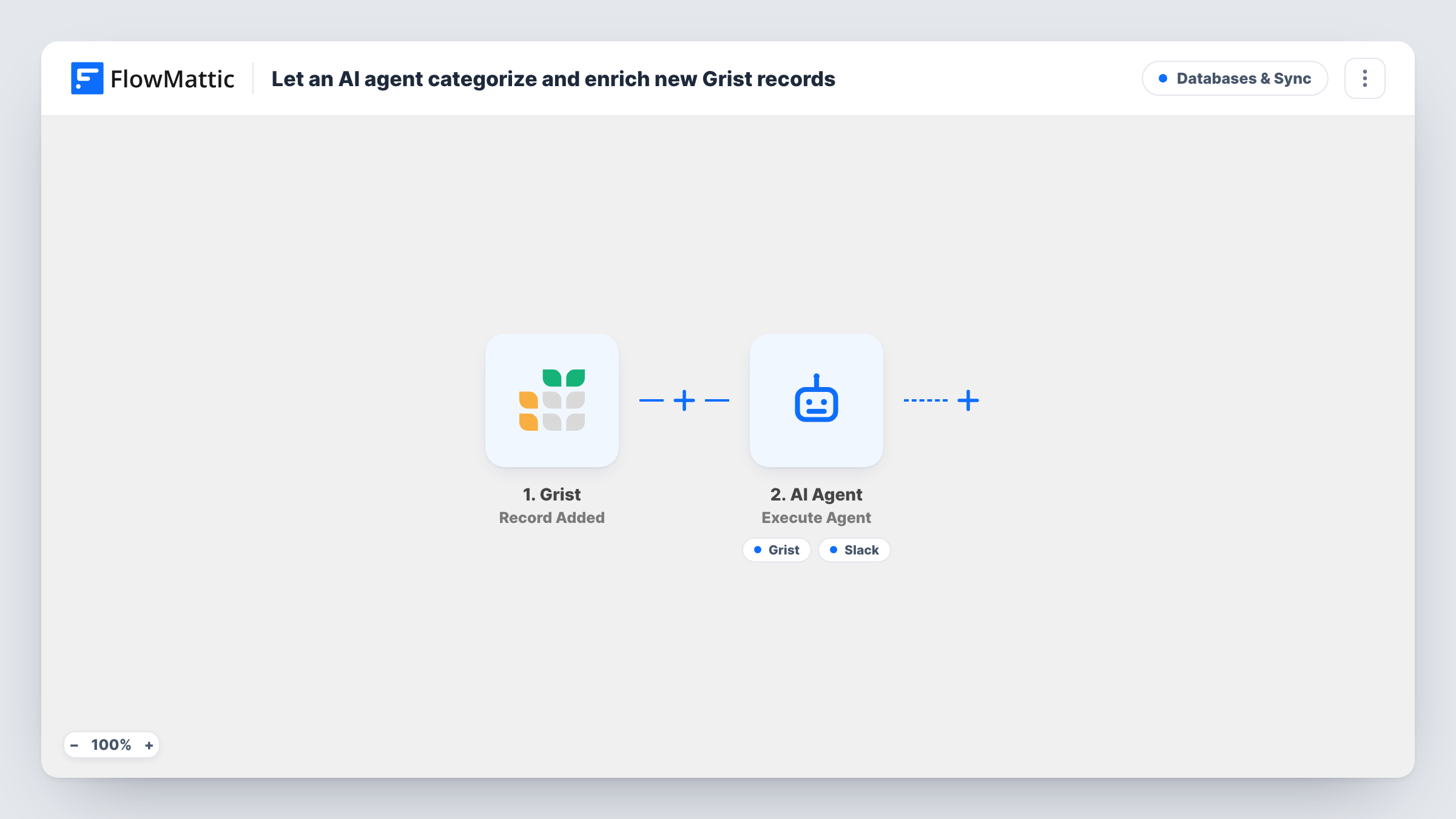
When a record is added to Grist, an AI agent reads its name, product and amount, picks a category, writes a one-line summary, and can save both to the row and post a note in Slack.
 Grist
Grist
 AI Agent
 Slack
Slack4 steps Setup ~8 min Used on 486 sites Databases & Sync Free to import
What this workflow does
Rows entered by hand or by a form often arrive without a category or any short description, and someone has to tidy them before they are useful in reports. This workflow hands each new Grist record to an AI agent that does the tidying for you.
The Grist Record Added trigger hands every freshly added row to the agent. The AI Agent step, set to OpenAI GPT-4o, receives the record's Name, Product and Amount. Its instructions are to choose a sensible Category, write a one-line Summary, update the record and notify the team. Two tools are attached to the agent for those jobs: Grist Update Record, which writes back to the same row using the record's ID, and Slack Send Channel Message for a note to your data channel.
The agent decides when to call its tools, so check Task History on your first few runs to confirm it updated the row and posted. It works only from the three values it is given. It does not look anything up on the web as imported.
Sales log with mixed products
Reps add deals to Grist with a product name and amount. The agent tags each with a category so your pivot tables group them without manual sorting.
Expense or purchase requests
Staff enter purchases with a product and cost. The agent labels them, for example software or equipment, and the finance channel sees a short note.
Inventory intake
New stock lines go into Grist. A category and summary are written onto each row, giving the team a readable list without extra typing.
How this workflow runs
What happens at each step once the workflow is on, and what you need before you import it.
 Grist Record Added
Fires when a new record is added to the Grist table you connect. The record's ID and its Name, Product and Amount columns are passed to the agent.
- AI Agent Execute Agent
Hands the Grist record to an agent running OpenAI's GPT-4o model. It gets the record's Name, Product and Amount with instructions to pick a Category, write a one-line Summary, update the row and tell the team. Link your OpenAI account when you import the Grist template.
- Grist Update Record
Agent tool that writes the Category and Summary back to the same Grist row, matched by the record ID from the trigger. Your table needs columns ready to hold those two values.
- Slack Send Channel Message
Agent tool that posts a short note about the record to a Slack channel. Pick the data channel when you connect Slack. The agent writes the text of the note.
What you need
- FlowMatticCore
- Grist AccountAccount
- AI ProviderAccount
- Slack AccountAccount
After importing, map your own data. To keep the template universal, not every step is pre-filled. Open each step in the builder and connect your accounts and fields (channels, lists, sheets, recipients) before you switch the workflow on.
Make it yours
Changes worth making after you import it.
- List your allowed categories in the agent's instructions, such as Hardware, Software or Services, so it picks from your set instead of inventing new ones.
- Give the agent the FlowMattic Browser tool if you want it to open a page by URL, such as a product page stored in the record, before it writes the summary.
- Add Category and Summary columns to your Grist table before the first run, so the Update Record tool has somewhere to write.
Questions about this workflow
Will the agent always update the Grist row and post to Slack?
It is told to do both, but the agent chooses when to use its tools. Check Task History on early runs to see which tools it called for each record.
Does updating the Grist row start the workflow again?
No. The trigger is Record Added, so an update to an existing row does not start another run.
Which AI model does the Grist agent use?
As shipped, the Grist agent step uses GPT-4o from OpenAI. Connect your own AI provider account, and you can switch the model in the agent step if your provider offers others.
Can the agent research the product online?
Not as imported. It sees only the Name, Product and Amount. Add the FlowMattic Browser tool, which opens pages by URL, if the record includes a link the agent should read.
More Databases & Sync workflows
Other ready-to-import templates from the same category.






Import this workflow into your WordPress site
Download the JSON, import it from the Workflows screen and connect your accounts. Every run stays on your server, with no per-task fees.
30-day money-back guarantee Unlimited workflows and runs Self-hosted