

Create and import dynamic images with slides using Google Slides and MCP Server
An AI assistant calls this workflow as an MCP tool, FlowMattic places an image on a Google Slides slide, and the outcome you choose is sent back to the assistant as the tool’s reply.
 FlowMattic MCP
 Google Slides
3 steps Setup ~5 min Used on 1.6k sites Free to import
What this workflow does
Building a deck with an AI assistant usually stops at the point where images have to be dropped in by hand. With this workflow the assistant can do that part itself: it calls one MCP tool, and the picture lands on a slide in your Google Slides presentation.
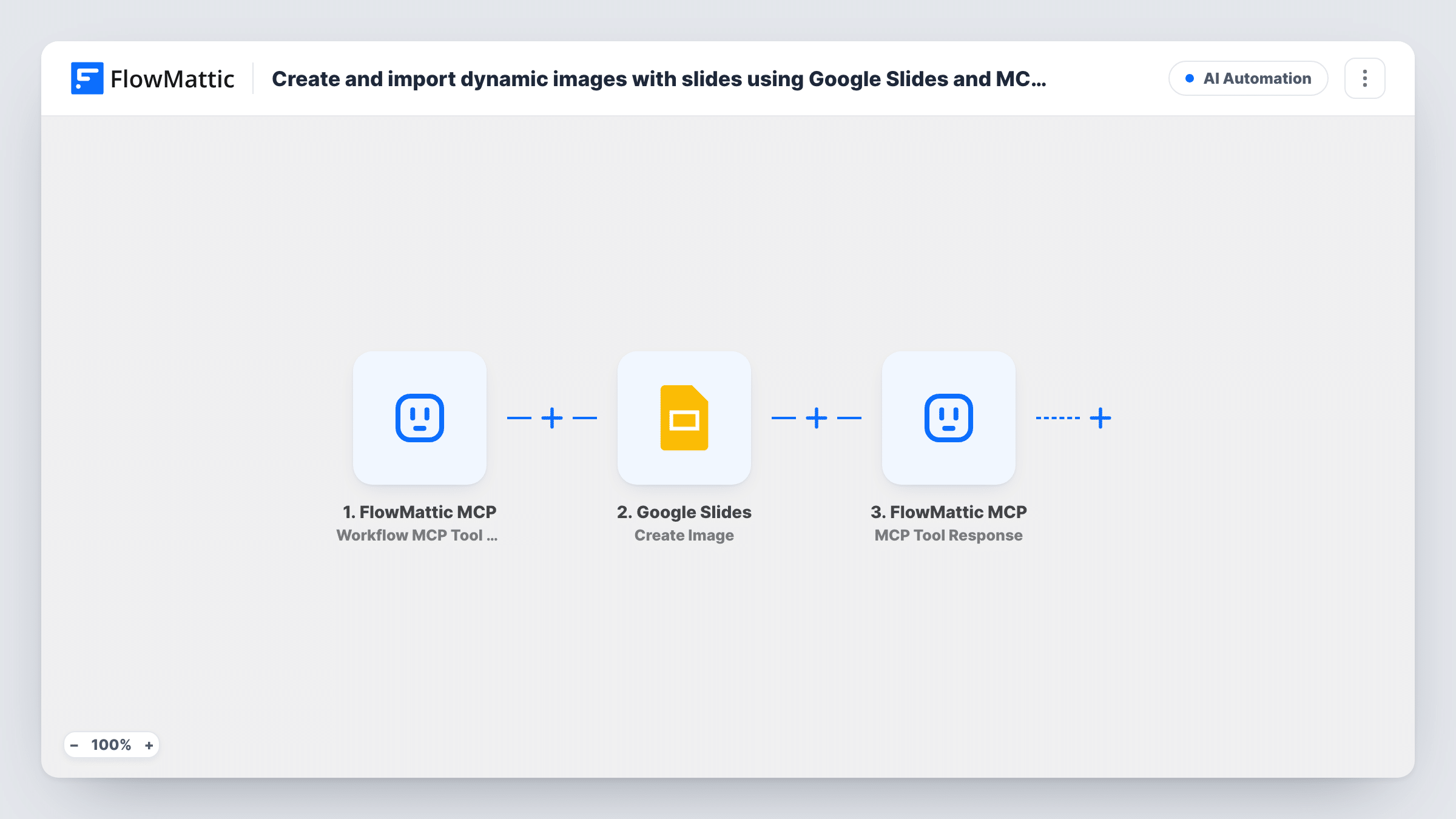
The run begins with the FlowMattic MCP trigger, which fires when a connected MCP client executes the tool linked to this workflow. On the FlowMattic MCP Server page you add that tool, set Workflow as the execution method, select this workflow and define the input parameters the assistant fills in, such as the image address and which presentation and slide it belongs on.
The Google Slides Create Image step then adds the image to a slide. No values come preset in this step. Connect your Google account and map the trigger's parameters into the step; run a test call to see what it needs and what it returns. The step adds an image to a slide that already exists, so it doesn't design the picture or build new slides on its own.
Finally, MCP Tool Response passes a result back to the assistant. Add response parameters, such as a confirmation or the ID the Slides step returned, because the step reports an error when it has none.
Charts from an AI analysis into a deck
An analyst asks their assistant to put a chart image it has a link to onto slide four of the monthly report, and the tool places it without opening Slides.
Product shots for a sales presentation
A sales rep working with an AI assistant adds product photos hosted on the company site to the right slides of a pitch deck as they draft it.
Generated visuals for training slides
A trainer's assistant creates illustration images elsewhere and calls this tool with their URLs to drop each one onto its matching slide in the course deck.
How this workflow runs
What happens at each step once the workflow is on, and what you need before you import it.
 FlowMattic MCP Workflow MCP Tool Triggered
Runs when an MCP client executes the tool you link to this workflow. The input parameters defined on that tool, such as an image URL and the target slide, become data for the next step.
- Google Slides Create Image
Places an image on a slide in Google Slides. Shipped with nothing filled in: connect Google and map the image and target values from the MCP trigger, then confirm them with a test call.
- FlowMattic MCP MCP Tool Response
Returns a reply to the assistant that called the tool. Choose the response parameters, for example a short confirmation and the result of the Slides step; the step errors when none are set.
What you need
- FlowMatticCore
- Google Slides AccountAccount
After importing, map your own data. To keep the template universal, not every step is pre-filled. Open each step in the builder and connect your accounts and fields (channels, lists, sheets, recipients) before you switch the workflow on.
Make it yours
Changes worth making after you import it.
- Name and describe the MCP tool so the assistant knows it needs a public image link, for example "Add an image from a URL to a Google Slides slide".
- If the assistant should also add a caption, put Google Slides' Insert Text or Create Text Box action between Create Image and MCP Tool Response and map the caption parameter into it.
- To let the assistant start a fresh slide first, add Google Slides' Create Slide action between the MCP trigger and Create Image, then map the new slide from its result into the image step.
- Send back the presentation link in the response, so the assistant can share it with you when it's done.
Questions about this workflow
Does this workflow generate the image itself?
No. Create Image adds an existing image to a slide. The assistant has to supply an image it already has a link to, whether it made it with another tool or found it elsewhere.
Which Google Slides presentation does the image go into?
The one you map in the Create Image step. You can fix it to one deck or let the assistant pass the presentation as an input parameter on the MCP tool.
Which AI clients can call the Google Slides tool?
Any MCP client connected to your FlowMattic MCP server, once you create the tool on the FlowMattic MCP Server page and select this workflow for it.
How do I know the image was added?
Open Task History to see what the Google Slides step returned for each call, and map that result into the MCP Tool Response so the assistant can report it.
More AI Automation workflows
Other ready-to-import templates from the same category.







Import this workflow into your WordPress site
Download the JSON, import it from the Workflows screen and connect your accounts. Every run stays on your server, with no per-task fees.
30-day money-back guarantee Unlimited workflows and runs Self-hosted