

Create Zoho Meetings from Fluent Forms submissions and track registrations in Google Sheets
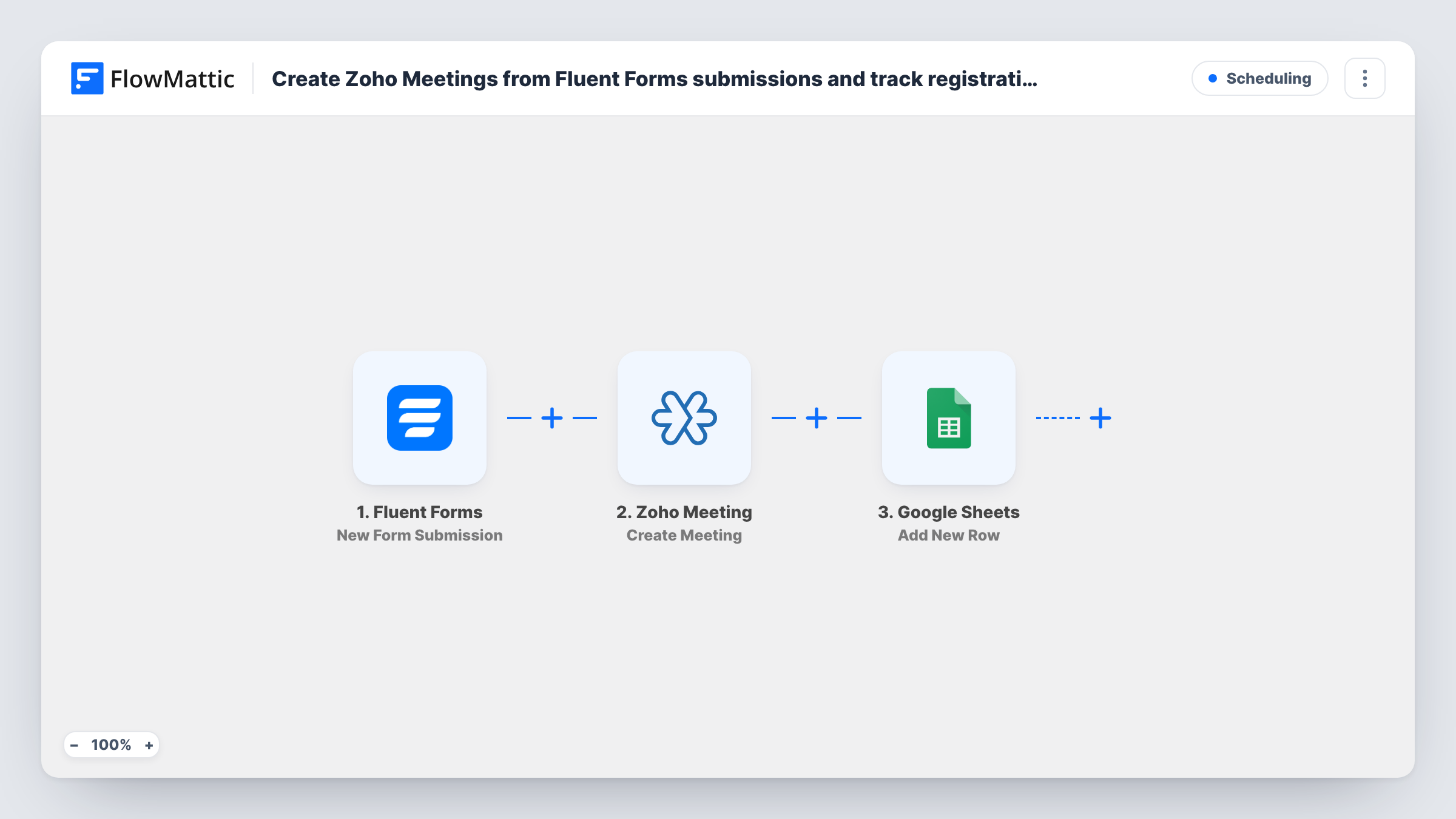
Each Fluent Forms submission creates a meeting in Zoho Meeting from the answers, then logs the request in a Google Sheets row, so every booking request becomes a scheduled call with a record to match.
 Fluent Forms
 Zoho Meeting
 Google Sheets
3 steps Setup ~5 min Used on 2.9k sites Free to import
What this workflow does
When people ask for a call through a form on your site, someone usually reads the entry, sets up a meeting by hand and notes it somewhere. That slows the reply and the notes go missing. This workflow sets up the meeting and keeps the record in one pass.
A visitor submits your Fluent Forms form, for example with their name, email, topic and preferred time. FlowMattic sends those answers to Zoho Meeting, where Create Meeting sets up a new meeting with the details you map. Then a row goes into Google Sheets holding the form answers and, if you map them, values Zoho Meeting returns for the new meeting.
Every submission creates its own meeting. Nothing checks your calendar for clashes or merges two requests for the same slot, so each one goes through as sent. Check a test run to see which meeting details Zoho Meeting returns, such as a join link, before you plan around them.
Discovery calls for a consultancy
Prospects pick a topic and a time on a Fluent Forms page. Each request becomes a Zoho meeting, and the sheet lets your team see who is booked and when.
Parent-teacher meetings
A school runs a Fluent Forms request form. Every request sets up an online meeting and a row the office uses as the day's schedule.
Product demos for a SaaS team
Demo requests from your WordPress site turn into Zoho meetings straight away, and the sheet tracks which rep took which demo.
How this workflow runs
What happens at each step once the workflow is on, and what you need before you import it.
 Fluent Forms New Form Submission
Begins with each meeting request sent through your Fluent Forms form. All answers, such as name, email and preferred time, are passed on for the next two steps.
- Zoho Meeting Create Meeting
Creates a new meeting in Zoho Meeting. Map the form answers into the meeting details, such as the topic and time, and connect your Zoho account on import.
- Google Sheets Add New Row
Adds a row to your Google Sheets spreadsheet with the request. Map the form answers and any meeting values Zoho returns into the sheet's columns.
What you need
- FlowMatticCore
- Fluent Forms PluginPlugin
- Zoho Meeting AccountAccount
- Google Sheets AccountAccount
After importing, map your own data. To keep the template universal, not every step is pre-filled. Open each step in the builder and connect your accounts and fields (channels, lists, sheets, recipients) before you switch the workflow on.
Make it yours
Changes worth making after you import it.
- Use a date and time field in the form and, if needed, a Date/Time Formatter step before Zoho Meeting, so the start time arrives in the format the meeting step accepts.
- Add an Email step after Google Sheets to send the requester their meeting details at the email they gave on the form, mapping the join link if Zoho Meeting returns one.
- Add a Filter after the trigger if the form also takes other kinds of requests, so only meeting requests create a Zoho meeting.
Questions about this workflow
Does the Fluent Forms submitter get a Zoho Meeting invite?
Not necessarily. Whether Zoho invites anyone depends on what you map into the meeting step. To be sure the person hears from you, add an Email step with the meeting details.
What if two people ask for the same time?
Both get a meeting. The workflow doesn't check for overlaps, so review the sheet or your Zoho calendar and reschedule clashes by hand.
Can I use Zoho webinars instead of meetings?
Yes. Zoho Meeting has a separate Create Webinar action in FlowMattic. Swap it in for the meeting step and remap the fields.
Is the Fluent Forms entry still stored on my site?
Yes. The workflow runs after submission, so Fluent Forms keeps the entry as usual alongside the meeting and the sheet row.
More Scheduling workflows
Other ready-to-import templates from the same category.






Import this workflow into your WordPress site
Download the JSON, import it from the Workflows screen and connect your accounts. Every run stays on your server, with no per-task fees.
30-day money-back guarantee Unlimited workflows and runs Self-hosted