

Schedule a workflow to pull all the new leads at the end of the day and add new leads to FluentCRM
Once a day, this workflow pulls the leads your NewOaks AI chatbot collected over the last three days and adds each one to FluentCRM as a contact, or updates the contact if that email is already in your CRM.
 Schedule
 NewOaks AI
 Iterator
 FluentCRM
4 steps Setup ~8 min Used on 2.6k sites Free to import
What this workflow does
Leads captured by a NewOaks AI chatbot stay in NewOaks until someone exports them. If your follow-up emails run from FluentCRM, a daily sync saves that manual step and keeps the CRM close to current. This workflow does the sync on a schedule instead of reacting to each lead as it arrives.
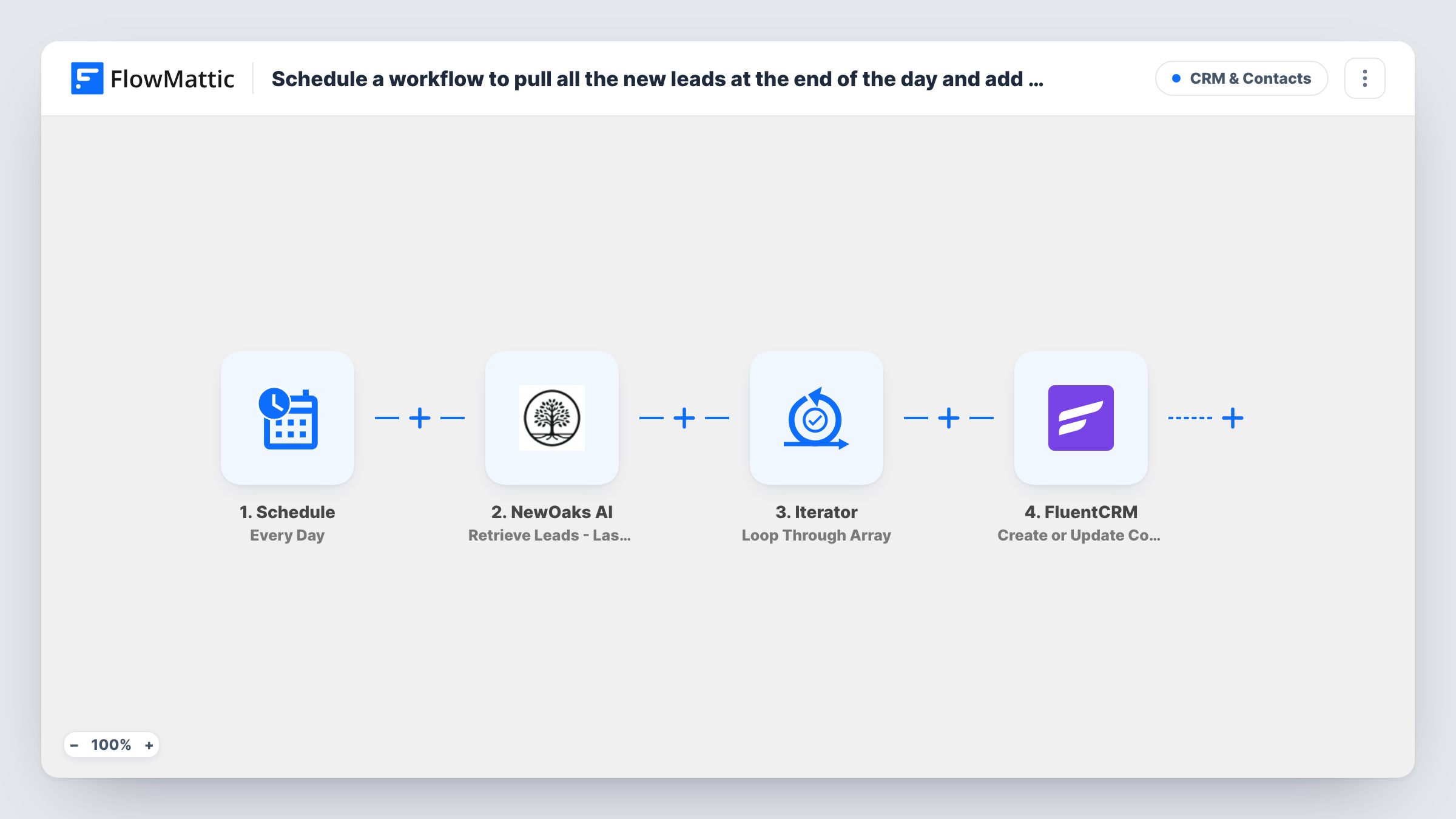
A daily Schedule trigger kicks off each sync. The NewOaks AI step then retrieves the leads from the last three days, as a list. An Iterator loops through that list and runs the last step once per lead. That step uses FluentCRM Create or Update Contact, which matches on email address: a new address becomes a contact, and an address already in FluentCRM is updated.
The three-day window is longer than the gap between runs, so each lead is pulled in up to three daily runs. The first run creates the contact and the later ones update it with the NewOaks values again. If you edit that contact in FluentCRM during those days, a later run can overwrite your change, and a blank value from NewOaks can clear a field. A lead with no email address can't be matched, and Task History will show the FluentCRM error for that item.
Evening sync for a sales chatbot
Your website chatbot collects visitor names and emails all day. Each evening the run brings them into FluentCRM, where a welcome sequence picks up new contacts.
Catching leads missed by an outage
Because every run looks back three days, a lead from a day the workflow didn't run is still picked up by the next one.
One CRM for chatbot and form leads
Form sign-ups already go to FluentCRM. This daily run adds the chatbot's leads to the same contact list, matched by email so nobody is listed twice.
How this workflow runs
What happens at each step once the workflow is on, and what you need before you import it.
 Schedule Every Day
Kicks off the lead sync on a daily schedule. Open the trigger after import and check when it runs, so the sync happens at the end of your working day.
- NewOaks AI Retrieve Leads - Last 3 Days
Retrieves the leads NewOaks AI collected in the last three days and returns them as a list. Connect your NewOaks AI account on import.
- Iterator Loop Through Array
Loops through the lead list from NewOaks AI and runs the next step once for each lead. Point it at the list the NewOaks step returns after a test run.
- FluentCRM Create or Update Contact
Creates a FluentCRM contact for each lead, or updates the existing contact when the email address is already there. Map the lead's email and name from the current Iterator item.
What you need
- FlowMatticCore
- NewOaks AI AccountAccount
- FluentCRM PluginPlugin
After importing, map your own data. To keep the template universal, not every step is pre-filled. Open each step in the builder and connect your accounts and fields (channels, lists, sheets, recipients) before you switch the workflow on.
Make it yours
Changes worth making after you import it.
- Add a Filter between the Iterator and FluentCRM that continues only when the lead's email is not empty, so leads without an address skip the CRM step instead of failing.
- To mark these people as chatbot leads, add FluentCRM's Add Tags to Contact after Create or Update Contact, inside the loop, so the tag goes on a contact that already exists.
- Run the workflow once by hand after import, then open Task History to see the list NewOaks AI returned and map the Iterator and FluentCRM fields from it.
Questions about this workflow
Will the same NewOaks lead be added to FluentCRM more than once?
Not as a second contact. The FluentCRM step matches on email, so later runs update the contact already there. Those updates can overwrite edits made in FluentCRM since the first run.
Why pull three days of NewOaks leads if it runs daily?
Retrieve Leads - Last 3 Days is the action NewOaks AI offers in FlowMattic. Each run covers that whole window, which also means a missed day doesn't lose leads.
Does FluentCRM have to be installed where FlowMattic runs for this NewOaks sync?
Yes. FluentCRM is a WordPress plugin, and FlowMattic's FluentCRM step works with it on the same site. Only the NewOaks AI step calls an outside service.
Can I add NewOaks leads to FluentCRM as they come in instead of daily?
Yes, with a different trigger. NewOaks AI has a Lead Generated trigger in FlowMattic. Use it with the FluentCRM step and you won't need the schedule or the Iterator.
More CRM & Contacts workflows
Other ready-to-import templates from the same category.







Import this workflow into your WordPress site
Download the JSON, import it from the Workflows screen and connect your accounts. Every run stays on your server, with no per-task fees.
30-day money-back guarantee Unlimited workflows and runs Self-hosted