

When an FG Funnels appointment status changes, add the lead to ActiveCampaign and alert Slack
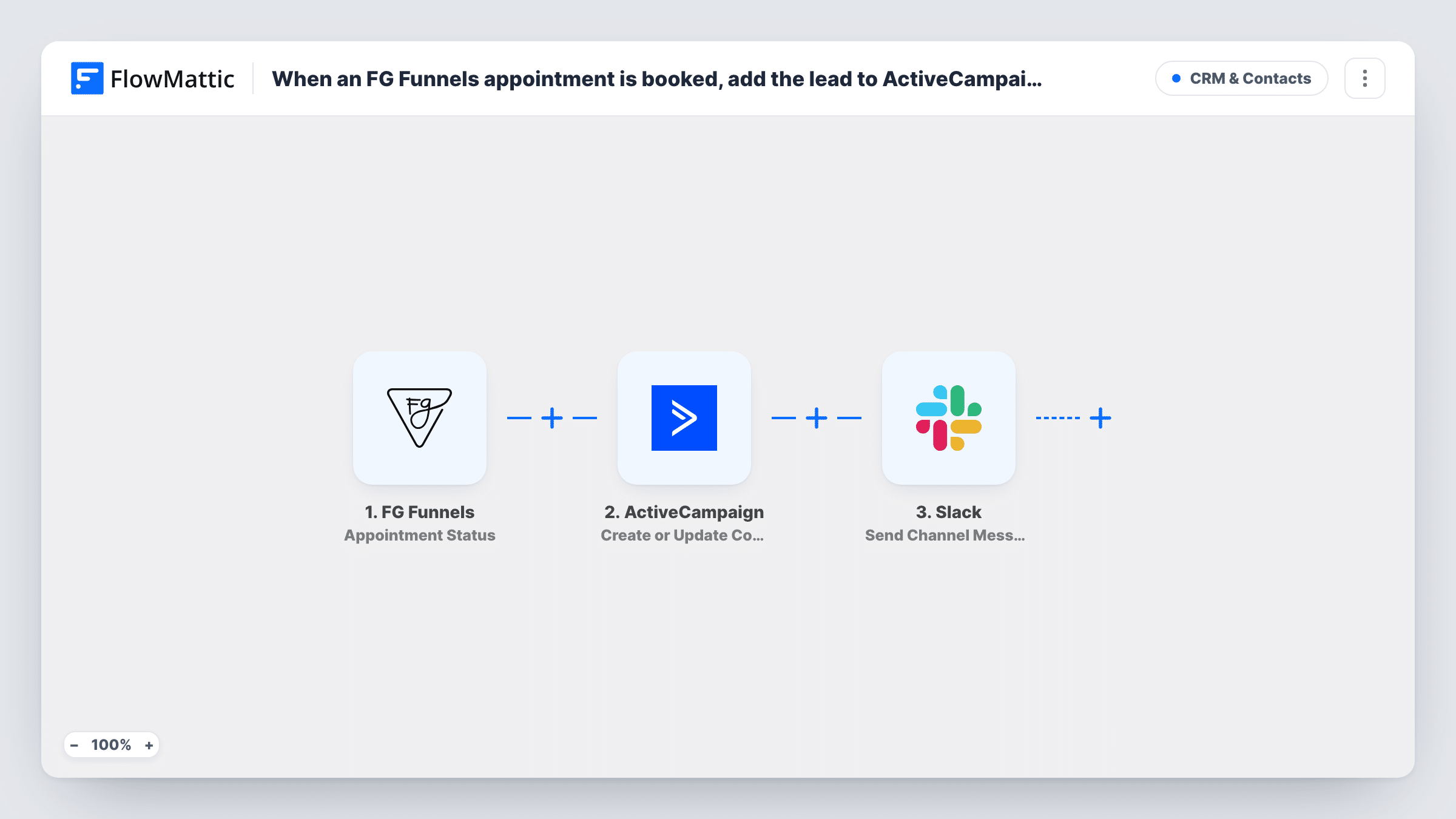
Each FG Funnels appointment status event adds the lead to ActiveCampaign, or updates them if they’re already a contact, and then posts a message in a Slack channel so your sales team sees the change.
 FG Funnels
 ActiveCampaign
 Slack
3 steps Setup ~5 min Used on 1.1k sites Free to import
What this workflow does
When leads book through an FG Funnels page, two things usually need to happen: the person belongs in your email list, and someone on the team should know. This workflow does both for every appointment status FG Funnels reports.
Every run starts from the FG Funnels trigger, which fires when an appointment gets a new status. One appointment can report several statuses as it moves along, and each starts a run. Look at a test event to see the lead and appointment fields that arrive.
The ActiveCampaign step creates a new contact, or updates the existing one if the lead is already there. That means repeat status events for the same person update their contact instead of adding a copy. The step ships unmapped, so after import you map the email, name and phone. Run a test to see which other contact fields the step lets you fill.
Last, a Slack step posts to the channel you choose. It also arrives empty: write the message and map in the lead's name, the appointment time and the status, so the team knows what changed. Each status event produces one message.
Booked calls into the nurture list
A consultant's FG Funnels bookings are added to ActiveCampaign, where they receive pre-call emails, and the sales channel hears about each status.
Status board in Slack
A small agency's #appointments channel shows every status reported for funnel bookings, so whoever is free can follow up.
Keeping the contact record current
A gym that books trial sessions through FG Funnels updates the same ActiveCampaign contact each time a session changes, instead of collecting duplicates.
How this workflow runs
What happens at each step once the workflow is on, and what you need before you import it.
 FG Funnels Appointment Status
Fires each time FG Funnels reports a new appointment status. The lead and appointment details are passed on, and an appointment that changes status again starts another run.
- ActiveCampaign Create or Update Contact
Creates the lead as an ActiveCampaign contact, or updates the contact if it already exists. Map the email, name and phone after import; the template leaves them blank.
- Slack Send Channel Message
Sends the team alert to one Slack channel of your choosing. Write the alert and map the lead's name, appointment details and status, so the team can see what changed.
What you need
- FlowMatticCore
- FG Funnels AccountAccount
- ActiveCampaign AccountAccount
- Slack AccountAccount
After importing, map your own data. To keep the template universal, not every step is pre-filled. Open each step in the builder and connect your accounts and fields (channels, lists, sheets, recipients) before you switch the workflow on.
Make it yours
Changes worth making after you import it.
- If the contact step lets you set a custom field, map the appointment status into it, so the contact shows the latest status FG Funnels reported.
- Put a Filter between the ActiveCampaign step and the Slack step that continues only for the statuses your team acts on. Every event still updates ActiveCampaign, and only those statuses reach Slack.
- For a private sales channel, use Slack's Send Private Channel Message action in place of Send Channel Message.
Questions about this workflow
Will the same lead be added to ActiveCampaign twice?
No. The step creates a contact or updates the existing one, so later status events for the same email update that contact rather than adding a new one.
Does every FG Funnels status post to Slack?
Yes, as imported. Each status event runs both steps. To quiet the channel, add a Filter between the ActiveCampaign step and the Slack step on the status field.
Can the lead be added to an ActiveCampaign list or automation?
Yes. Add a step after the contact step, such as ActiveCampaign's Subscribe or Unsubscribe Contact From List, Add/Remove Tag From Contact or Add Existing Contact to Automation, and map the contact from the earlier step.
More CRM & Contacts workflows
Other ready-to-import templates from the same category.






Import this workflow into your WordPress site
Download the JSON, import it from the Workflows screen and connect your accounts. Every run stays on your server, with no per-task fees.
30-day money-back guarantee Unlimited workflows and runs Self-hosted