

When a 99Inbound form is submitted, log it in Google Sheets, alert the team in Slack, then mark the row processed
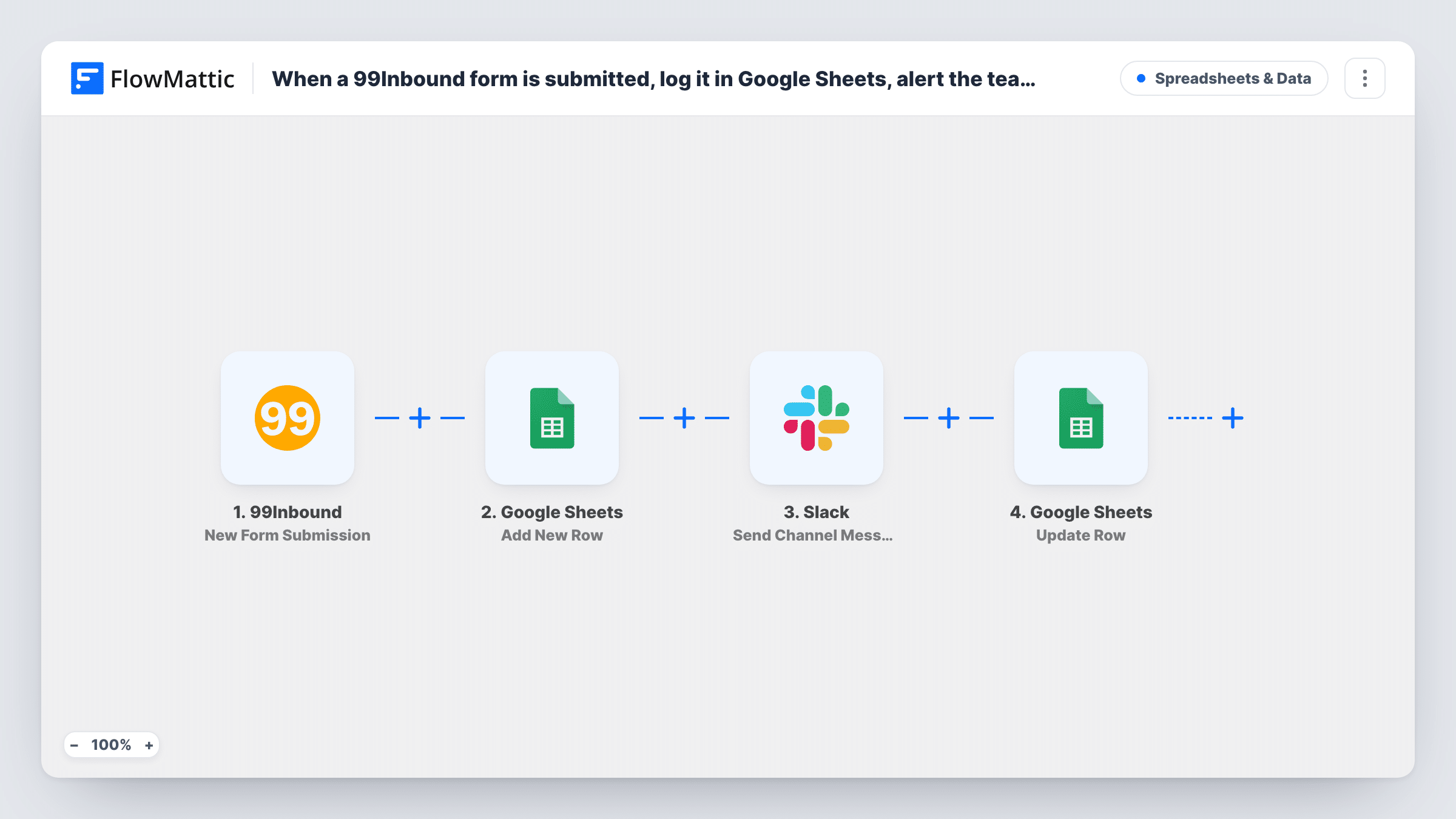
Each new 99Inbound form submission is saved as a Google Sheets row, shared with your team in a Slack channel, and then marked processed on that same row through the row number the first Sheets step returned.
 99Inbound
 Google Sheets
 Slack
4 steps Setup ~8 min Used on 1.3k sites Free to import
What this workflow does
99Inbound gives static sites and landing pages a form backend, but the submissions are most useful where your team already works. This workflow puts every entry into a shared Google Sheet, flags it in Slack, and then marks the row so the sheet shows which entries were shared.
The 99Inbound New Form Submission trigger fires when a submission is received on your form. Google Sheets Add New Row stores the entry and returns the row's number. A message then goes to the Slack channel you choose. The final Update Row step already uses {google_spreadsheets2.row_number} as its row number, so it edits the row created two steps before.
After import you map the details. Send a test submission, then pick the spreadsheet and sheet and match form fields to columns. Write the Slack message with the fields your team needs, and in Update Row select the same sheet and set a status column to Processed.
The Processed mark goes on right after Slack is notified, so treat it as a record that the entry was shared, not that someone replied. You can follow each 99Inbound entry through the steps in Task History.
Lead list for a static marketing site
A startup with a static landing page collects demo requests through 99Inbound and works through them from the Google Sheet each morning.
Quote requests in the sales channel
A web agency posts each 99Inbound quote request to #sales on Slack so whoever is free can reply to the prospect quickly.
Event sign-ups in one sheet
A meetup organiser collects RSVPs through a 99Inbound form and prints the sheet as a door list on the night.
How this workflow runs
What happens at each step once the workflow is on, and what you need before you import it.
 99Inbound New Form Submission
Starts a run whenever your 99Inbound form receives a submission. Send a test entry so the form's fields show up in Task History, ready to map in the next steps.
- Google Sheets Add New Row
Saves the 99Inbound entry as a new row in the spreadsheet and sheet you choose and returns its row number. Match the form fields to your column headers after import, as none are mapped.
- Slack Send Channel Message
Shares the submission in the Slack channel you pick. Write the message after import and map in form fields such as the name, email or message text.
- Google Sheets Update Row
Edits the row from step 2, located by the row number that step returned, which is mapped already. Point it at the same spreadsheet and sheet, then put Processed in your status column.
What you need
- FlowMatticCore
- 99Inbound AccountAccount
- Google Sheets AccountAccount
- Slack AccountAccount
After importing, map your own data. To keep the template universal, not every step is pre-filled. Open each step in the builder and connect your accounts and fields (channels, lists, sheets, recipients) before you switch the workflow on.
Make it yours
Changes worth making after you import it.
- Add Processed and Replied columns to the sheet, and let the workflow fill the first while your team fills the second by hand.
- Map the submitter's email into the Slack message so whoever picks up the entry can reply without opening the sheet.
- If the form collects personal details your whole workspace shouldn't see, use Slack's Send Private Channel Message action instead.
Questions about this workflow
Do I need to change my 99Inbound form to use this?
Connect the 99Inbound trigger in FlowMattic after import and send a test submission. The fields your form collects are what you'll be able to map into the sheet and the Slack message.
How is the 99Inbound entry's row updated rather than duplicated?
Add New Row returns the number of the row it created, and Update Row has {google_spreadsheets2.row_number} mapped as its row number, so it edits that same row.
Will spam submissions be logged too?
Yes. Every submission 99Inbound passes on starts a run and adds a row. To keep some out of Slack, put a Filter between the first Google Sheets step and the Slack step with a condition on a form field; it also stops Update Row for those entries.
More Spreadsheets & Data workflows
Other ready-to-import templates from the same category.



Import this workflow into your WordPress site
Download the JSON, import it from the Workflows screen and connect your accounts. Every run stays on your server, with no per-task fees.
30-day money-back guarantee Unlimited workflows and runs Self-hosted