

When a churn-signal Amplitude monitor fires, open a HubSpot ticket and alert the team in Slack
When your churn-signal custom monitor in Amplitude fires, FlowMattic opens a ticket in HubSpot CRM for follow-up and posts an alert in Slack, so someone on the team owns each warning.
 Amplitude
 HubSpot CRM
 Slack
Slack3 steps Setup ~5 min Used on 1.5k sites Free to import
What this workflow does
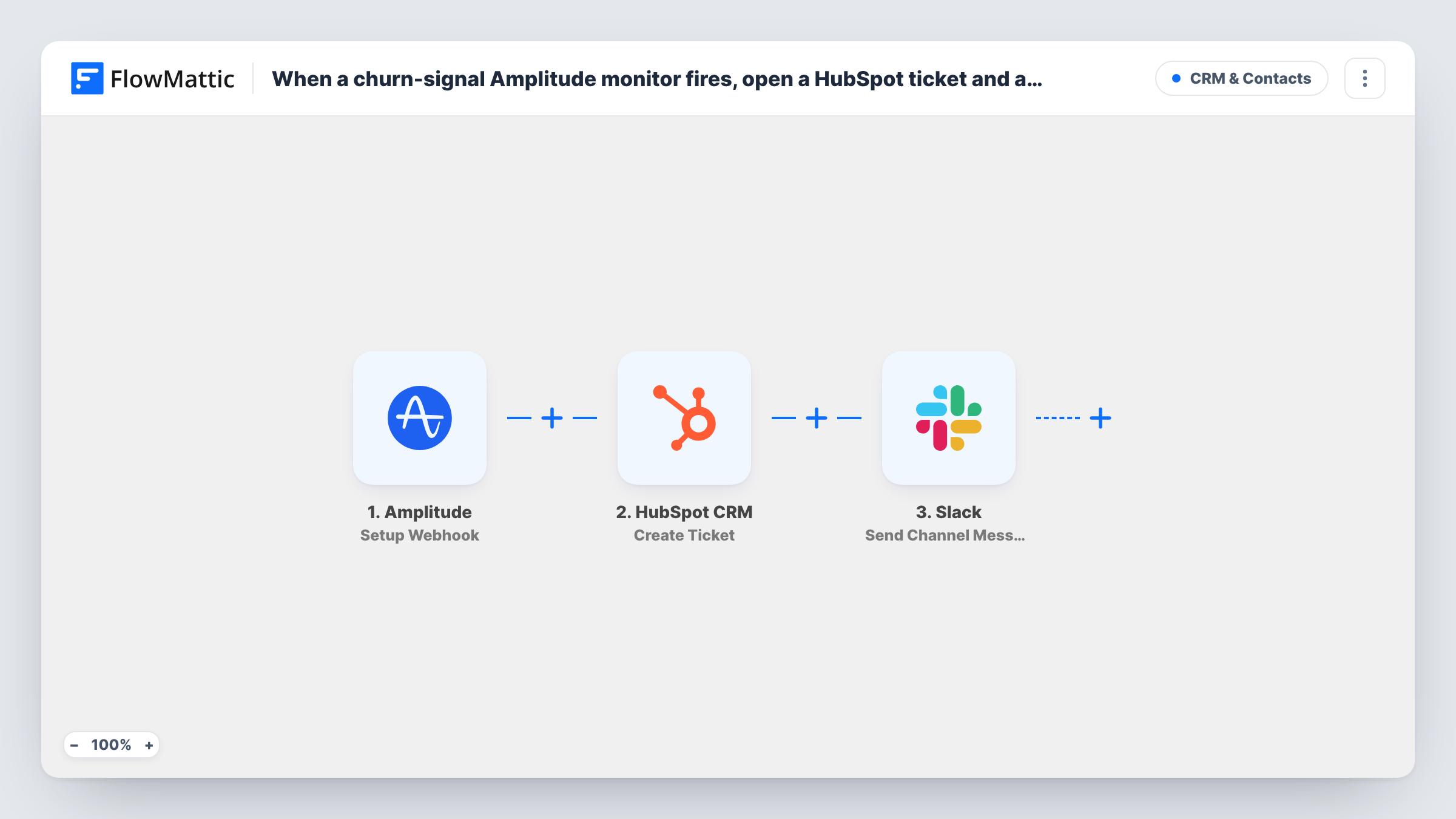
A drop in product usage is often the first sign that customers are about to leave. If you already watch for it with an Amplitude custom monitor, this workflow turns each alert into work someone owns: a HubSpot ticket to track the follow-up and a Slack message so the team knows straight away.
The Amplitude Setup Webhook trigger fires for custom monitors in Amplitude. You choose which monitors send to it in Amplitude's own settings, so connect only your churn-signal monitor to this webhook URL. Any other monitor you point at it would open tickets too. The alert data Amplitude sends, such as the monitor name and the values that triggered it, is shown in a test run.
The HubSpot CRM Create Ticket step then creates a ticket. It ships unmapped, so after import you connect HubSpot, give the ticket a name and description built from the monitor data, and set where it lands in your ticket setup. Amplitude monitor alerts describe a metric rather than a single customer, so don't expect a contact to be linked automatically.
Last, the Slack Send Channel Message step posts to a public channel. Write the alert text and map in the monitor details. Check Task History after the first alert to see what each step returned.
Customer success follow-up on falling usage
A SaaS company's monitor watches weekly active users on a key feature, and each alert becomes a HubSpot ticket the success team works through.
Product team alerted to a drop
When the churn monitor fires after a release, the product channel in Slack gets a message from the same run and checks whether the change caused it.
Tracking how churn signals were handled
A head of customer success reviews closed HubSpot tickets each quarter to see how the team responded to every churn alert.
How this workflow runs
What happens at each step once the workflow is on, and what you need before you import it.
 Amplitude Setup Webhook
Receives alerts from Amplitude custom monitors. In Amplitude, connect only your churn-signal monitor to this webhook so other monitors don't start runs. The alert details are passed on.
- HubSpot CRM Create Ticket
Creates a ticket in HubSpot CRM for the churn alert. Nothing is mapped yet, so connect HubSpot and map a ticket name and description from the monitor data after import.
- Slack Send Channel Message
Sends an alert to a public Slack channel about the churn signal. Pick the channel and write the message after import, mapping in the monitor name and values from Amplitude.
What you need
- FlowMatticCore
- Amplitude AccountAccount
- HubSpot CRM AccountAccount
- Slack AccountAccount
After importing, map your own data. To keep the template universal, not every step is pre-filled. Open each step in the builder and connect your accounts and fields (channels, lists, sheets, recipients) before you switch the workflow on.
Make it yours
Changes worth making after you import it.
- Point only the churn monitor at this workflow's webhook URL, and build separate workflows for other Amplitude monitors.
- Include the monitor name and the metric value in the HubSpot ticket name, so the team can tell alerts apart in the ticket list.
- Turn on the webhook's Require authentication on incoming requests setting in FlowMattic, if Amplitude can send the key you set, so only Amplitude can start runs.
Questions about this workflow
Which Amplitude monitors start this workflow?
Any custom monitor you connect to the webhook URL in Amplitude. Connect only the churn-signal monitor if every run should open a churn ticket.
Will the HubSpot ticket be linked to the affected customer?
Not automatically. A monitor alert is about a metric, not a contact. If your alert data names an account, map that name into the ticket description so the team knows whom to contact.
Can the churn alert go to a private Slack channel?
The included step targets public channels. Replace it with Slack's Send Private Channel Message action when the alert should stay in a private channel.
More CRM & Contacts workflows
Other ready-to-import templates from the same category.





Import this workflow into your WordPress site
Download the JSON, import it from the Workflows screen and connect your accounts. Every run stays on your server, with no per-task fees.
30-day money-back guarantee Unlimited workflows and runs Self-hosted