

When a Muvi user is created, add a Google Sheets row, welcome them via Gmail, then mark the row notified
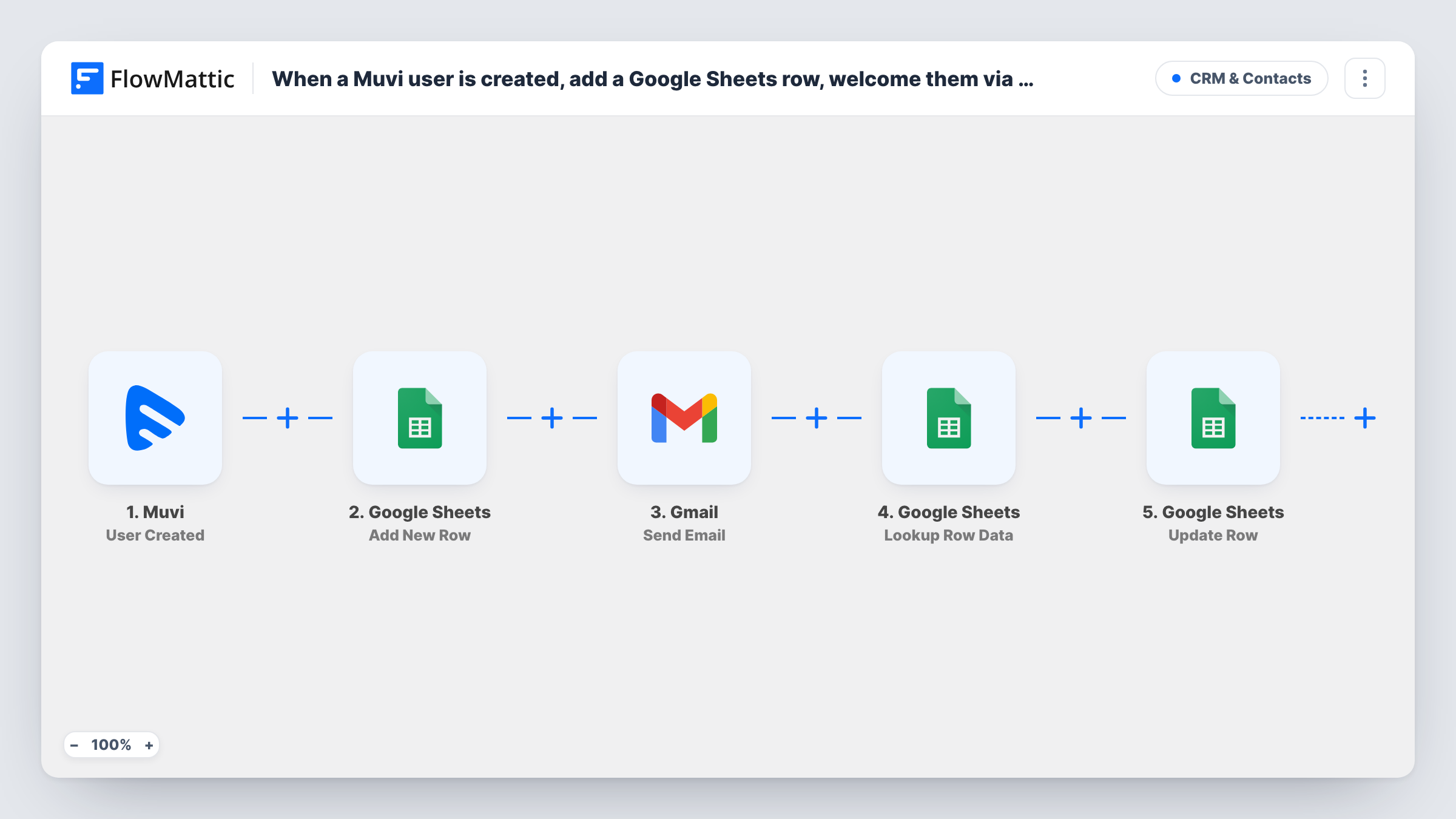
When a user is created in Muvi, FlowMattic adds them to a Google Sheet, sends a welcome email through Gmail, then finds their row again and updates it to show they were notified.
 Muvi
Muvi
 Google Sheets
 Gmail
Gmail5 steps Setup ~8 min Used on 1.2k sites Free to import
What this workflow does
Streaming platforms built on Muvi gain viewers every day, and someone usually wants a list of them and a friendly first email. Keeping a record of who was actually welcomed matters too, so nobody is missed or emailed twice by hand. This workflow covers all three from the moment a Muvi account is created.
The Muvi User Created trigger passes the new user's details, such as name and email, to the next steps. First, a Google Sheets Add New Row step writes the user into your sheet. Then the Gmail Send Email step sends your welcome message to the user's email address.
After the email, a Lookup Row Data step searches the same sheet for that user, for example by email, and Update Row changes the row it found, such as setting a Notified column to yes. The lookup is what tells Update Row which row to change, so map the row it returns into the update step.
None of the steps are mapped as imported. Set up the sheet with the columns you need, including the notified column, then map each step and run a test with a new Muvi user before going live.
Viewer list for a new streaming channel
A yoga studio launches an on-demand video channel on Muvi. Each new viewer lands in a Google Sheet and gets a welcome email with tips for getting started.
Proof that welcomes went out
A film festival's streaming team checks the Notified column before the opening night to confirm every registered viewer got the welcome email.
Sheet for the marketing team
A sports league's media team filters the sheet by sign-up date to see weekly growth on its Muvi platform.
How this workflow runs
What happens at each step once the workflow is on, and what you need before you import it.
 Muvi User Created
Fires when a user is created in your Muvi platform. The user's details, such as name and email, are passed to the sheet and email steps; a test sign-up shows the exact fields.
- Google Sheets Add New Row
Writes the new Muvi user into the spreadsheet you pick as a fresh row. No columns are mapped as imported, so choose the sheet and map the user's name, email and sign-up details.
- Gmail Send Email
Sends the welcome email from your Gmail account to the new user. Map their email as the recipient and write the subject and message, adding their name if you like.
- Google Sheets Lookup Row Data
Searches the same sheet for the user's row, for example by matching the email column against the Muvi email. The step ships unmapped, so set the column and value to search on.
- Google Sheets Update Row
Changes the row the lookup found, for example writing yes into a Notified column. Map the row reference from the Lookup Row Data step and the value you want written.
What you need
- FlowMatticCore
- Muvi AccountAccount
- Google Sheets AccountAccount
- Gmail AccountAccount
After importing, map your own data. To keep the template universal, not every step is pre-filled. Open each step in the builder and connect your accounts and fields (channels, lists, sheets, recipients) before you switch the workflow on.
Make it yours
Changes worth making after you import it.
- Add a Notified column to the sheet before importing and leave it empty in the Add New Row step, so Update Row is the only step that fills it.
- Search on the email column in Lookup Row Data, since it is the value most likely to be unique for each Muvi user.
- Put a Filter between the Muvi trigger and the Add New Row step that continues only when the email isn't empty, so every row has an address to email and to search on.
- Add a Delay between the Add New Row step and the Gmail step if you want the welcome to arrive a little after sign-up instead of straight away.
Questions about this workflow
Why does the workflow look up the row it just added?
This template doesn't take a row reference from Add New Row, so Update Row relies on the search to know where to write. The Lookup Row Data step finds the user's row in the sheet, and its result tells Update Row where to write.
What does the Muvi welcome email say?
Whatever you write. The Gmail step is empty in the template, so add a subject and message after import and map the user's name and email from the Muvi data.
What if two rows in the sheet have the same email?
Lookup Row Data may return the first match, so the wrong row could be updated. Keep one row per user, or search on a value Muvi gives each user, such as a user ID, if it appears in a test run.
Do existing Muvi users get a welcome email when I turn this on?
No. Only users created after the workflow is active start a run. Existing users need to be added to the sheet some other way.
More CRM & Contacts workflows
Other ready-to-import templates from the same category.




Import this workflow into your WordPress site
Download the JSON, import it from the Workflows screen and connect your accounts. Every run stays on your server, with no per-task fees.
30-day money-back guarantee Unlimited workflows and runs Self-hosted