

When a new submission received in Contact Form 7, check if the email is valid with Tomba and create a user in WordPress
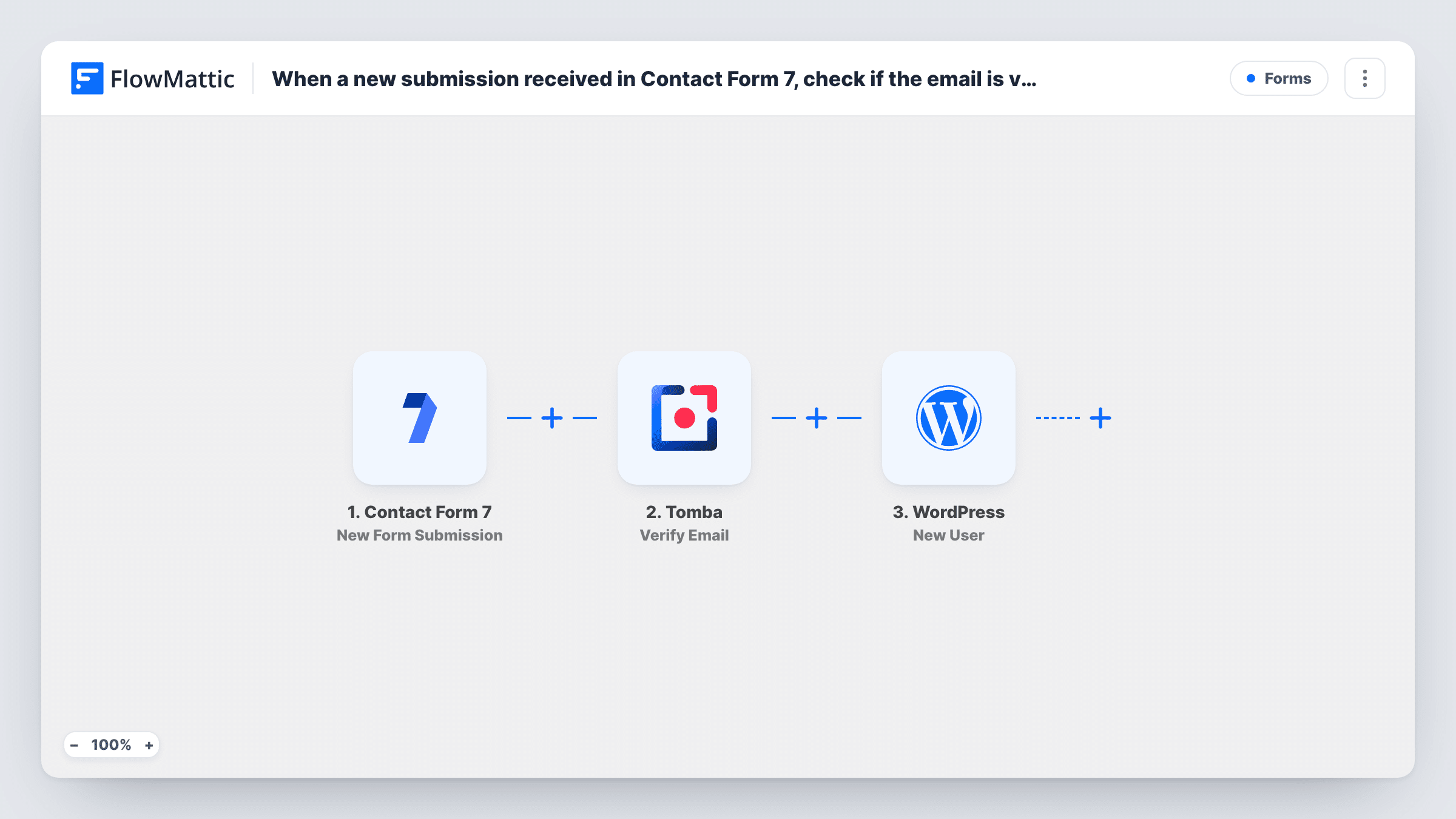
Each Contact Form 7 submission has its email address checked by Tomba, then FlowMattic creates a WordPress user from the form details. As imported, the user is created whatever Tomba’s result says.
 Contact Form 7
 Tomba
 WordPress
3 steps Setup ~5 min Used on 2.1k sites Free to import
What this workflow does
Some sites use a simple Contact Form 7 form as a sign-up form, for a members area, a client portal or a course. Creating each account by hand from the emailed submission is slow. This workflow creates the WordPress user for you and runs the address through Tomba first, so the check result is on hand.
When a visitor submits a Contact Form 7 form, FlowMattic picks up the fields. The email goes to Tomba, whose Verify Email action validates the address and returns a result you can map. The last step is New User in WordPress, which creates an account on your site from the details you map.
One warning applies here. There is no Filter after Tomba, so every submission tries to create a user, including ones with addresses that fail the check. On a public form, add a Filter on the Tomba result and keep the role low. An email that's already registered gets no new user: the step returns that account's ID. WordPress may refuse a username another account already uses, and Task History shows that response.
Accounts for a members-only area
A Contact Form 7 request form creates a WordPress user for each applicant, and with a Filter on Tomba's result, failed addresses get no account.
Client portal sign-ups
New clients fill in a short form, and FlowMattic sets up their WordPress login so you can grant access to their project pages.
Course or community registrations
Students register through Contact Form 7, and each one gets a WordPress account that a membership or LMS plugin can then work with.
How this workflow runs
What happens at each step once the workflow is on, and what you need before you import it.
 Contact Form 7 New Form Submission
Fires on every Contact Form 7 submission on your site. Each form field, including the email, becomes available to the Tomba and WordPress steps.
- Tomba Verify Email
Passes the visitor's address to Tomba's Verify Email action. Connect your Tomba account and map the form's email field. The result is passed on, but no step acts on it as imported.
- WordPress New User
Adds a WordPress account for the person who sent the Contact Form 7 form. Map the email and a username from the form, plus a name if you collect one. Run a test submission to see the other options the step offers, such as the role.
What you need
- FlowMatticCore
- Contact Form 7 PluginPlugin
- Tomba AccountAccount
After importing, map your own data. To keep the template universal, not every step is pre-filled. Open each step in the builder and connect your accounts and fields (channels, lists, sheets, recipients) before you switch the workflow on.
Make it yours
Changes worth making after you import it.
- Add a Filter between Tomba and WordPress that continues only when Tomba's result shows a valid address. Submit a real and a made-up address first to see the value Tomba returns.
- Use email* in the Contact Form 7 form tag so the email is required. Without it, Tomba has nothing to check and WordPress can't create the user.
- Add a Filter between the Tomba step and the WordPress step that also checks a consent or agreement checkbox, so an account is created only for visitors who asked for one.
Questions about this workflow
Will Contact Form 7 entries with a bad email still get a WordPress account?
Yes, as imported. Tomba checks the address and returns a result, but no step uses it. Add a Filter between the Tomba step and the WordPress step to stop the run when the address fails.
A Contact Form 7 visitor already has an account on my site. Is a second one made?
No. The New User step sees that the email is already registered, creates nothing and returns the existing user's ID, which Task History shows. If you set a role in the step, that role is added to the account. A username that belongs to a different account may be refused.
What role will accounts created from Contact Form 7 have?
You decide that while configuring the New User step. Check its options in a test run, and pick the lowest role that gives people what they need.
Will I keep getting the usual Contact Form 7 notification emails?
Yes. The workflow only listens for submissions and doesn't change your form's mail settings.
More Forms workflows
Other ready-to-import templates from the same category.






Import this workflow into your WordPress site
Download the JSON, import it from the Workflows screen and connect your accounts. Every run stays on your server, with no per-task fees.
30-day money-back guarantee Unlimited workflows and runs Self-hosted