

When a purchase is created in SureCart, Generate a PDF from template in Crove, add the document PDF URL to Google Sheet, and email the URL to user
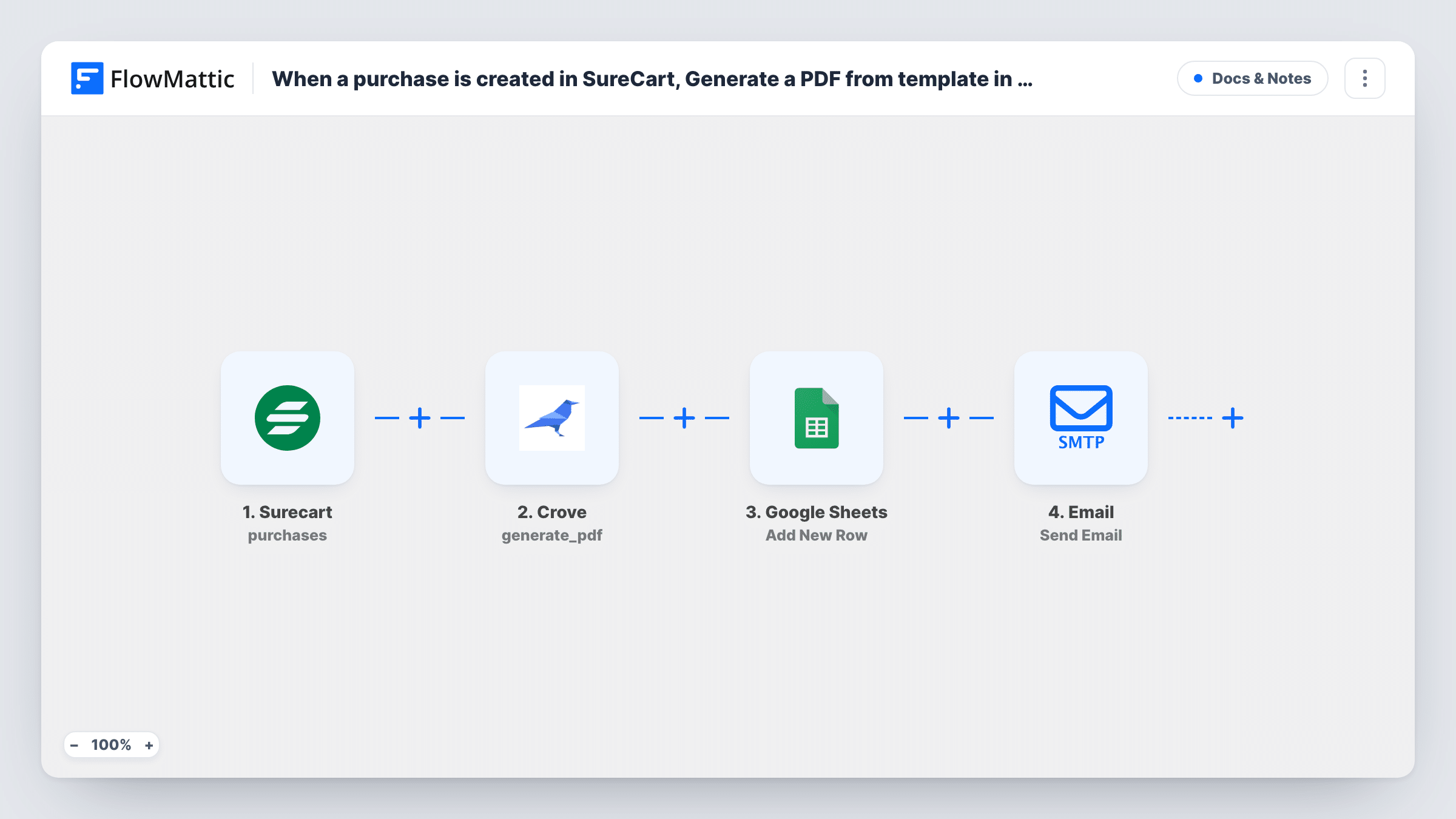
When a purchase is created in SureCart, Crove generates a PDF from your template, the PDF link is added to a Google Sheets row, and FlowMattic emails that link to the customer with a ready-written message.
 Surecart
 Crove
Crove
 Google Sheets
 Email
Email4 steps Setup ~8 min Used on 1.1k sites Free to import
What this workflow does
Some products come with paperwork: a certificate, a licence, a welcome pack or a personalised guide. Making each one by hand after a sale is slow, and keeping track of what you sent is easy to forget. This workflow creates the document from a Crove template for every SureCart purchase, logs its link and emails it out.
The SureCart trigger fires when a purchase is created, and passes the purchase data on. The Crove step then generates a PDF from one of your templates. It ships unmapped: after import you pick the template and map purchase details, such as the product and customer name, into its fields.
Next, a Google Sheets step adds a row with the data you map, for example the purchase ID, date and PDF link, so you have a list of every document produced. The final step is FlowMattic's Email module, which sends through WordPress mail or your SMTP account. Its subject reads "Your document is ready" and the body includes the PDF link from Crove. The recipient isn't set, so map the customer's email address.
Check a test purchase to see whether the purchase data includes the customer's email or only a customer ID. If it's only an ID, FlowMattic's SureCart integration has a Find Customer By ID action you can add to look the email up. Each run's results, step by step, appear in Task History.
Course certificates on purchase
An online course seller fills a Crove certificate template with the buyer's name and emails the PDF link as soon as the course is bought.
Licence documents for software
A plugin developer sends each SureCart buyer a PDF licence document and keeps the link in a Google Sheet for support lookups.
Personalised welcome pack
A coaching business generates a welcome PDF with the client's name and programme for each purchase, and the sheet records every pack that went out.
How this workflow runs
What happens at each step once the workflow is on, and what you need before you import it.
 Surecart Purchase created
Fires when a purchase is created in SureCart. The purchase data becomes available to map; run a test purchase to see whether it carries the customer's name and email or only IDs.
- Crove Generate PDF From Template
Generates a PDF from one of your Crove templates. The template leaves this step empty, so choose your Crove template and map the purchase details into its fields.
- Google Sheets Add New Row
Adds a new row to your spreadsheet for each purchase. Pick the spreadsheet and sheet, then map columns such as the purchase ID, date and the PDF link Crove returned.
 Email Send Email
Emails the PDF link using FlowMattic's Email module. The subject and body are written, with the Crove PDF link already in the message; map the customer's email as the recipient and adjust the wording.
What you need
- FlowMatticCore
- SureCart AccountAccount
- Crove AccountAccount
- Google Sheets AccountAccount
After importing, map your own data. To keep the template universal, not every step is pre-filled. Open each step in the builder and connect your accounts and fields (channels, lists, sheets, recipients) before you switch the workflow on.
Make it yours
Changes worth making after you import it.
- If the purchase data only has a customer ID, put SureCart's Find Customer By ID action between the SureCart trigger and the Crove step, then map the email it returns into the Email step.
- Enter your SMTP details in the Email step, or use your site's WordPress mail, and send a test to your own address so you can check the message and link.
- Put a Filter between the SureCart trigger and the Crove step that checks the product, if only some products should come with a document. Purchases it stops get no PDF, row or email.
Questions about this workflow
Do I need a Crove template before importing this SureCart workflow?
Yes. The Generate PDF From Template step builds the PDF from a template in your Crove account, so create it first and pick it in the step after import.
Does the customer get the PDF as an attachment?
Not as imported. The email contains the link to the PDF that Crove generated. The body is already written as "Here is your document:" followed by that link.
Who receives the email?
The person whose address you map. The template leaves the recipient empty, so map the buyer's email from the purchase data, or from a Find Customer By ID step if the purchase only carries an ID.
Which columns does the Google Sheets row contain?
Only the columns you match in Add New Row. Set up a header row in your sheet first, then match the purchase details and the Crove PDF link to those columns.
More Docs & Notes workflows
Other ready-to-import templates from the same category.





Import this workflow into your WordPress site
Download the JSON, import it from the Workflows screen and connect your accounts. Every run stays on your server, with no per-task fees.
30-day money-back guarantee Unlimited workflows and runs Self-hosted