

When invoice created in WooCommerce PDF Invoices, upload to Google Drive client folder and send link via Gmail.
When WooCommerce PDF Invoices & Packing Slips creates an invoice for an order, FlowMattic uploads the file to the Google Drive folder you keep for client invoices and emails a link through Gmail.
 WooCommerce PDF Invoices & Packing Slips
 Google Drive
 Gmail
Gmail3 steps Setup ~5 min Used on 2.6k sites Free to import
What this workflow does
Many stores keep a copy of every invoice in Google Drive for their accountant, and some customers prefer a link they can open again later over an attachment. This workflow does both from the moment an invoice exists, so nobody has to download PDFs from WordPress and upload them by hand.
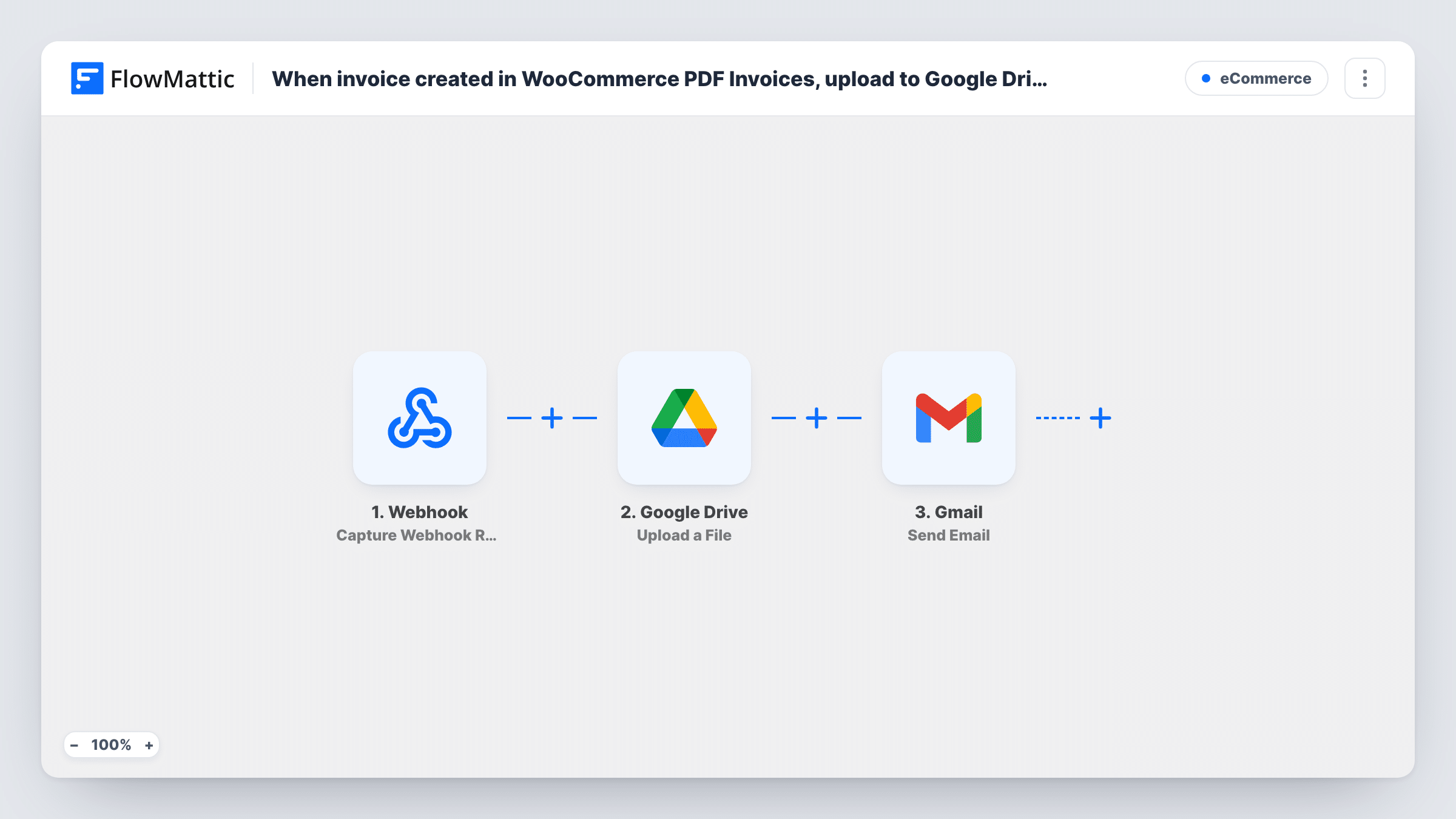
The WooCommerce PDF Invoices & Packing Slips trigger fires when an invoice is created for an order. The Google Drive step then places a copy of the invoice in the Drive folder you name in its settings. The template leaves it unmapped, so after import you pick your client invoices folder and map the invoice file from the trigger. Run a test order and check Task History for the PDF's path or link; if the trigger data doesn't include it, add the plugin's Get Document PDF Path action between the trigger and the upload.
The final step uses Gmail to send an email. It also ships unmapped: set the recipient to the order's billing email, write the subject and message, and map the file link that the Drive step returns.
Every invoice goes into the one folder you choose; the template doesn't create a folder for each client. Files you upload to Drive are private to your account by default, so a client who opens the link may be asked to request access. To avoid that, add a Google Drive sharing step before the Gmail step.
Invoice archive for the bookkeeper
A shop gives its accountant access to one Drive folder, and every invoice the plugin creates appears there without anyone exporting PDFs at month end.
Invoice links for B2B buyers
A wholesaler's trade customers get an email with a link to their invoice that they can forward to their own finance team.
Backup outside WordPress
A store owner keeps a copy of each invoice in Google Drive so the documents are still at hand if the site has problems.
How this workflow runs
What happens at each step once the workflow is on, and what you need before you import it.
 WooCommerce PDF Invoices & Packing Slips Invoice Created
Starts the workflow when WooCommerce PDF Invoices & Packing Slips creates an invoice for an order. The invoice and order data from the event are passed on; place a test order to see exactly which fields the plugin includes.
- Google Drive Upload a File
Puts the invoice file into a Google Drive folder of your choice. The template ships this step unmapped: connect Google Drive, choose your client invoices folder and map the invoice PDF from the trigger or from a step that fetches its path.
- Gmail Send Email
Emails the client through your connected Gmail mailbox. Nothing is preset, so map the order's billing email as the recipient, write the subject and body, and include the Drive file link from the upload step.
What you need
- FlowMatticCore
- WooCommerce PDF Invoices & Packing Slips PluginPlugin
- Google Drive AccountAccount
- Gmail AccountAccount
After importing, map your own data. To keep the template universal, not every step is pre-filled. Open each step in the builder and connect your accounts and fields (channels, lists, sheets, recipients) before you switch the workflow on.
Make it yours
Changes worth making after you import it.
- Put Google Drive's Share File with Anyone action between the Upload a File step and the Gmail step, then use the link it generates in the email so clients can open the invoice without a Google sign-in.
- Name the uploaded file with the invoice number and the customer name, so the Drive folder stays easy to search.
- If the trigger data has no file path, add the WooCommerce PDF Invoices Get Document PDF Path action between the trigger and the Drive upload and map its result into the file field.
- Mention the invoice number and order total in the Gmail message, so the client can match the email to their order.
Questions about this workflow
Does the workflow create a separate Google Drive folder for each client?
No. Every invoice goes into the folder you pick in the Upload a File step. For a folder per client you would add Google Drive steps that find or create the folder before the upload.
Can the client open the Google Drive link without a Google account?
Only if the file is shared. Uploaded files are private to your Drive by default, so add a sharing step, such as Share File with Anyone, between the upload and the Gmail step.
Is the invoice PDF attached to the Gmail email?
No. The workflow sends a link to the file in Google Drive. If you want an attachment as well, use FlowMattic's Email step, which can attach files stored on your WordPress site.
Do I need the WooCommerce PDF Invoices & Packing Slips plugin?
Yes. The trigger comes from that plugin, so it must be installed and creating invoices for your WooCommerce orders.
More E-Commerce workflows
Other ready-to-import templates from the same category.




Import this workflow into your WordPress site
Download the JSON, import it from the Workflows screen and connect your accounts. Every run stays on your server, with no per-task fees.
30-day money-back guarantee Unlimited workflows and runs Self-hosted