

Send a weekly shout-out to every contact tagged as an advocate
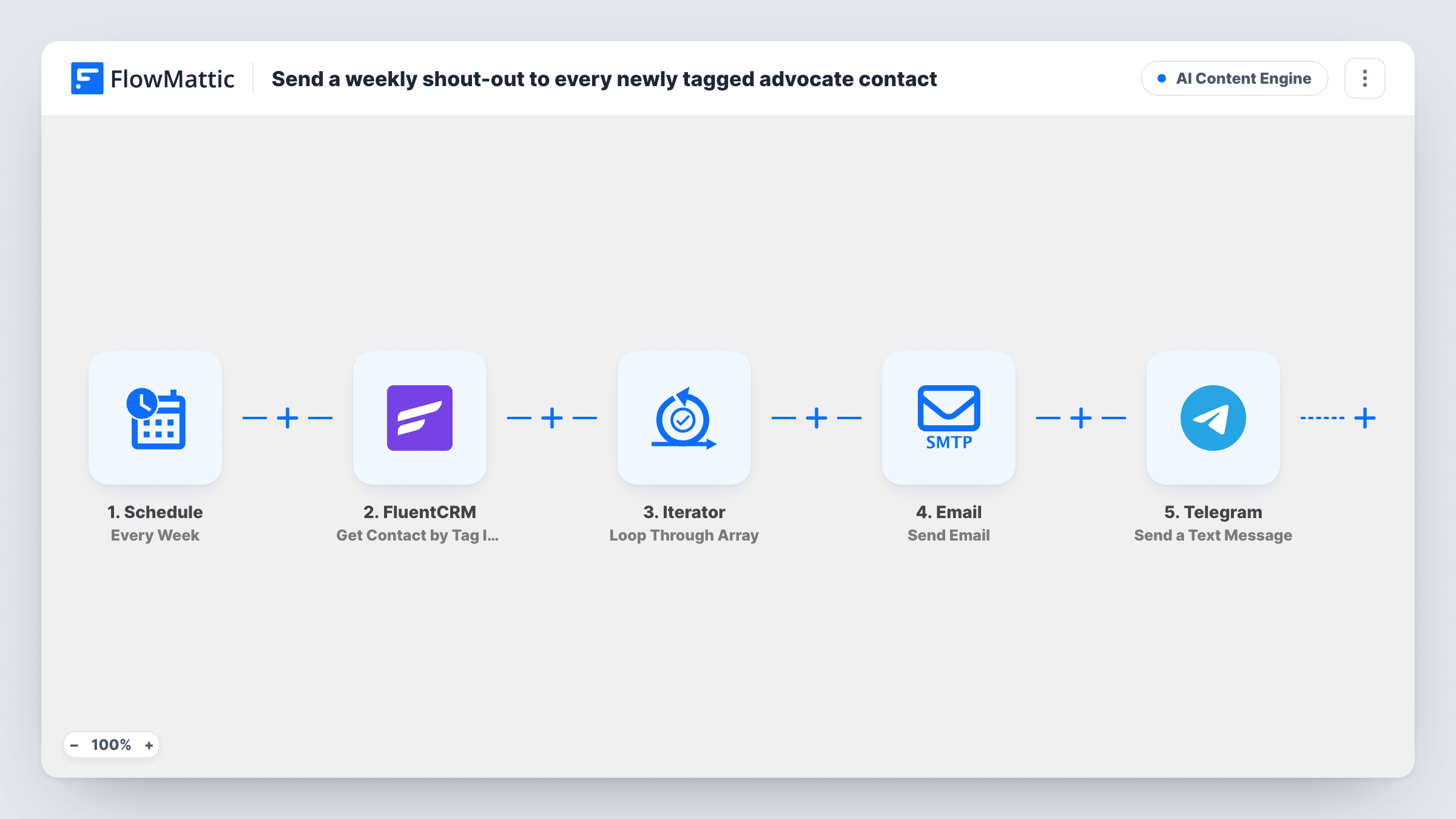
Each week, FlowMattic pulls every FluentCRM contact with your advocate tag, emails each one a short thank-you by first name and posts a Telegram note for every shout-out it sends.
 Schedule
 FluentCRM
 Iterator
 Email
 Telegram
5 steps Setup ~8 min Used on 1.3k sites Content Ops Free to import
What this workflow does
People who recommend you, leave reviews or answer questions in your community rarely hear back. If you already mark them with a tag in FluentCRM, this workflow sends each of them a short thank-you on a weekly rhythm and keeps your team informed on Telegram.
A weekly Schedule trigger sets the rhythm for these thank-yous. The FluentCRM step retrieves contacts by tag ID. No tag is set in the template, so choose your advocate tag after import.
An Iterator then loops through the contacts. For each person, FlowMattic's Email step sends a message to their address with their first name in the subject and a body thanking them for championing you this week. A Telegram text then logs the shout-out with the contact's name and email, using HTML formatting. Connect your bot and pick the chat it posts to.
Every weekly run reaches everyone who carries the tag at that moment, so the same advocates get the email each week. Reword the message so it reads well on repeat, or take the tag off people once you've thanked them.
Thanking customers who refer friends
A meal-kit brand tags customers who sent a referral and emails them a weekly thanks, while the marketing team sees each shout-out in a Telegram group.
Recognising community helpers
A software forum tags members who answer the most questions, and each of them gets a personal note of thanks every week the tag is on.
Reviewers of a new product
A shop tags buyers who left a review this week, thanks them by email, then removes the tag so next week's batch only holds new reviewers.
How this workflow runs
What happens at each step once the workflow is on, and what you need before you import it.
 Schedule Every Week
Starts the workflow once a week at the time you choose. It provides no contact data; it only sets when the shout-outs go out.
- FluentCRM Get Contact by Tag IDs
Retrieves FluentCRM contacts that have one or more tag IDs. Pick your advocate tag after import, since the template leaves the tag empty.
- Iterator Loop Through Array
Loops through the contacts FluentCRM returns, so the email and the Telegram note run once for each tagged person.
 Email Send Email
Emails the current contact a short thank-you for championing you, with their first name in the subject. Edit the wording to say what you're thanking them for.
- Telegram Send a Text Message
Sends a Telegram text logging the shout-out with the contact's first name and email, formatted as HTML. Choose the team chat that should receive these notes.
What you need
- FlowMatticCore
- FluentCRM PluginPlugin
- Telegram AccountAccount
After importing, map your own data. To keep the template universal, not every step is pre-filled. Open each step in the builder and connect your accounts and fields (channels, lists, sheets, recipients) before you switch the workflow on.
Make it yours
Changes worth making after you import it.
- Remove the advocate tag from each contact once they've been thanked, so people aren't thanked for the same thing every week.
- Mention the specific action in the email body, such as a referral or a review, so the thank-you doesn't read like a form letter.
- Put a Filter between the Iterator and the Email step that continues only for subscribed contacts, if a test run shows the status field. Inside the loop it only skips the contacts who fail.
- Drop the Telegram step if you don't need a log, or replace its text with a weekly count once you're happy the emails go out.
Questions about this workflow
Will a FluentCRM advocate get the same email every week?
Yes, as long as they keep the tag. Each weekly run emails every contact with that tag at the time, so take the tag off when you no longer want to thank someone.
Is the shout-out email sent from FluentCRM?
No. It goes out through FlowMattic's Email step, which uses WordPress mail or your SMTP settings. FluentCRM supplies the list of tagged contacts.
What does the Telegram message contain?
A short note that a shout-out was sent, with the contact's first name and email. It goes to the Telegram chat you choose for your bot.
Which tag counts as an advocate in this workflow?
Whichever one you pick in the Get Contact by Tag IDs step. The template ships without a tag, so set it before you turn the workflow on.
More AI Content Engine workflows
Other ready-to-import templates from the same category.





Import this workflow into your WordPress site
Download the JSON, import it from the Workflows screen and connect your accounts. Every run stays on your server, with no per-task fees.
30-day money-back guarantee Unlimited workflows and runs Self-hosted