

Push breaking-news posts out instantly and queue the rest
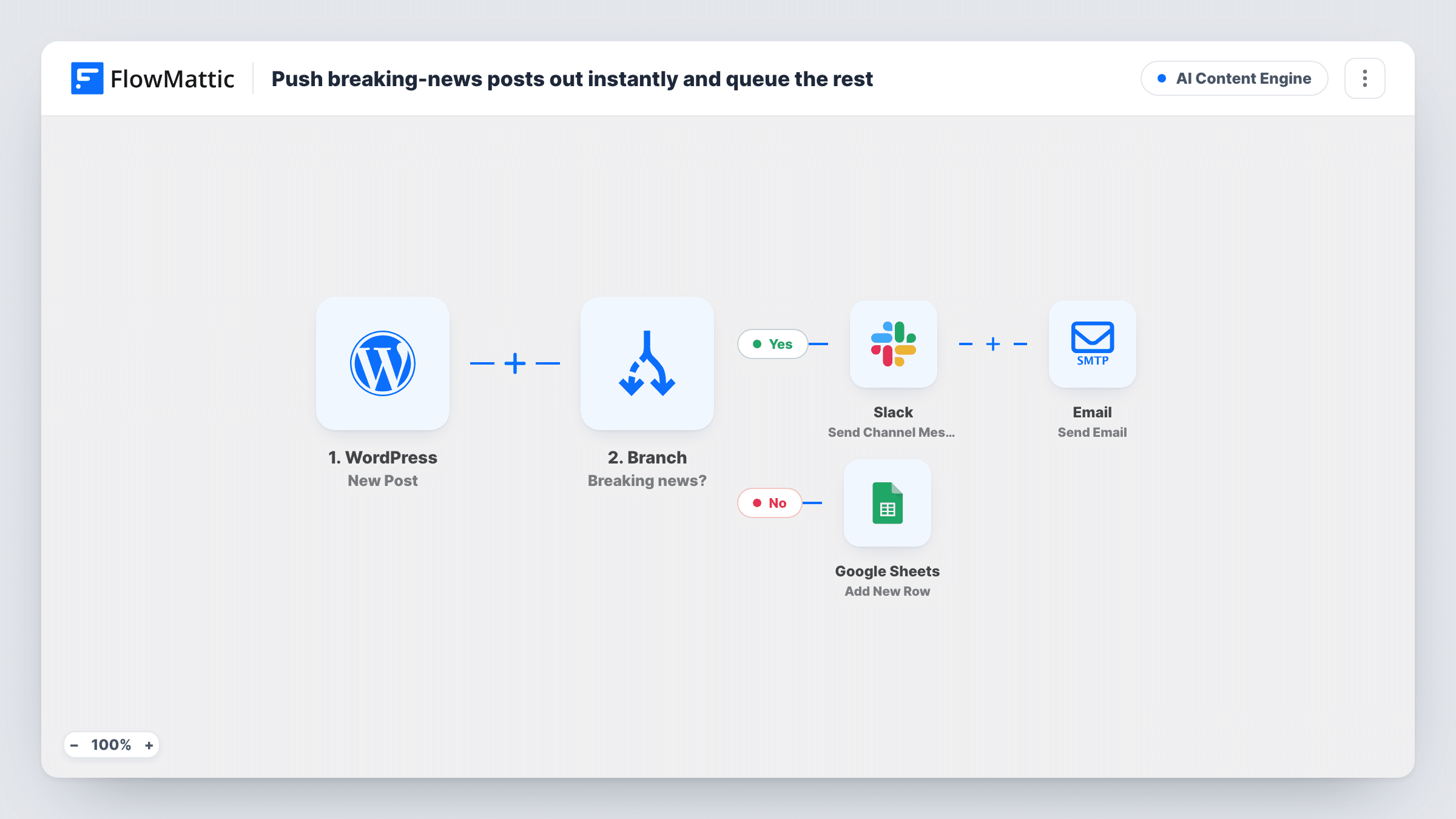
A Branch checks whether a new post is breaking news; breaking stories are broadcast immediately, everything else is queued for scheduled promotion.
 WordPress
 Branch
 Slack
 Email
 Google Sheets
5 steps Setup ~8 min Used on 1.3k sites Content Ops Free to import
What this workflow does
A news site cannot treat every post the same way. A breaking story is stale within hours, so it has to go out now. A feature or a how-to can wait for a planned slot. This workflow sorts each new post on one simple rule and handles the urgent ones first.
When the WordPress New Post trigger fires, FlowMattic passes the title, URL, excerpt and author on. A Branch checks whether the title contains breaking. On the Yes path, Slack posts BREAKING with the title and link, and then the Email module sends a message titled Just published, with the title and link, to [email protected]. On the No path, Google Sheets adds a new row instead.
The sheet is your queue. The workflow does not promote anything from it later, so someone works through the rows, or you build a separate workflow that reads them. The email address is a placeholder: use a list or group address that reaches your subscribers or team.
Local news site
Editors put Breaking at the start of urgent headlines. The newsroom sees those posts in Slack, and everything else goes into the sheet for the social team's daily plan.
Company announcements blog
Posts about outages or urgent changes go to staff by email straight away, while regular updates wait in the sheet for the weekly roundup.
Industry news site with a newsletter
Breaking stories go to the email list address at once, and other posts collect in the sheet as material for the next scheduled newsletter.
How this workflow runs
What happens at each step once the workflow is on, and what you need before you import it.
 WordPress New Post
The workflow starts automatically when a new post is published in WordPress. FlowMattic captures that data for the steps below.
- Branch Breaking news?
The Branch evaluates "Breaking news?": when it's true the Yes path runs, otherwise the No path runs — two outcomes, one workflow.
- Slack Send Channel Message
On the Yes path (condition met) — Slack — post or Schedule a new message to a specific #channel. Data is mapped from earlier steps; connect your Slack account on import.
 Email Send Email
On the Yes path (condition met) — Email — send an email using built-in WP mail function or custom SMTP. Data is mapped from earlier steps; connect your Email account on import.
- Google Sheets Add New Row
On the No path (otherwise) — Google Sheets — trigger when a new row is added to the spreadsheet. Data is mapped from earlier steps; connect your Google Sheets account on import.
What you need
- FlowMatticCore
- Slack AccountAccount
- Google Sheets AccountAccount
After importing, map your own data. To keep the template universal, not every step is pre-filled. Open each step in the builder and connect your accounts and fields (channels, lists, sheets, recipients) before you switch the workflow on.
Make it yours
Changes worth making after you import it.
- The Branch ignores upper and lower case and matches breaking anywhere in the title, so Breaking and BREAKING both pass, and so does a headline like Heartbreaking loss. Ask editors to use a fixed prefix if that matters.
- Prefer a category over a word in the title? Change the Branch to check a field your editors fill in, so headlines are not shaped to fit the rule.
- Map the post author into the queued row as well, so whoever plans promotion knows whom to ask about each post.
Questions about this workflow
Does a WordPress draft trigger the breaking alert?
No. The WordPress New Post trigger fires once, when a post is first published, so saving a draft or editing a post that is already live does not start a run.
Are queued posts promoted automatically later?
No. The No path only adds a row to the sheet. Promotion from the sheet is up to your team or another workflow.
Who gets the Just published email?
As imported, [email protected], which is a placeholder. Put in an address that forwards to your readers or staff, such as a group inbox.
Do breaking posts also get a sheet row?
No. A run takes one path. Add a Google Sheets step to the Yes path if you want every post in the sheet.
More AI Content Engine workflows
Other ready-to-import templates from the same category.





Import this workflow into your WordPress site
Download the JSON, import it from the Workflows screen and connect your accounts. Every run stays on your server, with no per-task fees.
30-day money-back guarantee Unlimited workflows and runs Self-hosted