

Route reviews by AI sentiment to marketing or support
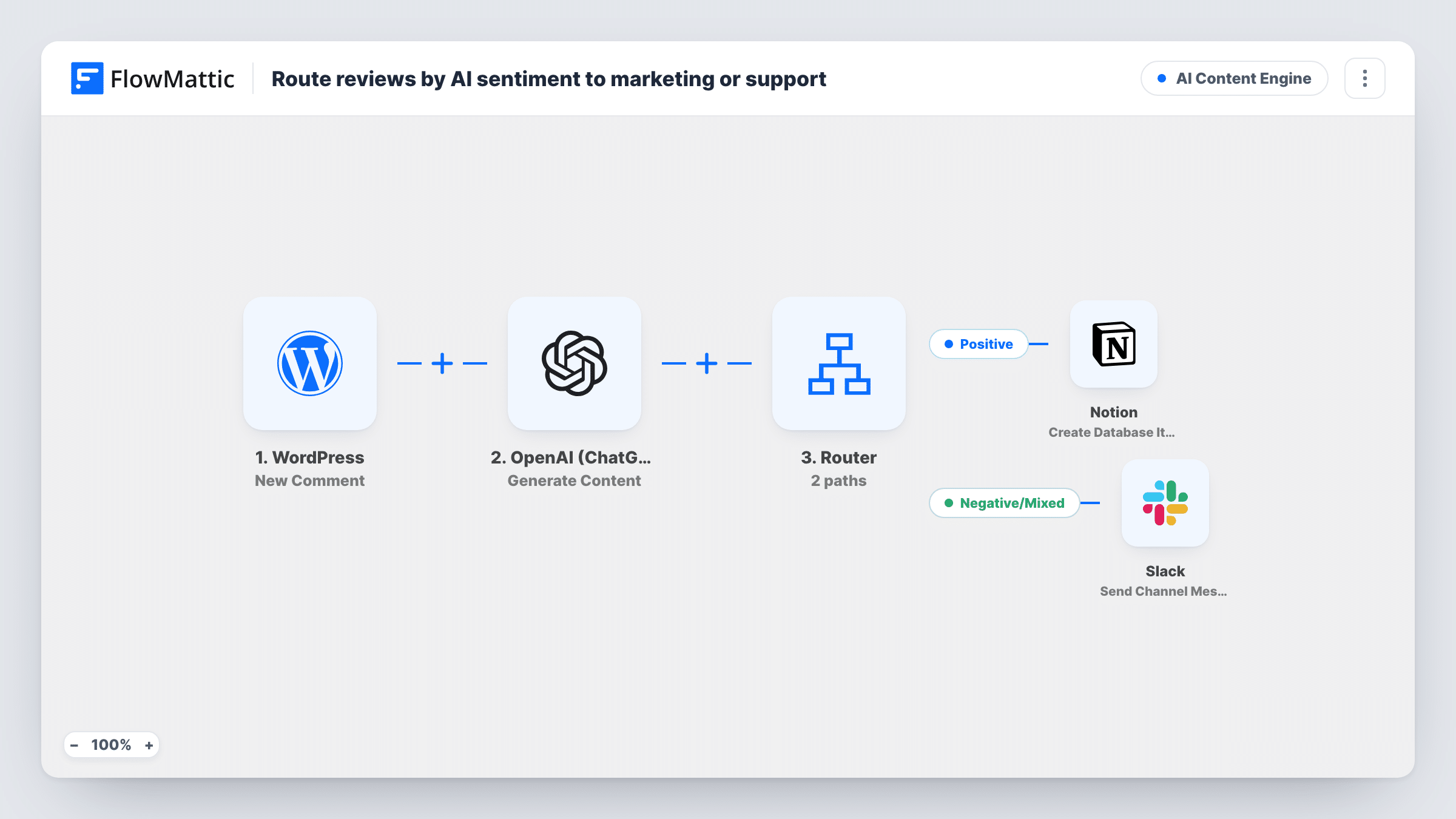
OpenAI labels each new WordPress comment or review as positive, negative or mixed. Positive ones go to a Notion database for marketing, and negative or mixed ones alert support in Slack.
 WordPress
 OpenAI (ChatGPT)
 Router
 Notion
 Slack
Slack6 steps Setup ~12 min Used on 883 sites Content Ops Free to import
What this workflow does
Praise and complaints arrive in the same comments section, but they belong to different teams. Marketing wants the kind words for testimonials; support needs to hear about problems quickly. This workflow reads the tone of each comment with AI and sends it to the right place.
The WordPress New Comment trigger fires for every comment added to your site. On a WooCommerce store, product reviews are saved as comments, so they start a run too. The OpenAI (ChatGPT) step sends the text to gpt-4o and asks for one word: POSITIVE, NEGATIVE or MIXED.
A Router then checks that word. Positive comments create an item in a Notion database. That step ships unmapped, so pick the database and map the author and comment text into its properties. Negative and Mixed comments each post a Slack message with the author's name and the full comment.
Each label is a different word, so a single-word reply follows exactly one route. Capitals are ignored, so Positive counts as POSITIVE, and a reply that contains none of the three words follows no route, so check a few test comments in Task History. Spam also counts as a new comment, so consider a Filter for it.
Collecting testimonials from product reviews
A skincare shop gets every glowing review saved in a Notion testimonials board, where marketing picks quotes for the homepage.
Fast response to unhappy customers
A software company's support team sees negative comments on its help articles in Slack and replies before the thread grows.
Spotting mixed feedback
A course creator gets mixed comments in their own Slack message, so they can thank the reader and fix the part that didn't land.
How this workflow runs
What happens at each step once the workflow is on, and what you need before you import it.
 WordPress New Comment
Fires when a new comment is added on your WordPress site, including WooCommerce product reviews. The author's name and comment text are passed on.
- OpenAI (ChatGPT) Generate Content
Asks gpt-4o to classify the comment as POSITIVE, NEGATIVE or MIXED, with a very short answer limit so it replies in one word. Connect your OpenAI account.
- Router 3 paths
Reads OpenAI's word and runs the matching route: Positive for POSITIVE, Negative for NEGATIVE, Mixed for MIXED. The three words can't match each other.
- Notion Create Database Item
On the Positive route, creates an item in your Notion database. Nothing is mapped yet, so choose the database and map the author and comment into its properties.
- Slack Send Channel Message
On the Negative route, posts a Slack message to support with the commenter's name and what they wrote. Pick the support channel when setting it up.
- Slack Send Channel Message
On the Mixed route, posts a separate Slack message labelled as a mixed review, with the author and comment. It can use the same channel or a different one.
What you need
- FlowMatticCore
- OpenAI (ChatGPT) AccountAccount
- Notion AccountAccount
- Slack AccountAccount
After importing, map your own data. To keep the template universal, not every step is pre-filled. Open each step in the builder and connect your accounts and fields (channels, lists, sheets, recipients) before you switch the workflow on.
Make it yours
Changes worth making after you import it.
- Put a Filter between the New Comment trigger and the OpenAI step that continues only for approved or pending comments, not spam. Every later step sits behind it, so spam never reaches Notion or Slack.
- Add WordPress Get Post by ID between the trigger and the OpenAI step, using the comment's post ID, if you want the post or product name in Notion and Slack.
- Add Notion properties for the date and the author's email, so marketing can ask the reviewer for permission before quoting them.
- If test runs show OpenAI wrapping the label in a sentence, tell it in the prompt to reply with the label alone, since each route runs whenever its word appears anywhere in the reply.
Questions about this workflow
Can one WordPress comment go to both Notion and Slack?
Not when OpenAI replies with a single label. POSITIVE, NEGATIVE and MIXED don't contain each other, so each reply matches one route. A longer reply naming two labels would run both, which the short answer limit makes unlikely.
Does this only run on WooCommerce product reviews?
No. The New Comment trigger fires for every new comment on posts and products alike. Add a Filter on the comment type or post type between the trigger and OpenAI if you only want reviews.
What does the Notion testimonials database need?
Properties to hold the details you map, such as the author name and comment text. The Create Database Item step ships empty, so you pick the database and match those fields after import.
What happens if OpenAI replies with something other than the three labels?
No route matches, so the comment isn't saved or posted anywhere. Check Task History for the reply and tighten the prompt if that happens.
More AI Content Engine workflows
Other ready-to-import templates from the same category.




Import this workflow into your WordPress site
Download the JSON, import it from the Workflows screen and connect your accounts. Every run stays on your server, with no per-task fees.
30-day money-back guarantee Unlimited workflows and runs Self-hosted