

Score every new lead and start the right nurture track
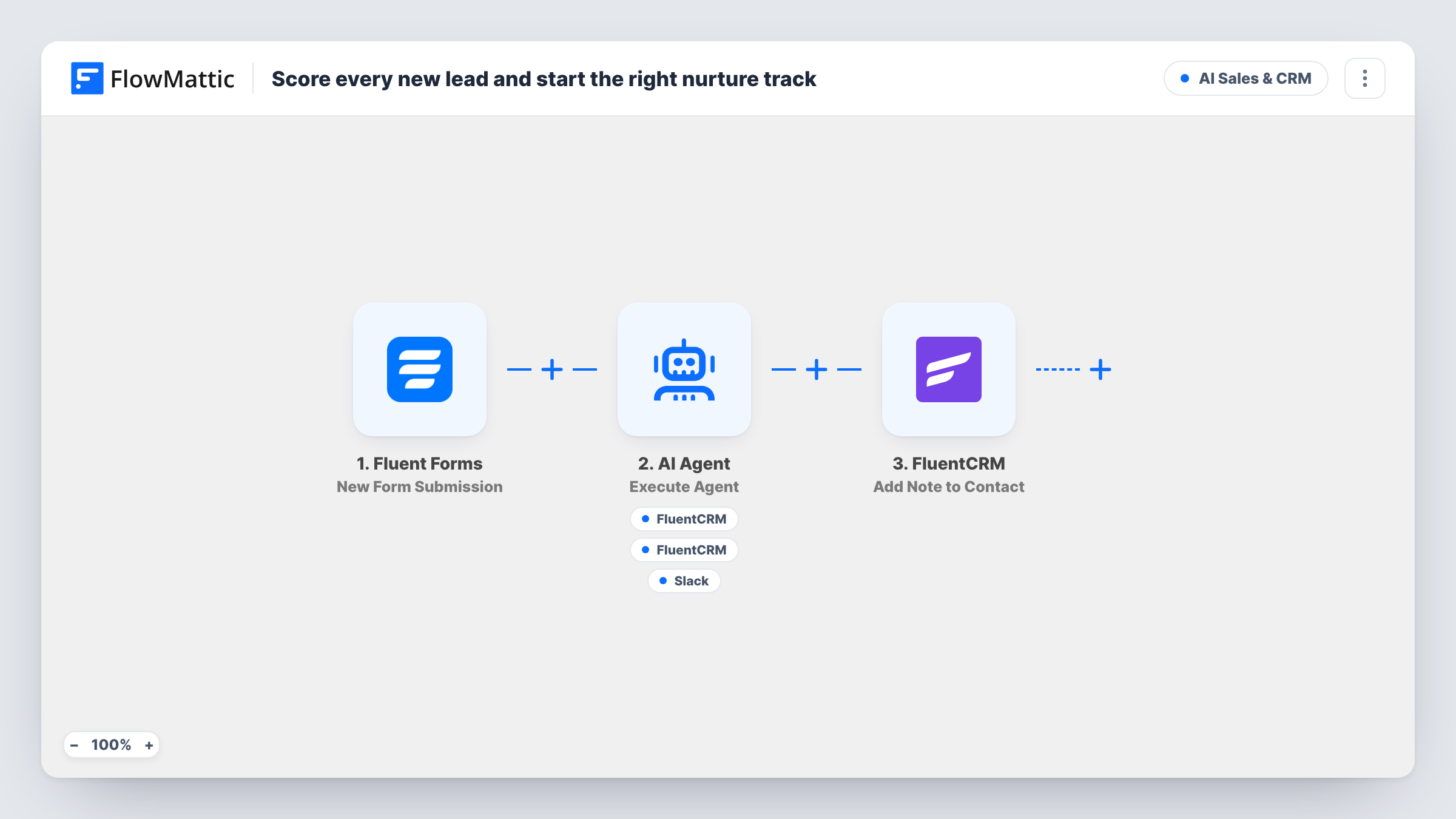
An AI Agent weighs each Fluent Forms lead for fit and buying intent, adds them to FluentCRM with a hot-lead or nurture tag, and can alert sales in Slack. The tag is what you hang each follow-up track on.
 Fluent Forms
 AI Agent
 FluentCRM
 Slack
Slack6 steps Setup ~12 min Used on 2.1k sites Revenue Ops Free to import
What this workflow does
Treating every form lead the same wastes effort in both directions. Serious buyers wait in a generic email sequence, and casual readers get a sales call they never wanted. This workflow puts each new lead into one of two groups as soon as the form is sent, so your follow-up can differ between them.
Each Fluent Forms submission hands the name, email, company and message to the AI Agent. It is told to judge fit and intent, create the contact, and apply either a hot-lead or a nurture tag based on its score. Its tools are Create or Update Contact and Add Tags to Contact in FluentCRM, and Send Channel Message in Slack for alerting sales about hot leads. The agent picks which tools to use on each run and writes the tag and Slack text itself.
The workflow does not enrol anyone in a sequence on its own. In FluentCRM you build one automation that starts when the hot-lead tag is applied and another for nurture, and the agent's tag decides which one runs. A final step adds a note titled Lead scored by AI to the contact, naming the company from the form. Task History keeps every run, including the agent's reply.
Software trial sign-up form
Leads who describe a team and a deadline get the hot-lead tag and a Slack alert for sales, while students exploring the product get the nurture tag and your longer email course.
Consultancy contact page
A message asking for a proposal starts your hot-lead automation in FluentCRM, and a message asking for general advice goes into the newsletter-style nurture track.
Agency services enquiry
Your team sees only the likely buyers in Slack, and every other enquiry still lands in FluentCRM with a tag, so nothing is lost while sales stays focused.
How this workflow runs
What happens at each step once the workflow is on, and what you need before you import it.
 Fluent Forms New Form Submission
Runs on each new Fluent Forms submission. Your form needs fields that map to name, email, company and message, because the agent's input and the note use those values.
- AI Agent Execute Agent
The AI Agent assesses fit and buying intent from the submission and decides between hot-lead and nurture. The template uses OpenAI GPT-4o, connected through your own AI provider account.
- FluentCRM Create or Update Contact
The agent's tool for adding the lead to FluentCRM by the submitted email, or updating that contact if it exists. The agent fills the first and last name from what the form gives it.
- FluentCRM Add Tags to Contact
The agent's tool for tagging the contact by email. Its instructions name the two tags, hot-lead and nurture, and the agent chooses which to apply after scoring.
- Slack Send Channel Message
The agent's tool for telling sales about a hot lead in Slack, with text the agent writes. Connect your workspace and use a test submission to confirm the channel it posts to.
- FluentCRM Add Note to Contact
Adds a note titled Lead scored by AI to the FluentCRM contact with the submitted email, saying the AI reviewed the inquiry from the company named in the form. It runs on every submission.
What you need
- FlowMatticCore
- Fluent Forms PluginPlugin
- AI ProviderAccount
- FluentCRM PluginPlugin
- Slack AccountAccount
After importing, map your own data. To keep the template universal, not every step is pre-filled. Open each step in the builder and connect your accounts and fields (channels, lists, sheets, recipients) before you switch the workflow on.
Make it yours
Changes worth making after you import it.
- Create the hot-lead and nurture tags in FluentCRM before you import, then build an automation for each that starts when its tag is applied.
- List what makes a good fit for you in the agent's instructions, such as company size, budget words or industries. The scoring then reflects your own sales criteria.
- Map the agent's reply into the note content so the FluentCRM note records why the lead was tagged, not only that it was reviewed.
Questions about this workflow
Does this enrol Fluent Forms leads in a FluentCRM email sequence?
Not directly. It applies a hot-lead or nurture tag. Set up a FluentCRM automation that starts on each tag, and the tag then decides which sequence the person gets.
Is a numeric lead score saved in FluentCRM?
No. The agent scores internally and the result is the tag it applies. If you want a number on the contact, ask the agent to include it in its reply and map that into the note.
Will sales get a Slack message for every submission?
The agent is told to alert sales on hot leads, and it decides when to call its Slack tool. Send a few test entries of different quality and check Task History to see how it behaves.
What if the lead already exists in FluentCRM?
Create or Update Contact matches by email, so the existing contact is updated and gets the new tag and note instead of a duplicate being made.
More AI Sales & CRM workflows
Other ready-to-import templates from the same category.




Import this workflow into your WordPress site
Download the JSON, import it from the Workflows screen and connect your accounts. Every run stays on your server, with no per-task fees.
30-day money-back guarantee Unlimited workflows and runs Self-hosted