

Qualify demo requests and put a calendar hold on the sales calendar
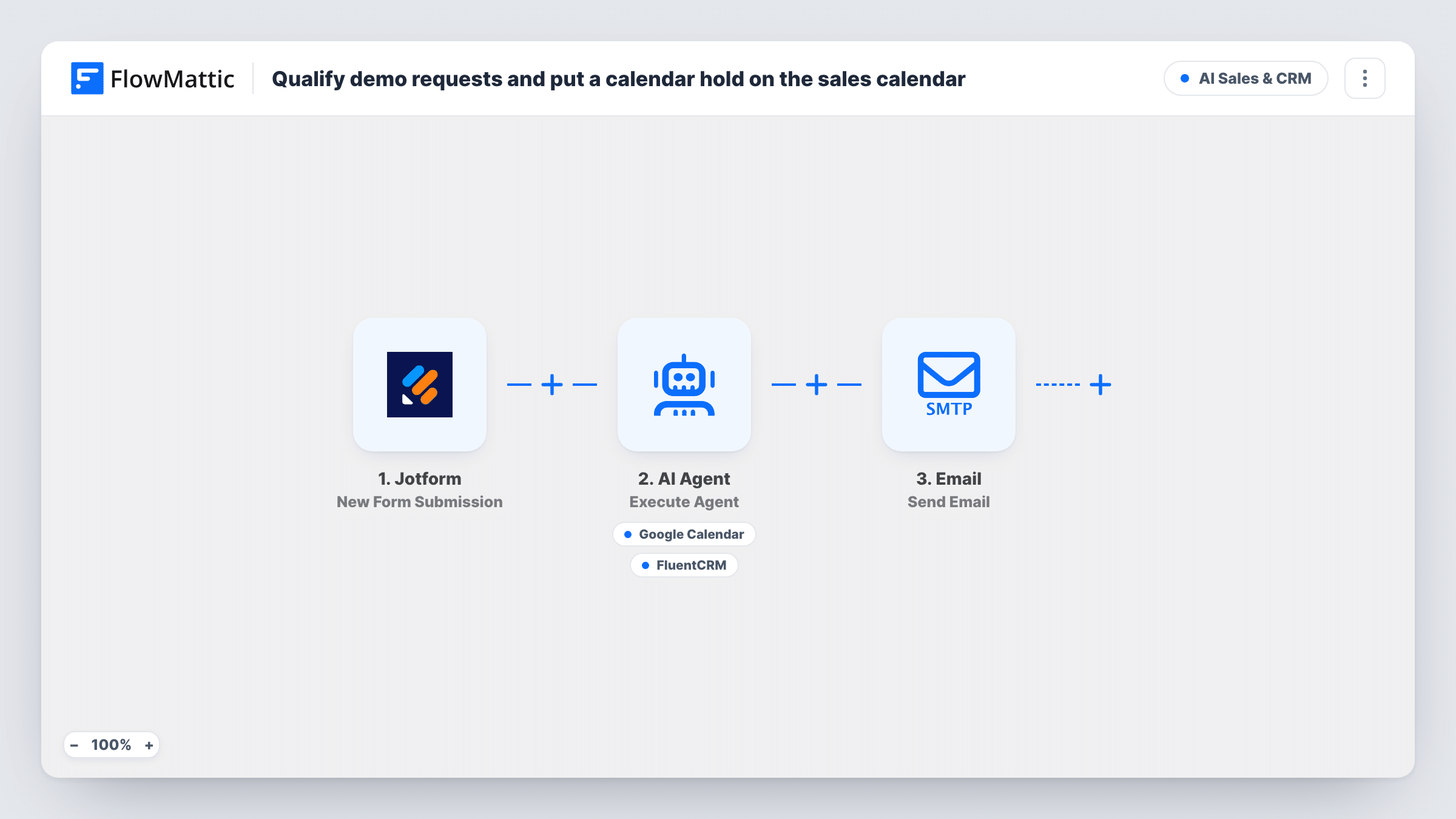
Each Jotform demo request is saved to FluentCRM, then an AI agent checks company size and use case and, for leads it judges qualified, puts a 30-minute hold on Google Calendar for tomorrow. Sales gets an email for every request.
 Jotform
 FluentCRM
 Date/Time Formatter
 AI Agent
 Google Calendar
 Email
Email7 steps Setup ~12 min Used on 3.2k sites Revenue Ops Free to import
What this workflow does
A demo request form brings in everyone: students, tiny teams and real buyers. Reps lose time sorting them before anyone books a call. This workflow stores every request, lets an AI agent apply your qualification rule, and blocks a provisional slot on the sales calendar for the ones that pass, so a rep can confirm instead of starting from scratch.
The Jotform trigger starts a run for each submission. A FluentCRM step creates the contact, or updates the one with that email, using the name and email answers. Two Date/Time Formatter steps then work out a proposed start 24 hours from now and an end 24.5 hours from now.
The AI Agent step, on OpenAI GPT-4o, reads the name, email, company size, use case and both times. Its rule: a lead qualifies with 50 or more people and a clear use case. For a qualified lead it is told to create a Google Calendar event titled Tentative demo plus the name at exactly those times, and for others to create nothing. The event is a normal calendar entry; tentative is only in its title.
Last, an email goes to the sales address in the template for every request, qualified or not, asking someone to review it. The hold lands at the same clock time as the submission, so a request sent late at night gets a late-night slot. Check the times in a test run before going live.
Keeping small leads off the reps' calendars
A B2B software company gets many demo requests from one-person businesses. Only requests the agent reads as 50+ people with a real use case get a slot held.
A slot waiting when the rep starts work
Qualified requests that arrive during the day already show as a held half-hour tomorrow, which the rep confirms or moves after a quick look.
Every request stored in FluentCRM
Leads the agent turns down are still kept as FluentCRM contacts, so marketing can send them self-serve material later.
How this workflow runs
What happens at each step once the workflow is on, and what you need before you import it.
 Jotform New Form Submission
Starts a run for each new Jotform submission. The template maps answers named name, email, company_size and use_case, so match those to the questions on your demo form.
- FluentCRM Create or Update Contact
Creates a FluentCRM contact from the form's email and name, or updates the existing contact with that email. Every request is stored here, whatever the agent decides later.
- Date/Time Formatter Modify Current Date
Takes the current date and time, adds 24 hours and outputs it as year-month-day hours:minutes:seconds. This is the proposed start of the demo hold.
- Date/Time Formatter Modify Current Date
Adds 1,470 minutes, which is 24.5 hours, to the current time in the same format. This is the proposed end, giving a 30-minute hold.
- AI Agent Execute Agent
An OpenAI GPT-4o agent reads the request. It qualifies a lead at 50+ people with a clear use case, creates a calendar hold only for qualified leads, and replies with one line saying qualified or not and why.
- Google Calendar Create Detailed Event
Agent tool that creates a Google Calendar event. Start and end come from the two date steps, and the agent writes the title. Choose the sales calendar after import.
 Email Send Email
Emails the sales address set in the template about every request, with the company size in the subject and the lead's email in the body. Replace [email protected] with your own address.
What you need
- FlowMatticCore
- Jotform AccountAccount
- FluentCRM PluginPlugin
- AI ProviderAccount
- Google Calendar AccountAccount
After importing, map your own data. To keep the template universal, not every step is pre-filled. Open each step in the builder and connect your accounts and fields (channels, lists, sheets, recipients) before you switch the workflow on.
Make it yours
Changes worth making after you import it.
- Map the agent's one-line verdict into the sales email body, so whoever reads it sees qualified or not and the reason without opening Task History.
- Make company size a dropdown on your Jotform form with ranges such as 1-10, 11-49 and 50+, which gives the agent an unambiguous answer to judge.
- Edit the qualification rule in the system prompt to match yours, such as a different headcount or required industries, and keep the instruction to create nothing for leads that don't qualify.
Questions about this workflow
Does every Jotform demo request get a calendar hold?
No. The agent is told to create the event only for leads that meet the rule in its prompt. It makes that call itself, so review a few runs and adjust the wording if it holds slots for leads you would turn down.
What time is the Google Calendar hold?
Twenty-four hours after the submission, for 30 minutes. The time isn't moved into working hours, so a request at 11pm becomes an 11pm hold. Change the Date/Time Formatter steps if you want another offset.
Is the lead invited to the calendar event?
No. The tool sets the title, start and end only, so the hold sits on your sales calendar. A rep confirms the time with the lead and sends the invitation.
What if the lead is already a FluentCRM contact?
The Create or Update Contact step matches on email, so an existing contact is updated with the form's name instead of being duplicated.
More AI Sales & CRM workflows
Other ready-to-import templates from the same category.






Import this workflow into your WordPress site
Download the JSON, import it from the Workflows screen and connect your accounts. Every run stays on your server, with no per-task fees.
30-day money-back guarantee Unlimited workflows and runs Self-hosted