

Re-engage inactive subscribers with a weekly sweep
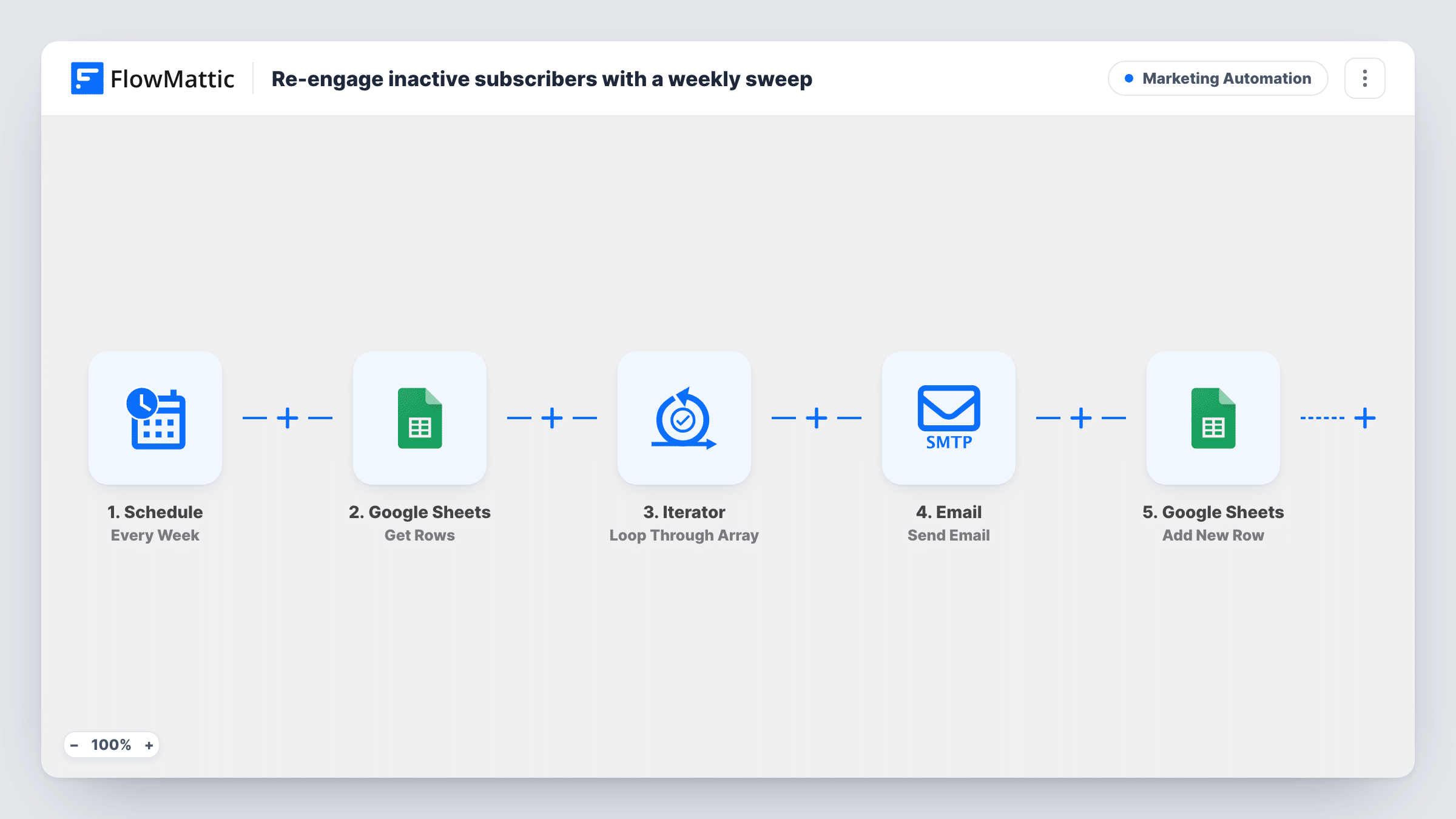
Once a week, this workflow reads your list of inactive subscribers from Google Sheets, emails each one a we-miss-you message by first name, and adds a row to a log sheet for every email sent.
 Schedule
 Google Sheets
 Iterator
 Email
5 steps Setup ~8 min Used on 458 sites Marketing Free to import
What this workflow does
Subscribers who stop opening your emails drag down your list, but a direct, personal note can still bring some of them back. Sending that note by hand each week is tedious, and keeping track of who was already contacted is worse. This workflow sends it on a timer and writes down every send.
Each week the Schedule trigger starts a run. The first Google Sheets step gets rows from the sheet that holds your inactive subscribers, such as an export from your email tool. An Iterator loops through them one at a time. For each subscriber, the Email step sends a message titled We miss you with their first name, saying here is what is new since their last visit. The second Google Sheets step then adds a row to the spreadsheet you pick, giving you a record of each send.
The workflow does not judge who is inactive, and it does not remove anyone from the source sheet. Whoever is listed when it runs gets the email, every week they stay listed. Send the log rows to a different sheet or tab from the source list, or the workflow will read its own log as subscribers on the next run.
Newsletter list clean-up
You export subscribers with no opens in 90 days into the sheet. Each gets one personal nudge, and the log shows who was contacted before you prune the list.
Online store with a lapsed-customer list
A sheet of customers who have not ordered in months gets a weekly we-miss-you email, with a record kept of each send.
Blog or podcast audience
Readers who stopped visiting are listed in a sheet you update. They get a short note about new posts, and the log helps you see whether they come back.
How this workflow runs
What happens at each step once the workflow is on, and what you need before you import it.
 Schedule Every Week
Starts the workflow on a weekly cycle, so the sweep through your inactive list runs on the same day each week.
- Google Sheets Get Rows
Gets rows from the Google Sheets spreadsheet holding your inactive subscribers. The rows are passed to the Iterator as a list.
- Iterator Loop Through Array
Loops through the inactive subscribers one at a time. The Email and log steps after it run once for each row.
 Email Send Email
Emails the subscriber at the row's email address with the subject We miss you and their first name. Add your actual news or links to the short body.
- Google Sheets Add New Row
Adds a row to the Google Sheets spreadsheet you choose for each email sent. Map the subscriber's details into your log columns after a test run.
What you need
- FlowMatticCore
- Google Sheets AccountAccount
After importing, map your own data. To keep the template universal, not every step is pre-filled. Open each step in the builder and connect your accounts and fields (channels, lists, sheets, recipients) before you switch the workflow on.
Make it yours
Changes worth making after you import it.
- Map the subscriber's email into a log column, then compare the log with your source list each week to see who has been nudged more than once.
- Add a Filter after the Iterator that skips rows marked as unsubscribed in a status column, so people who opted out are never emailed.
- Replace the generic body with a link to your latest post or offer. A specific reason to return tends to work better than a plain reminder.
Questions about this workflow
Who counts as an inactive subscriber?
Whoever is in the source sheet. The workflow does not check opens or logins. You fill the sheet, for example with an export of subscribers who have not engaged recently.
Can the log go in the same Google Sheet as the inactive list?
Use a separate sheet or tab. If log rows land where the Get Rows step reads, they will be treated as subscribers on the next run.
Will someone on the list be emailed every week?
Yes, for every run where their row is still in the source sheet. Take people off the list once they re-engage or after one or two nudges.
Does this unsubscribe people who do not respond?
No. It only sends the email and logs it. Remove or unsubscribe non-responders in your email tool when you decide to.
More Marketing Automation workflows
Other ready-to-import templates from the same category.









Import this workflow into your WordPress site
Download the JSON, import it from the Workflows screen and connect your accounts. Every run stays on your server, with no per-task fees.
30-day money-back guarantee Unlimited workflows and runs Self-hosted