

Onboard members differently by plan tier
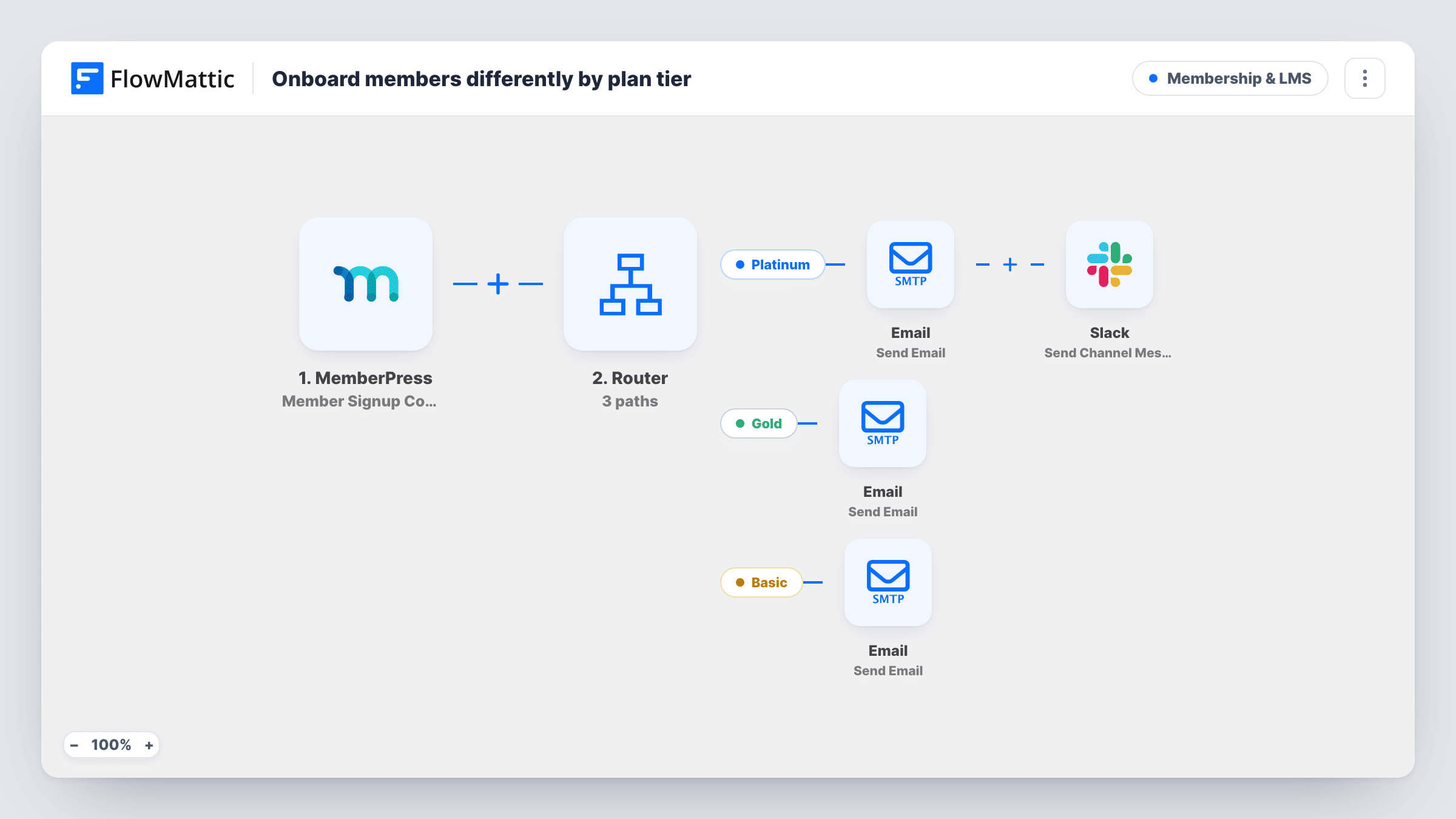
When a MemberPress signup completes, a Router reads the membership name and sends Platinum, Gold and Basic members their own welcome email, with a Slack alert for Platinum.
 MemberPress
 Router
 Email
Email
 Slack
Slack6 steps Setup ~12 min Used on 1.7k sites Community Free to import
What this workflow does
Members on your top tier pay for more attention, and they notice when their welcome reads the same as everyone else's. Entry-level members, on the other hand, mostly want to get started on their own. This workflow gives each tier its own first email and tells your team when a top-tier member joins.
The MemberPress trigger runs when a new member completes signup and their payment is accepted. A Router then checks the membership value on three routes: Platinum, Gold and Basic. Each route matches when the membership name contains that word, ignoring upper and lower case, so a membership called Gold Annual still takes the Gold route.
On the Platinum route the member gets an email titled Your concierge onboarding, welcoming them by first name and saying a specialist will reach out, and a Slack message asks the team to assign a concierge. Gold members get Welcome to Gold with a line about making the most of it. Basic members get a short email pointing to a quick-start guide; add the guide or a link to it before you go live.
A membership whose name contains none of the three words, or two of them, won't route as you'd expect. Check your membership names against the conditions and run a test signup for each tier.
Concierge setup for premium members
A business coaching site alerts its client success channel in Slack for every Platinum signup, so a coach books a kickoff call.
Tier-specific welcome for a course library
An online academy sends Gold members a note about their extra courses while Basic members get a self-serve getting-started email.
Community with paid levels
A private community sends each new member a welcome that matches what they bought, without staff checking the MemberPress dashboard.
How this workflow runs
What happens at each step once the workflow is on, and what you need before you import it.
 MemberPress Member Signup Completed
Runs when a new member completes signup in MemberPress and the payment is accepted. The member's email, first name and membership are passed on to the Router and emails.
- Router 3 paths
Sends the signup down the Platinum, Gold or Basic route when the membership name contains that word, ignoring case. A name containing none of them takes no route.
 Email Send Email
On the Platinum route, emails the member with the subject Your concierge onboarding, greeting them by first name and saying a specialist will reach out.
- Slack Send Channel Message
On the Platinum route, posts a Slack channel message naming the new Platinum member and asking the team to assign a concierge. Connect Slack and pick the channel after import.
- Email Send Email
On the Gold route, emails the member with the subject Welcome to Gold and a line about how to make the most of the membership. Add your own Gold details to the body.
- Email Send Email
On the Basic route, emails the member with the subject Welcome, start here, saying their quick-start guide is inside. Add the guide or its link to the body before going live.
What you need
- FlowMatticCore
- MemberPress PluginPlugin
- Slack AccountAccount
After importing, map your own data. To keep the template universal, not every step is pre-filled. Open each step in the builder and connect your accounts and fields (channels, lists, sheets, recipients) before you switch the workflow on.
Make it yours
Changes worth making after you import it.
- If your MemberPress memberships use other names, such as Pro or Starter, change the three Router conditions to words that appear in those names and nowhere else.
- Map the member's email into the Slack message on the Platinum route, so whoever takes the concierge task can contact them right away.
- Write the Basic quick-start guide into the email body, or link to a members-only page, since the imported text only says the guide is inside.
- Avoid membership names that contain two tier words, like Gold to Platinum Upgrade, because every route whose word appears would run.
Questions about this workflow
What if my MemberPress membership names don't include Platinum, Gold or Basic?
Then no route matches and nobody gets an email. Edit each route's condition to a word from your own membership names, and test a signup for each one.
Do members still get MemberPress's own welcome emails?
This workflow doesn't change MemberPress settings. Any emails MemberPress sends on signup still go out, so review them to avoid two similar welcomes.
Does a renewal send the tier welcome again?
The trigger is described as a new member completing signup with payment accepted. Run a test renewal and check Task History to see whether your setup starts a run for it.
Is the Platinum Slack alert sent to a private channel?
Send Channel Message posts to a regular channel you choose. For a private channel, swap in the Send Private Channel Message action that FlowMattic's Slack integration also has.
More Membership & LMS workflows
Other ready-to-import templates from the same category.




Import this workflow into your WordPress site
Download the JSON, import it from the Workflows screen and connect your accounts. Every run stays on your server, with no per-task fees.
30-day money-back guarantee Unlimited workflows and runs Self-hosted