

Trigger enterprise finance steps for large payments
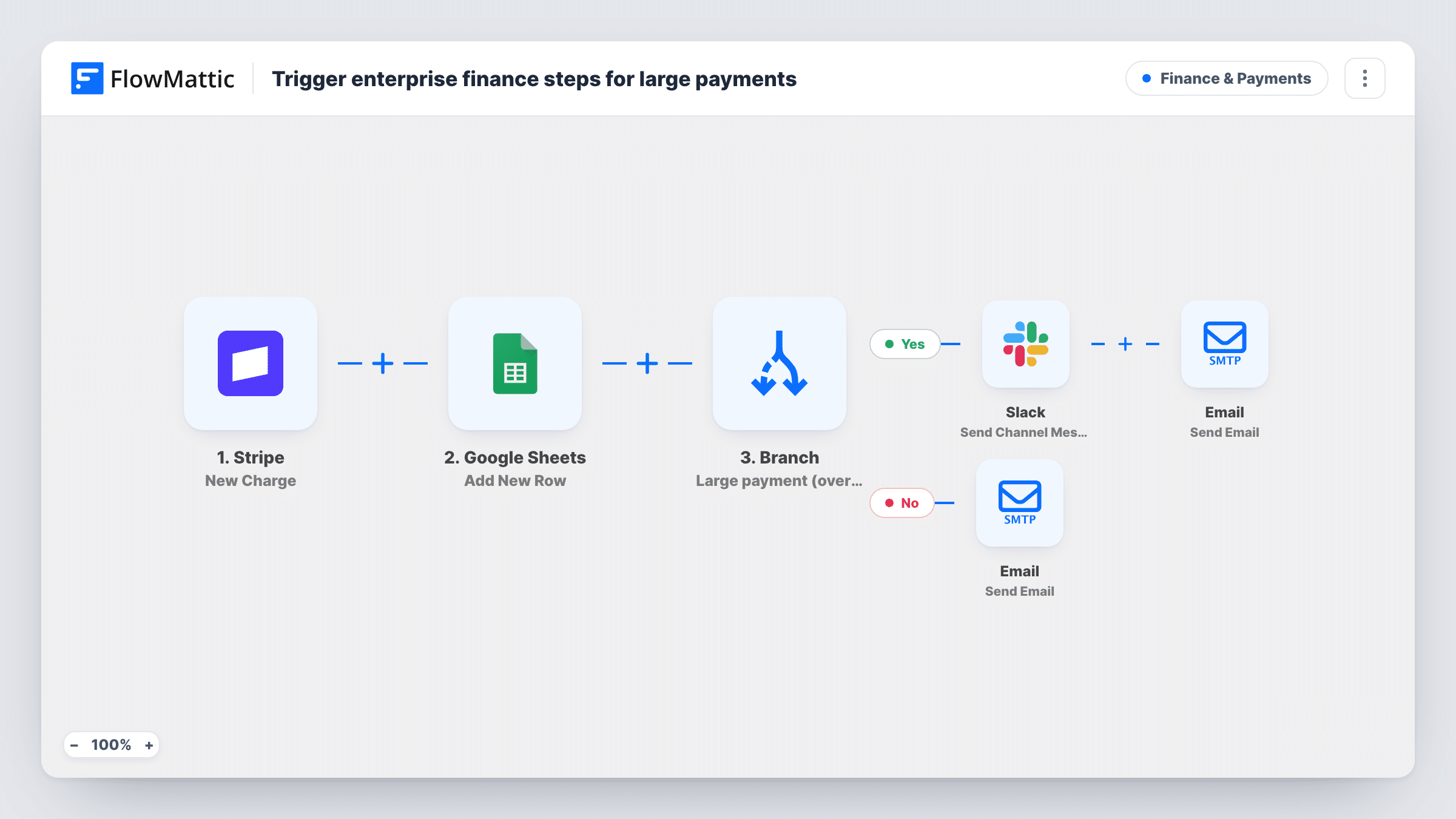
Every successful Stripe charge is logged in Google Sheets. Charges over 100000 in Stripe’s smallest unit, which is $1000 in USD, alert finance in Slack and by email, and smaller ones get a confirmation email to the customer.
 Stripe
 Google Sheets
 Branch
 Slack
Slack
 Email
Email6 steps Setup ~12 min Used on 2.4k sites Finance Free to import
What this workflow does
An enterprise payment often needs more than a receipt. Finance may have to issue a formal invoice, check the contract or thank the account owner. Small payments just need a confirmation. This workflow records every charge and then sends large ones down a separate path for your finance team.
The Stripe New Charge trigger runs when a charge succeeds, with the amount, currency, customer email and description. First, a Google Sheets step adds a row for the payment. A Branch then checks whether the amount is greater than 100000. Stripe sends amounts in the smallest currency unit, so for USD that means more than $1000.
On the Yes path, Slack posts Large payment with the currency, amount and customer email, and an email titled Enterprise payment received asks [email protected] to issue a formal invoice. On the No path, the customer receives an email confirming their payment and its amount. Large payers do not get that confirmation from this workflow, so add one to the Yes path if they should.
Software company selling annual plans
Annual enterprise payments reach the finance lead in Slack, with an email reminder to send the formal invoice the customer's procurement team expects.
Agency taking project deposits
Large deposits are flagged so someone checks the signed proposal, while small add-on payments just get a confirmation email.
Training provider with group bookings
Company bookings over the threshold go to finance for invoicing, and individual seats are confirmed to the buyer automatically.
How this workflow runs
What happens at each step once the workflow is on, and what you need before you import it.
 Stripe New Charge
Starts each time a charge succeeds in the connected Stripe account. The sample includes amount, currency, customer email and description.
- Google Sheets Add New Row
Logs every charge to Google Sheets before the Branch, so large and small payments both appear. No columns are mapped as imported; map the Stripe values you want.
- Branch Large payment (over $1000)?
Checks whether the amount is greater than 100000. In USD that is $1000, because Stripe counts in cents. Larger charges follow the Yes path, others the No path.
- Slack Send Channel Message
On the Yes path, posts Large payment with the currency, amount and customer email to Slack. Connect Slack and run a test to confirm it reaches your finance lead's channel.
 Email Send Email
On the Yes path, emails [email protected], a placeholder, with the subject Enterprise payment received, asking them to issue a formal invoice for the customer and description.
- Email Send Email
On the No path, emails the customer with the subject Payment received - thank you, confirming the currency and amount. The amount shows in cents as Stripe sends it, so reword it before customers see it.
What you need
- FlowMatticCore
- Stripe AccountAccount
- Google Sheets AccountAccount
- Slack AccountAccount
After importing, map your own data. To keep the template universal, not every step is pre-filled. Open each step in the builder and connect your accounts and fields (channels, lists, sheets, recipients) before you switch the workflow on.
Make it yours
Changes worth making after you import it.
- Set the threshold in your currency's smallest unit. For a 5000 euro cut-off, use 500000. Some currencies, such as the Japanese yen, have no minor unit, so test with a real charge.
- Add a confirmation email to the Yes path as well, so enterprise customers also hear that their payment arrived while finance prepares the invoice.
- Amounts in the messages appear as Stripe sends them, for example 250000 for $2,500. Word the Slack and email text so readers know the figure is in cents.
Questions about this workflow
Why is the Stripe threshold 100000 and not 1000?
Stripe sends amounts in the smallest unit of the currency, such as cents. 100000 cents is $1000. Adjust the value for your currency and cut-off.
Do enterprise customers get a payment confirmation?
Not from this workflow as imported. The confirmation email is on the No path only. Stripe's own receipts, if you have them turned on, are separate.
Does this create the formal invoice?
No. It emails your finance address asking someone to issue one. The invoice itself is made in whatever tool your finance team uses.
Are small payments logged too?
Yes. The Google Sheets step runs before the Branch, so every successful charge gets a row whichever path it then takes.
More Finance & Payments workflows
Other ready-to-import templates from the same category.





Import this workflow into your WordPress site
Download the JSON, import it from the Workflows screen and connect your accounts. Every run stays on your server, with no per-task fees.
30-day money-back guarantee Unlimited workflows and runs Self-hosted