

Auto-escalate tickets that are still open after an SLA delay
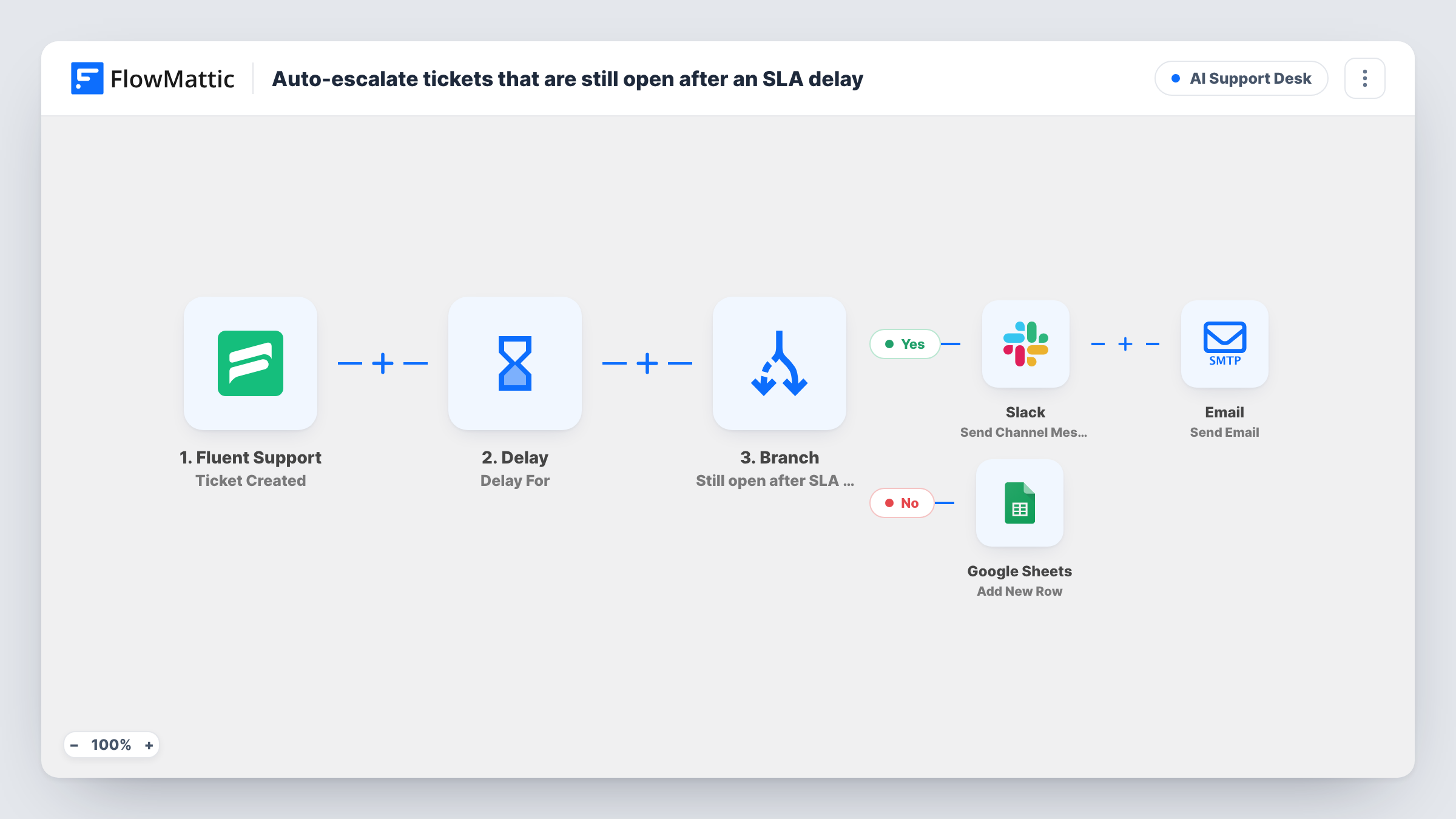
Four hours after a Fluent Support ticket is created, FlowMattic checks it again. Closed tickets are logged to Google Sheets; tickets still not closed are escalated by Slack and email.
 Fluent Support
 Delay
Delay
 Branch
 Google Sheets
 Slack
Slack
 Email
Email7 steps Setup ~12 min Used on 3.3k sites Agentic Support Free to import
What this workflow does
Support promises like a four-hour resolution are easy to make and hard to watch. Agents get busy, and nobody notices a ticket slipping until the customer writes again. This workflow checks every new ticket after a set wait and raises the alarm when one isn't closed yet.
The Fluent Support trigger starts a run for each new ticket. A Delay then holds the run for 4 hours. After the wait, Get Specific Ticket fetches the same ticket by its ID, so the workflow sees its current status rather than the status at creation.
A Branch labelled Ticket closed within the SLA window? checks whether that status is exactly closed. If it is, a Google Sheets step adds a row to a log; that step ships unmapped, so choose the sheet and map the ticket fields after import. If the status is anything else, such as new or active, a Slack message warns of an SLA breach risk with the ticket number and subject, and an email goes to [email protected] with the same details.
Replace the placeholder manager address and choose the Slack channel before you turn it on. Change the 4 hours in the Delay step to match your own response target.
Four-hour resolution target
A software company promises paying customers a fix or answer within four hours, and the support lead hears about any ticket still not closed at that point.
Compliance log of closed tickets
A managed services provider keeps a Google Sheet of tickets closed within the window to show clients at monthly reviews.
Weekend coverage check
A small shop with one agent on weekends gets an email to the owner when a ticket sits open past the wait, so it can be picked up from home.
How this workflow runs
What happens at each step once the workflow is on, and what you need before you import it.
 Fluent Support Ticket Created
Fires when a new ticket is created in Fluent Support by a customer or an agent. The ticket ID and subject are kept for the later steps.
- Delay Delay For
Waits 4 hours before the next step runs. Set this to your own response or resolution target.
- Fluent Support Get Specific Ticket
Fetches the ticket again by the ID from the trigger, so the Branch can read its status as it is after the wait.
- Branch Ticket closed within the SLA window?
Checks whether the fetched ticket's status is exactly closed. Closed tickets take the yes path to the log; any other status takes the no path to the escalation steps.
- Google Sheets Add New Row
On the yes path, adds a row to your Google Sheets log for the closed ticket. The step ships unmapped: pick the sheet and map the ticket ID, subject and any other fields you track.
- Slack Send Channel Message
On the no path, posts SLA breach risk with the ticket number, still open, and its subject to a Slack channel. Connect Slack and pick the channel your leads watch.
 Email Send Email
On the no path, emails [email protected] with the subject SLA escalation and the ticket number, and says the ticket needs attention. Put your manager's real address in its place.
What you need
- FlowMatticCore
- Fluent Support PluginPlugin
- Google Sheets AccountAccount
- Slack AccountAccount
After importing, map your own data. To keep the template universal, not every step is pre-filled. Open each step in the builder and connect your accounts and fields (channels, lists, sheets, recipients) before you switch the workflow on.
Make it yours
Changes worth making after you import it.
- Match the Delay to your real target, for example 1 hour for chat-like support or 24 hours for standard email support.
- Map the ticket's assigned agent into the Slack message, if Get Specific Ticket returns it, so the escalation names who owns the ticket.
- Send a test ticket and leave it open, then a second one you close quickly, and check Task History after the wait to see each path run.
Questions about this workflow
Does the escalation fire if a Fluent Support ticket is closed after the delay?
The check happens once, when the Delay ends. A ticket closed after that check has already been escalated, and nothing in the workflow looks at it again.
Which ticket statuses count as still open for this SLA check?
Any status other than closed, such as new or active. Only a status that is exactly closed sends the ticket to the Google Sheets log.
Can I use a different SLA window for urgent Fluent Support tickets?
Not as imported, because every ticket waits the same 4 hours. Put a Router between the trigger and the Delay step, and give each priority route its own Delay, ticket fetch, Branch, log and escalation steps.
More AI Support Desk workflows
Other ready-to-import templates from the same category.


Import this workflow into your WordPress site
Download the JSON, import it from the Workflows screen and connect your accounts. Every run stays on your server, with no per-task fees.
30-day money-back guarantee Unlimited workflows and runs Self-hosted