

Give VIP subscribers early access, everyone else the standard offer
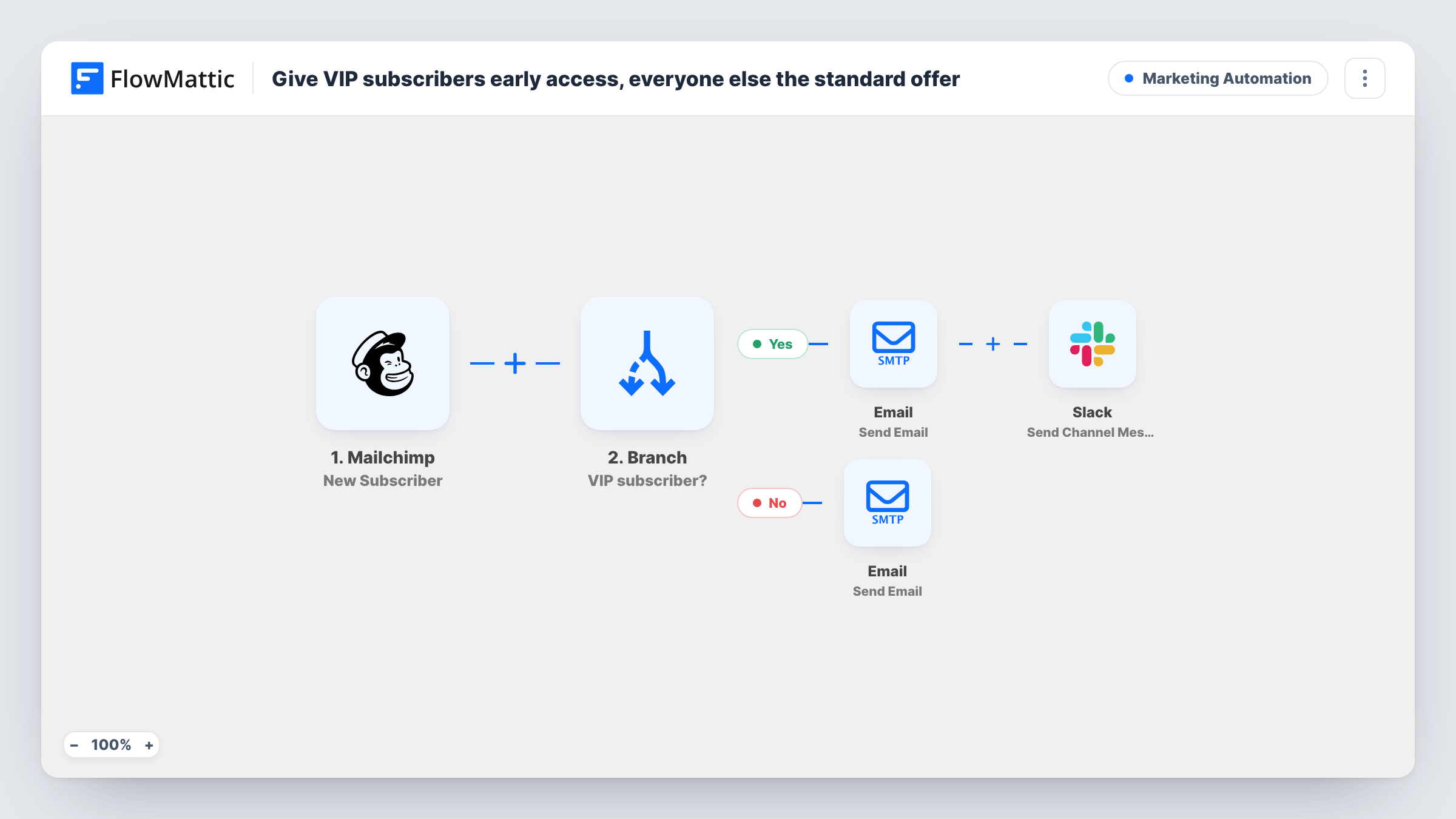
When someone joins your Mailchimp audience, a Branch checks their VIP field. VIPs get an early-access email and your team hears about them in Slack; everyone else gets a standard welcome email.
 Mailchimp
 Branch
 Email
Email
 Slack
Slack5 steps Setup ~8 min Used on 3.0k sites Marketing Free to import
What this workflow does
Not every new subscriber arrives the same way. Some come through a VIP list, a past purchase or a partner invite, and treating them like everyone else wastes that goodwill. This workflow splits new Mailchimp subscribers in two as they arrive, so VIPs hear about early access straight away.
The Mailchimp New Subscriber trigger passes on the subscriber's email, first name and a field named vip. A Branch checks whether that vip value contains yes. On the Yes path, the subscriber receives an email saying their VIP early access is here, and a Slack channel message names the new VIP by email. On the No path, the subscriber receives a short welcome that thanks them for subscribing.
The VIP check depends on your audience carrying a field with that value. If new subscribers arrive without it, the Branch sends them all down the No path. Both emails go out through the Email step in FlowMattic, not through Mailchimp campaigns, and the template text is a starting point: add your actual early-access link or offer before you switch it on.
Product launch waitlist
Past customers sign up through a form that sets VIP to yes. They get an early-access email, while the public waitlist gets the standard welcome.
Membership tiers on one list
One Mailchimp audience holds both paid and free members. Paid members flagged as VIP are greeted differently, and the team is told in Slack.
Event pre-sale
Sponsors and past attendees are tagged VIP when they subscribe, so they hear about pre-sale tickets before the general announcement.
How this workflow runs
What happens at each step once the workflow is on, and what you need before you import it.
 Mailchimp New Subscriber
Fires when a new subscriber joins your Mailchimp audience, passing their email, first name and vip value to the Branch and the emails.
- Branch Branch
Tests whether the subscriber's vip value contains yes. If it does, the Yes path runs. Any other value, including an empty one, sends the subscriber down the No path.
 Email Send Email
Yes path: emails the subscriber that their VIP early access is here, greeting them by first name. Add your early-access link to the body before going live.
- Slack Send Channel Message
Yes path: posts a message to your chosen Slack channel with the new VIP subscriber's email address, so the team can follow up personally.
- Email Send Email
No path: emails a short welcome that thanks the subscriber by first name. Edit it to point new subscribers to your standard offer.
What you need
- FlowMatticCore
- Mailchimp AccountAccount
- Slack AccountAccount
After importing, map your own data. To keep the template universal, not every step is pre-filled. Open each step in the builder and connect your accounts and fields (channels, lists, sheets, recipients) before you switch the workflow on.
Make it yours
Changes worth making after you import it.
- Create a merge field in your Mailchimp audience for the VIP flag, then subscribe a test VIP after import. Check the exact field name in the trigger data and update the Branch if it differs.
- Add a Slack step on the No path as well, posting to a quieter channel, if your team wants to see standard sign-ups alongside the VIP alerts.
- Insert a Delay before the No-path email if you want VIPs to get a head start of a day or two before the standard welcome reaches everyone else.
Questions about this workflow
Where does the Mailchimp VIP flag come from?
From a field on the subscriber named vip. The template expects it to contain yes for VIPs. Set it with a merge field, or from the form or import that adds people to the list.
What happens to a new Mailchimp subscriber with no VIP value?
The Branch condition is not met, so they take the No path and get the standard welcome email. Nothing is posted to Slack for them.
Are these emails sent by Mailchimp?
No. Both go through the Email step in FlowMattic, using the SMTP connection you set up. Your Mailchimp automations keep running as they are.
Does the workflow give VIPs a discount or access link?
No. The VIP email text promises early access but contains no link or code. Add your own before switching the workflow on.
More Marketing Automation workflows
Other ready-to-import templates from the same category.






Import this workflow into your WordPress site
Download the JSON, import it from the Workflows screen and connect your accounts. Every run stays on your server, with no per-task fees.
30-day money-back guarantee Unlimited workflows and runs Self-hosted