

Write an event recap and thank-you note from webinar feedback
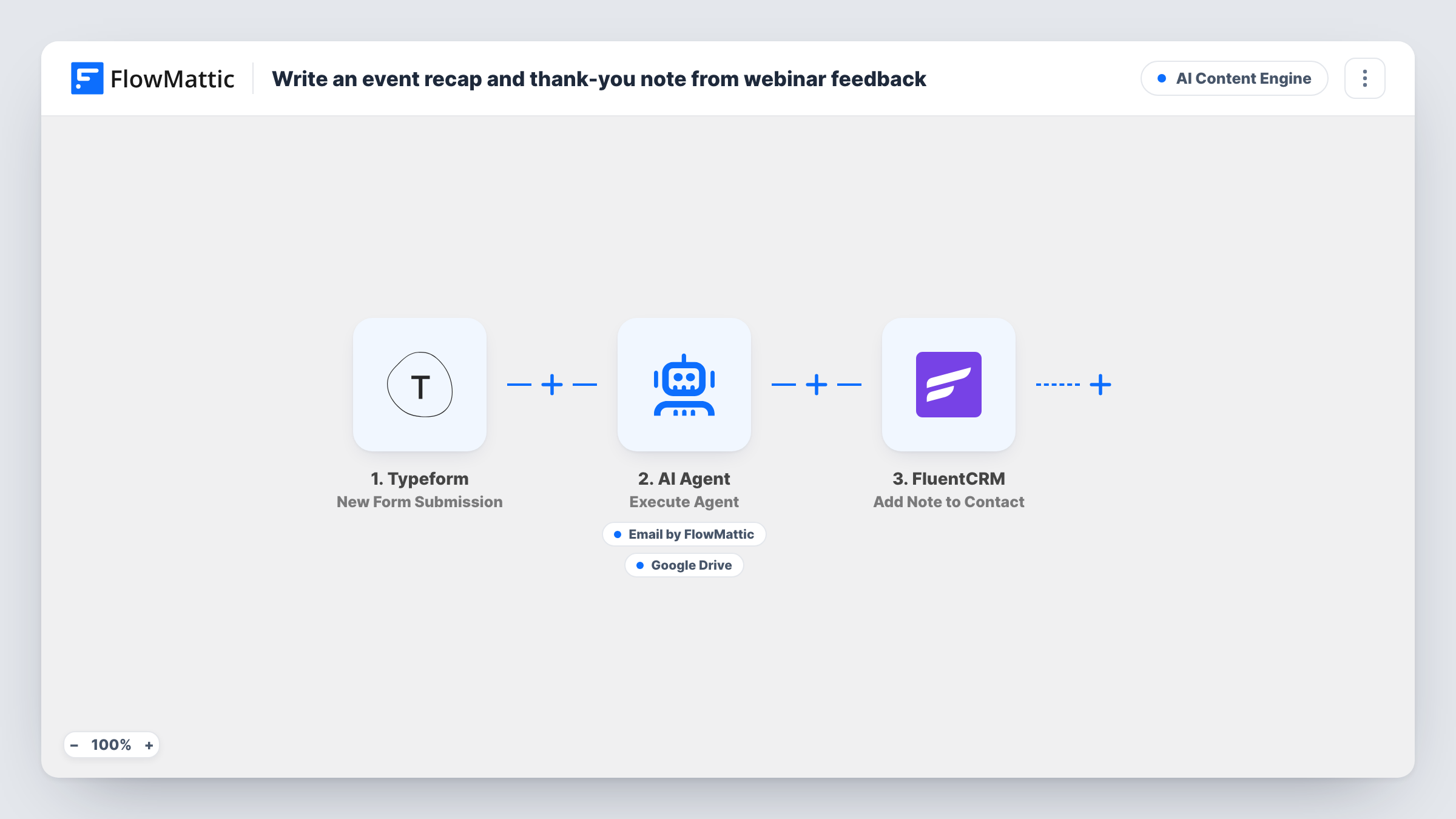
When an attendee fills in your Typeform webinar feedback form, an AI Agent writes them a personal thank-you and a short recap paragraph it can email and save to Google Drive, and FluentCRM keeps their feedback as a note.
 Typeform
 AI Agent
 Email
Email
 Google Drive
 FluentCRM
5 steps Setup ~8 min Used on 1.5k sites Content Ops Free to import
What this workflow does
Feedback forms after a webinar usually end in a spreadsheet nobody reads, and attendees hear nothing back. A reply that mentions what they actually said shows them someone read it. This workflow answers each response with a note written around that attendee's own words.
Every new Typeform response passes the attendee's name, written feedback and rating to the AI Agent. Its instructions are to act as an events writer and produce two pieces: a warm recap paragraph and a personalised thank-you note. It has two tools for them. Send Email goes to the address given in the form, with a subject and body the agent writes. Create File From Text in Google Drive saves a file whose name and contents the agent chooses. The agent decides which tools to call on each run.
After the agent, a fixed step adds a note titled Webinar feedback to the FluentCRM contact with that email, quoting what the person wrote. Every response is handled on its own, so each recap is based on one attendee's feedback, not on all of them together. Task History shows what the agent wrote on each run.
Monthly product webinar for customers
Each customer who rates the session gets a thank-you that picks up on their comment, and their feedback sits on their FluentCRM record for your account team.
Free training session for leads
Attendees who leave feedback get a personal follow-up straight away, while each recap paragraph lands in Google Drive as raw material for your own event write-up.
Online workshop with a paid ticket
Ticket holders who say what they want next get a reply that acknowledges it, and the note in FluentCRM helps you plan who to invite to the follow-up workshop.
How this workflow runs
What happens at each step once the workflow is on, and what you need before you import it.
 Typeform New Form Submission
Runs on each new response to your Typeform feedback form. Your form needs answers that map to name, email, message and rating, since the later steps use those four values.
- AI Agent Execute Agent
The AI Agent reads the attendee's name, feedback and rating, then writes a recap paragraph and a personal thank-you. OpenAI GPT-4o is the model the template uses, through your own AI provider connection.
 Email Send Email
The agent's tool for the thank-you. It sends to the email address from the Typeform response, with a subject and body the agent writes, using your FlowMattic email settings.
- Google Drive Create File From Text
The agent's tool for keeping the recap. It creates a file in your Google Drive from text, with a file name and contents the agent picks. Connect your Google account and check with a test run where it is saved.
- FluentCRM Add Note to Contact
Adds a note titled Webinar feedback to the FluentCRM contact with the attendee's email, holding the text they wrote in the form. It runs after the agent step on every response.
What you need
- FlowMatticCore
- Typeform AccountAccount
- AI ProviderAccount
- Google Drive AccountAccount
- FluentCRM PluginPlugin
After importing, map your own data. To keep the template universal, not every step is pre-filled. Open each step in the builder and connect your accounts and fields (channels, lists, sheets, recipients) before you switch the workflow on.
Make it yours
Changes worth making after you import it.
- Add a Filter after the trigger that continues only when the rating is at or above a value you pick, if you want low scores answered by a person instead of the agent.
- Give the agent the webinar's title and two or three key points in its instructions. The thank-you notes can then refer to the session itself, not only to the feedback.
- Put a Delay before the agent so the thank-you arrives an hour after the form is sent. It reads less like an instant automated reply.
Questions about this workflow
Does the AI Agent combine all Typeform responses into one webinar recap?
No. Each response starts its own run, so the agent writes one recap paragraph per attendee, based on that person's feedback and rating. Pull the saved files together yourself if you want one write-up for the event.
Can I read the thank-you email before the attendee gets it?
Not as imported. The agent sends it through its email tool during the run. Test with your own address in the form first, and read what arrives before sharing the live form.
Does the attendee need to be a FluentCRM contact already?
The note step looks up the contact by the email from the form. If your webinar sign-ups do not reach FluentCRM, submit a test with a new address and check Task History to see how that step behaves.
Where in Google Drive do the recap files go?
The template sets only the file name and contents, both written by the agent. Send one test response, then look in your Drive to see where the new file appears.
More AI Content Engine workflows
Other ready-to-import templates from the same category.







Import this workflow into your WordPress site
Download the JSON, import it from the Workflows screen and connect your accounts. Every run stays on your server, with no per-task fees.
30-day money-back guarantee Unlimited workflows and runs Self-hosted