

Thank customers when a subscription becomes active and start recovery when it goes on hold
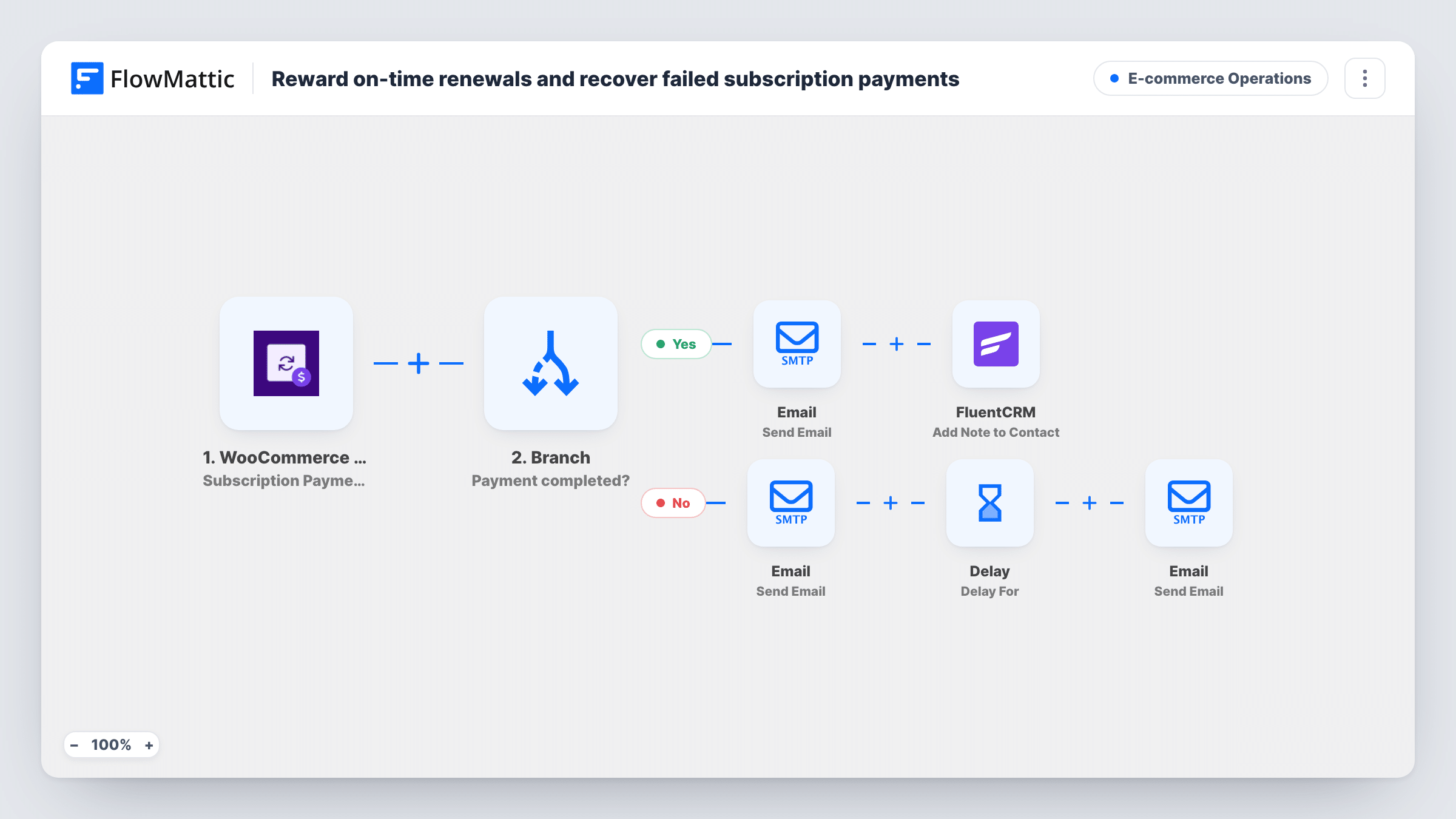
When a WooCommerce subscription turns active, the customer gets a thank-you email and their FluentCRM contact gets a note. When one goes on hold, they get a payment email and a reminder two days later.
 WooCommerce Subscriptions
 Router
 Email
Email
 FluentCRM
 Delay
Delay7 steps Setup ~12 min Used on 1.1k sites Store Ops Free to import
What this workflow does
Subscription status changes are the moments a store most wants to talk to its customers: when a renewal goes through, and when one stalls because a payment didn't. This workflow listens for both and responds to each, so a held subscription gets a nudge to update the card without anyone watching the subscriptions list.
The WooCommerce Subscriptions trigger fires whenever a subscription's status changes. A Router then checks the new status. When it is exactly active, the customer gets an email thanking them for renewing, and a note titled Renewal is added to their FluentCRM contact. When it is exactly on-hold, the customer gets an email asking them to update their payment method, the run waits two days, and a reminder goes out.
Any other status, such as cancelled or expired, matches neither route and nothing happens. Note that a brand-new subscription moving to active also takes the first route, and the email as written thanks them for renewing, so reword it if that matters to you.
Two things to know before turning it on. The FluentCRM step adds the note only to a contact that already exists with the customer's email. And the reminder goes out after two days even if the customer has fixed their payment by then, because nothing checks the status again.
Recovering renewals that failed to charge
A coffee subscription store puts subscriptions on hold when a card is declined. The customer gets a request to update their payment method straight away and a second one two days later.
Renewal history on the CRM contact
A membership site that already syncs customers into FluentCRM adds a Renewal note to the contact each time a subscription becomes active, so support can see it in one place.
Thanking customers who come back
When a held subscription is paid and returns to active, the customer receives a short thank-you rather than silence.
How this workflow runs
What happens at each step once the workflow is on, and what you need before you import it.
 WooCommerce Subscriptions Subscription Status Updated
Fires whenever a WooCommerce subscription changes status, whatever the old and new status are. The new status and the customer's email are passed on for the Router and the later steps.
- Router 2 paths
Checks the new status. The Active route runs when it exactly matches active, and the On hold route when it exactly matches on-hold. These can't both match, and any other status takes neither route.
 Email Send Email
On the Active route, emails the customer a thank-you saying their subscription is active for another cycle. The subject thanks them for renewing, so edit it if first-time subscribers should read something else.
- FluentCRM Add Note to Contact
Still on the Active route, adds a note titled Renewal to the FluentCRM contact with the customer's email. FlowMattic describes this action as adding a note to an existing contact, so customers who aren't in FluentCRM get no note.
- Email Send Email
On the On hold route, emails the customer that their renewal couldn't be processed and asks them to update their payment method. Add a link to your account page in the body.
- Delay Delay For
Waits two days before the next step on the On hold route. Change the delay value or unit here if you want the reminder sooner or later.
- Email Send Email
Sends a reminder that the subscription is still on hold and asks again for an updated payment method. It goes out after the delay whatever the subscription's status is by then.
What you need
- FlowMatticCore
- WooCommerce Subscriptions PluginPlugin
- FluentCRM PluginPlugin
After importing, map your own data. To keep the template universal, not every step is pre-filled. Open each step in the builder and connect your accounts and fields (channels, lists, sheets, recipients) before you switch the workflow on.
Make it yours
Changes worth making after you import it.
- To stop the reminder for customers who already paid, add WooCommerce Subscriptions' Get Subscription step between the Delay and the reminder email, then a Filter that continues only when the status is still on-hold.
- Put a FluentCRM Create or Update Contact step before the Add Note step on the Active route if some subscribers may not be in FluentCRM yet, so every one of them has a contact to hold the note.
- Map the subscription or product name into both on-hold emails, so customers with more than one subscription know which one needs attention.
Questions about this workflow
Do new WooCommerce subscriptions get the thank-you email too?
Yes, when their status changes to active, because the route only checks the new status. Edit the subject and body so they read well for a first payment as well as a renewal.
What if the customer isn't a FluentCRM contact?
The note step needs an existing contact with that email, so FluentCRM won't add a note for them. Task History shows what FluentCRM returned for each run.
Will a customer who fixes their card still get the reminder?
As imported, yes. The Delay waits two days and the reminder is sent without checking the status again. Add a Get Subscription step and then a Filter between the Delay and the reminder email, so it goes only to subscriptions still on hold.
What happens when a subscription is cancelled or expires?
Neither route matches, so the run ends at the Router and no email is sent. Add a route with an exact match on that status if you want to respond to it.
More E-commerce Operations workflows
Other ready-to-import templates from the same category.






Import this workflow into your WordPress site
Download the JSON, import it from the Workflows screen and connect your accounts. Every run stays on your server, with no per-task fees.
30-day money-back guarantee Unlimited workflows and runs Self-hosted