

Notify VIP subscribers whenever back-in-stock items are restocked
When a FluentCart product’s stock goes from zero to available, FlowMattic emails every VIP-tagged FluentCRM contact that an item is back and logs each send in Slack.
 FluentCart
 Filter
 FluentCRM
 Iterator
 Email
 Slack
6 steps Setup ~12 min Used on 438 sites Store Ops Free to import
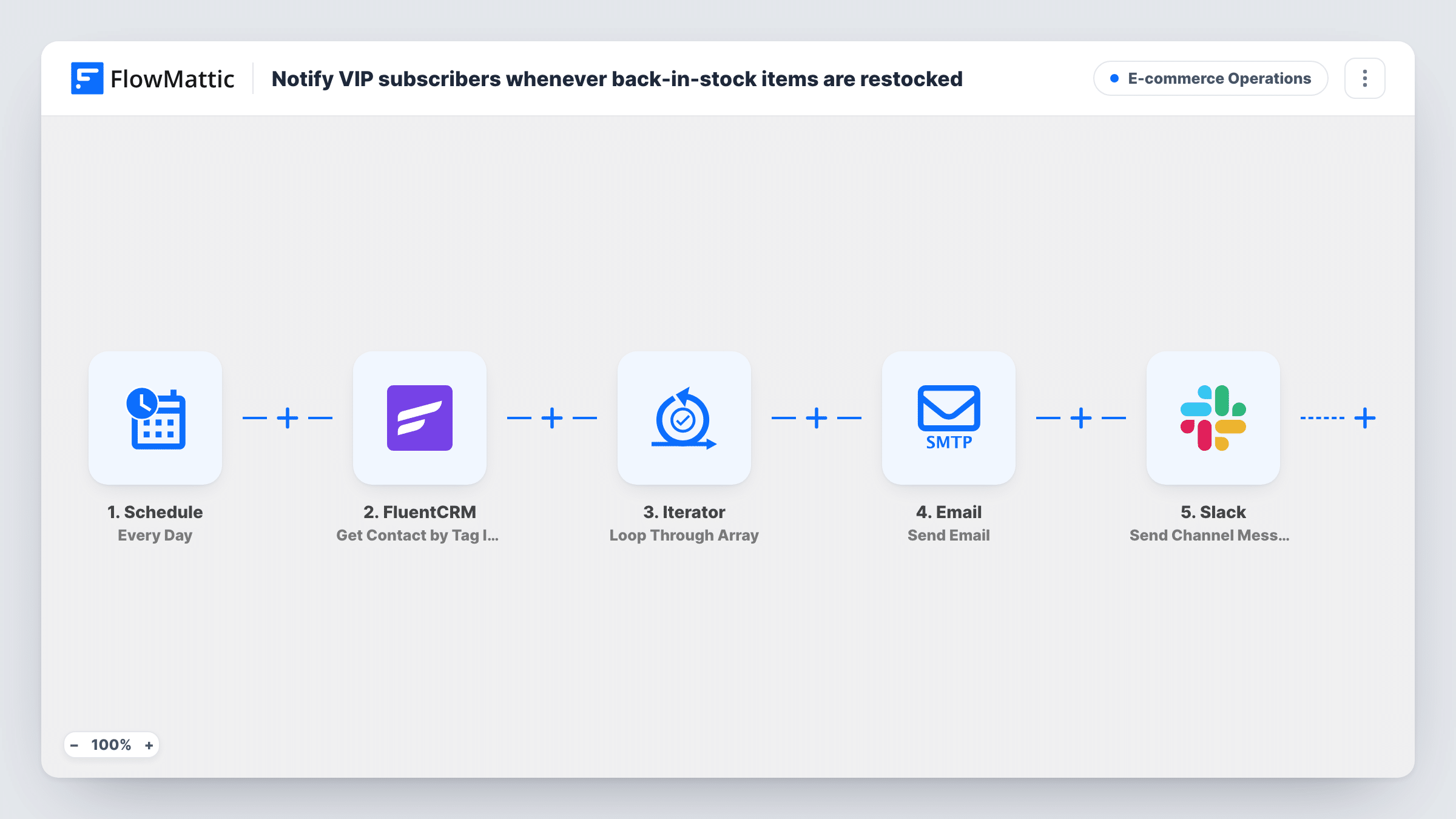
What this workflow does
Your best customers are the ones most likely to want first pick when sold-out stock returns. This workflow watches FluentCart stock levels and, as soon as a product comes back from zero, sends a back-in-stock email to each contact you've tagged as VIP in FluentCRM.
The FluentCart Product Stock Changed trigger fires whenever a product's stock quantity changes. A Filter right after it lets the run continue only when the old stock was exactly 0 and the new stock is greater than 0, so ordinary sales and top-ups of products already in stock stop there.
Next, FluentCRM fetches contacts by tag. The template puts "vip" in the tag IDs field; replace it with the ID of your VIP tag. An Iterator then loops through those contacts. For each one, the Email step sends "Back in stock for you" with their first name, and Slack posts a line saying an alert went to that email.
Every VIP gets the email on every restock, not only people who wanted that product. The message doesn't name the item as imported, so map the product name from the trigger into the subject or body if a test run shows it. With many VIPs, each restock also means one Slack message per contact.
Limited drops for loyal customers
A clothing shop that restocks popular sizes emails its VIP list the moment a sold-out item returns, before announcing it more widely.
Small-batch products that sell out
A coffee roaster whose single-origin bags run out every week alerts its VIP subscribers each time a batch is back on the shelf.
A restock log the team can see
The store owner watches the Slack channel to confirm which VIP contacts were emailed after each restock.
How this workflow runs
What happens at each step once the workflow is on, and what you need before you import it.
 FluentCart Product Stock Changed
Fires whenever the stock quantity of a FluentCart product changes, passing on the old and new stock numbers.
- Filter Continue If
Continues only when the old stock was exactly 0 and the new stock is above 0. Stock changes that don't bring a product back from zero stop here, before any contact is fetched.
- FluentCRM Get Contact by Tag IDs
Fetches FluentCRM contacts by tag. The tag IDs field holds "vip" in the template; replace it with the ID of your VIP tag so the right contacts are returned.
- Iterator Loop Through Array
Loops through the VIP contacts that FluentCRM returned and runs the email and Slack steps once for each contact.
 Email Send Email
Emails the contact with the subject "Back in stock for you" plus their first name, and a short note that an item is available again. Add the product name and link before going live.
- Slack Send Channel Message
Posts "Restock alert sent to" and the contact's email to the Slack channel you pick, once for each VIP emailed.
What you need
- FlowMatticCore
- FluentCart PluginPlugin
- FluentCRM PluginPlugin
- Slack AccountAccount
After importing, map your own data. To keep the template universal, not every step is pre-filled. Open each step in the builder and connect your accounts and fields (channels, lists, sheets, recipients) before you switch the workflow on.
Make it yours
Changes worth making after you import it.
- Look up your VIP tag's ID in FluentCRM and enter it in the Get Contact by Tag IDs step, because the template's "vip" placeholder is not an ID.
- Run a test restock and check which product fields the trigger returns, then map the product name and link into the Email step so contacts know what came back.
- To limit alerts to certain products, add a condition on the product to the existing Filter between the Product Stock Changed trigger and the FluentCRM step. The product you pick there is an example to change.
- If one Slack message per contact is too many, remove the Slack step and check Task History for the sends instead.
Questions about this workflow
Does every FluentCart stock change send emails?
No. The Filter only lets the run continue when stock goes from exactly 0 to more than 0. Sales and stock top-ups on products already in stock stop at the Filter.
Do only VIPs who wanted that product get the email?
No. Every contact with your VIP tag is emailed on each restock. Nothing in the workflow tracks who was waiting for which item.
Which FluentCRM tag does the workflow use?
The template has "vip" in the tag IDs field as a placeholder. Replace it with your VIP tag's ID, otherwise FluentCRM may return no contacts.
Will a VIP be emailed again if the same product sells out and comes back?
Yes. Each time that product's stock goes from 0 back above 0, the workflow runs again and emails every VIP contact.
More E-commerce Operations workflows
Other ready-to-import templates from the same category.




Import this workflow into your WordPress site
Download the JSON, import it from the Workflows screen and connect your accounts. Every run stays on your server, with no per-task fees.
30-day money-back guarantee Unlimited workflows and runs Self-hosted