

Route leads to the right team by company size
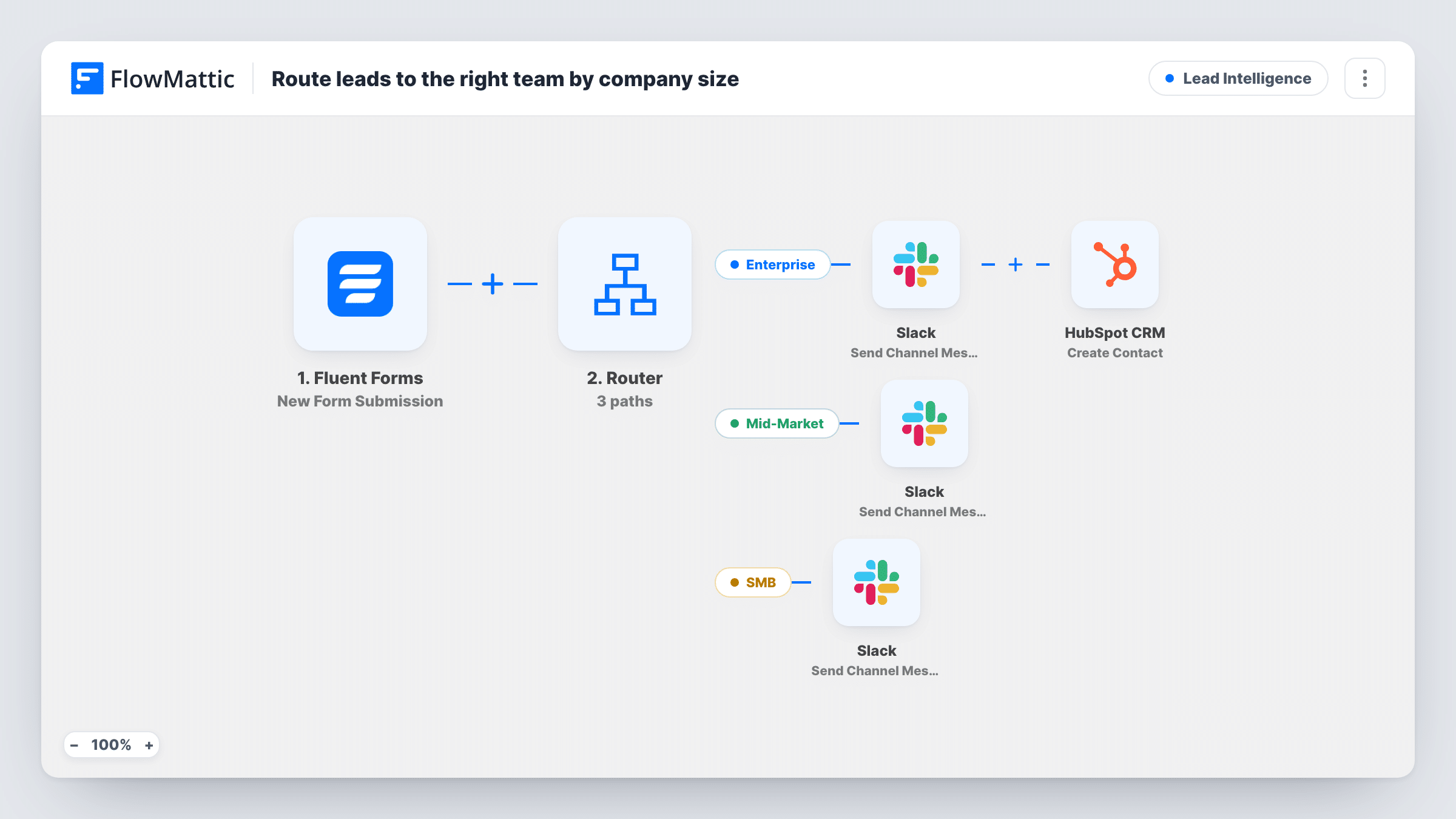
A Fluent Forms lead is routed by the employee count it gives: enterprise leads alert Slack and go into HubSpot, mid-market and small business leads each alert Slack with their own message.
 Fluent Forms
 Router
 Slack
Slack
 HubSpot CRM
6 steps Setup ~12 min Used on 736 sites Growth Free to import
What this workflow does
A 2,000-person company and a five-person studio usually need different salespeople and a different first call. If your lead form asks for company size, this workflow sorts each submission by that number and tells the right team, so nobody has to read every lead and pass it along.
The Fluent Forms trigger fires on each new submission of the form you connect. A Router then reads a field named employees. Enterprise matches more than 500. Mid-Market matches more than 50 and less than 501. SMB matches less than 51. These ranges don't overlap, so each lead follows the one route its number fits.
Each route posts its own Slack channel message, such as "Enterprise lead" with the person's name. The Enterprise route also creates a HubSpot contact with the lead's email and the name field as the first name. Pick a channel for each Slack step after import.
Both sides of each check are read as whole numbers. A blank answer counts as 0 and goes to SMB, and a value like 50.9 is read as 50. Use a number field for employees, or adjust the conditions to the values your form collects.
Enterprise deals straight to account executives
A software company sends leads from large companies to its enterprise Slack channel and HubSpot, while smaller leads go to the self-serve team.
Agency intake with team-by-size
A marketing agency's contact form asks for headcount, and each submission lands in the Slack channel of the team that handles that size of client.
Separate SMB handling
A B2B service posts small-business leads to a channel watched by the inside sales rep, who replies with a standard onboarding offer.
How this workflow runs
What happens at each step once the workflow is on, and what you need before you import it.
 Fluent Forms New Form Submission
Fires on each new submission of the Fluent Forms form you choose. The form's name, email and employees fields are used by the later steps; rename them to match your form.
- Router 3 paths
Sends the lead down one of three routes by the employees value: Enterprise (more than 500), Mid-Market (51 to 500) or SMB (50 or fewer). The ranges don't overlap.
- Slack Send Channel Message
On the Enterprise route, posts "Enterprise lead" and the person's name to the Slack channel you pick for the enterprise team.
- HubSpot CRM Create Contact
Also on the Enterprise route, creates a HubSpot contact with the lead's email, putting the whole name field into the first name and leaving the last name empty.
- Slack Send Channel Message
On the Mid-Market route, sends a Slack message reading "Mid-market lead" with the name, to the channel where that team works.
- Slack Send Channel Message
On the SMB route, for 50 employees or fewer and for blank answers, posts "SMB lead" and the person's name to the small-business team's Slack channel.
What you need
- FlowMatticCore
- Fluent Forms PluginPlugin
- Slack AccountAccount
- HubSpot CRM AccountAccount
After importing, map your own data. To keep the template universal, not every step is pre-filled. Open each step in the builder and connect your accounts and fields (channels, lists, sheets, recipients) before you switch the workflow on.
Make it yours
Changes worth making after you import it.
- Use a Fluent Forms number field for company size and make it required, so blank answers don't fall into the SMB route.
- The field name employees and the 50 and 500 cut-offs are examples. Change both the field and the numbers in each route's condition, keeping the ranges so a lead can only fit one.
- Add the email and company name to each Slack message, so the team can reply without opening the form entry.
- If your form has separate first and last name fields, map them into the HubSpot step's first and last name instead of the single name field.
Questions about this workflow
Can one Fluent Forms lead alert more than one team?
No. A Router runs every route whose condition matches, but these three ranges can't overlap, so each submission fits exactly one route.
What happens if someone leaves company size blank?
A blank value counts as 0, which is less than 51, so the lead takes the SMB route and posts to that channel.
Do mid-market and small leads go into HubSpot too?
Not as imported. Only the Enterprise route has the HubSpot Create Contact step. Add a copy of it to the other routes, after their Slack steps, if you want every lead in HubSpot.
What if the email is already a HubSpot contact?
Create Contact only creates new contacts, so HubSpot may refuse an email it already holds. Open Task History to read what HubSpot sent back for that lead.
My form uses ranges like 51-200. Will that work?
Not reliably, because the conditions compare whole numbers. Use a number field, or change each route to check for your exact range labels with text conditions that can't both match.
More Lead Intelligence workflows
Other ready-to-import templates from the same category.





Import this workflow into your WordPress site
Download the JSON, import it from the Workflows screen and connect your accounts. Every run stays on your server, with no per-task fees.
30-day money-back guarantee Unlimited workflows and runs Self-hosted