

Route leads by acquisition channel to the right playbook
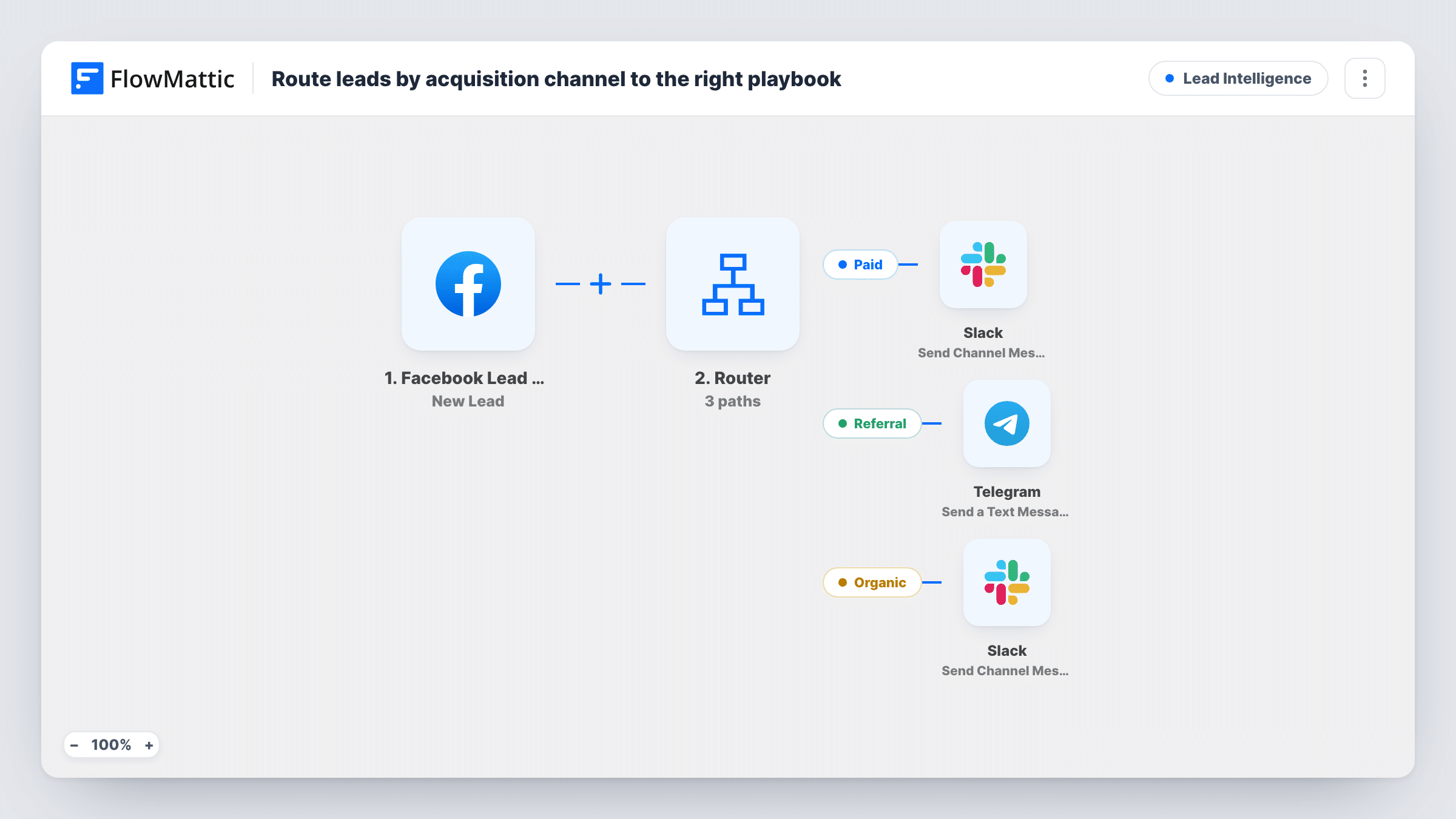
New Facebook Lead Ads leads are routed by a source value: paid leads alert one Slack channel, referral leads go to a Telegram chat, and organic leads alert a second Slack channel.
 Facebook Lead Ads
 Router
 Slack
Slack
 Telegram
5 steps Setup ~8 min Used on 2.4k sites Growth Free to import
What this workflow does
Different channels often need different follow-up. A lead from a paid campaign may need a fast sales call, a referral may need a thank-you to the partner who sent it, and an organic lead may suit a nurture sequence. This workflow sends each new lead to the team that owns its channel, based on a source value the lead carries.
The Facebook Lead Ads New Lead trigger fires when a lead is created on the form you connect. A Router then reads a field named source and checks it for the words "paid", "referral" and "organic".
Paid leads post a Slack message with the lead's full name. Referral leads are sent as a Telegram text with the name and email. Organic leads post to a second Slack channel. After import, pick the two Slack channels and finish the Telegram step's setup.
The source field is an example to edit. Send a test lead and look in Task History at the data the trigger received. Then point the three route conditions at the field that holds your channel, such as a form question or hidden value, and match the words it uses. A lead whose source contains none of the three words gets no alert, and one containing two of them would run both routes.
Paid campaign leads to the sales channel
An agency running Facebook lead campaigns sends paid leads to the #sales channel so a rep can call while the ad is still fresh in the lead's mind.
Referral partners on Telegram
A business whose partner team works in Telegram gets each referral lead in that chat with name and email, ready to thank the referrer.
Organic leads to the growth team
A startup sends leads tagged organic to a growth channel, where the team adds them to a slower nurture plan.
How this workflow runs
What happens at each step once the workflow is on, and what you need before you import it.
 Facebook Lead Ads New Lead
Starts a run for each lead created on the Facebook Lead Ads form you connect, passing on the full name, email and the source value that the routes check.
- Router 3 paths
Checks the lead's source field. Paid: it contains "paid". Referral: it contains "referral". Organic: it contains "organic". Every route whose condition matches runs, and a lead with none of the words takes no route.
- Slack Send Channel Message
On the Paid route, posts "Paid lead" and the lead's full name to the Slack channel you choose for the paid team.
- Telegram Send a Text Message
On the Referral route, sends a Telegram text with "Referral lead", the full name and the email in brackets. Finish the Telegram step's setup and test that it reaches your partnerships chat.
- Slack Send Channel Message
On the Organic route, sends a Slack message reading "Organic lead" with the person's name, to a channel for the growth team.
What you need
- FlowMatticCore
- Facebook Lead Ads AccountAccount
- Slack AccountAccount
- Telegram AccountAccount
After importing, map your own data. To keep the template universal, not every step is pre-filled. Open each step in the builder and connect your accounts and fields (channels, lists, sheets, recipients) before you switch the workflow on.
Make it yours
Changes worth making after you import it.
- Run a test lead first and check in Task History which field carries the channel, then set that field and its exact words in all three route conditions.
- In the existing Router between the New Lead trigger and the alert steps, add a fourth route for leads whose source holds none of the three words, using "does not contain" conditions for each word, and give it its own alert step.
- Add the lead's email and phone to the two Slack messages, so the team can reach out without opening Facebook.
- Keep source values to one word each. A value like "paid referral" would match two routes and alert both teams.
Questions about this workflow
Where does the source value for each Facebook lead come from?
From a field named source in the lead data. Check a test lead in Task History, and if your form stores the channel elsewhere, point the route conditions at that field.
What happens to a lead that matches none of the three channels?
Nothing is sent for it, since no route matches. Add a route with conditions that the source contains none of the three words if those leads should go somewhere.
Can a Facebook lead trigger both Slack and Telegram?
Only if its source contains more than one of the words, because the Router runs every route that matches. With one word per lead, each lead takes one route.
Do I need a Telegram bot for the referral route?
You need a Telegram connection in FlowMattic for the Send a Text Message step. Set it up after import and send a test lead to confirm the message arrives.
More Lead Intelligence workflows
Other ready-to-import templates from the same category.








Import this workflow into your WordPress site
Download the JSON, import it from the Workflows screen and connect your accounts. Every run stays on your server, with no per-task fees.
30-day money-back guarantee Unlimited workflows and runs Self-hosted