

Qualify leads by budget before routing to sales
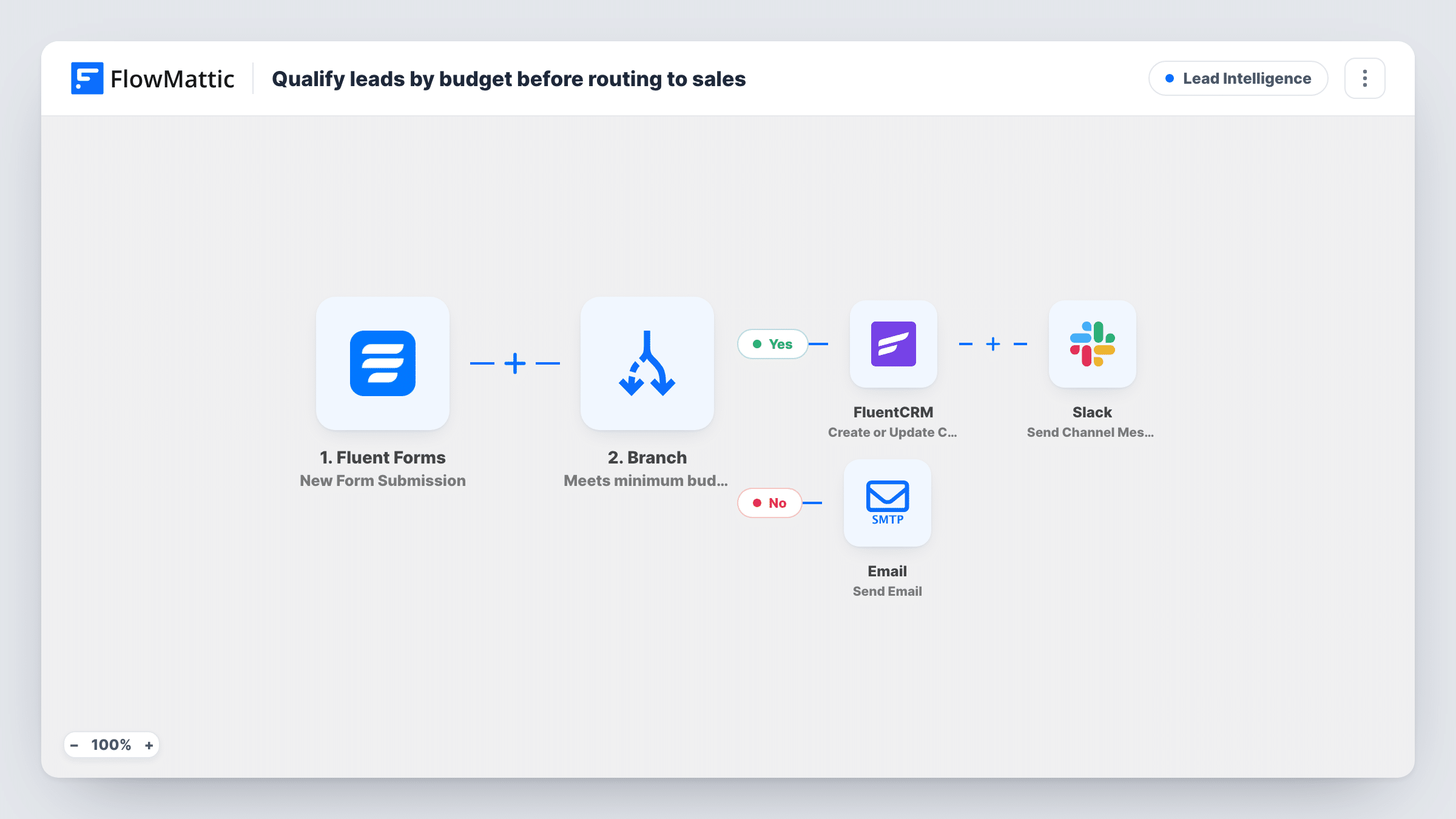
A Branch reads the budget on each Fluent Forms enquiry. Leads above 2000 are saved to FluentCRM and announced in Slack, while smaller budgets get an automatic email pointing them to self-serve resources.
 Fluent Forms
 Branch
 FluentCRM
 Slack
Slack
 Email
Email5 steps Setup ~8 min Used on 2.9k sites Growth Free to import
What this workflow does
Sales time is limited, and a lead with a small budget can take as long to answer as a large one. If your enquiry form asks for a budget, you can use that answer to decide who your team talks to and who gets a polite, useful reply instead. This workflow makes that call on every submission.
When someone submits your Fluent Forms enquiry form, a Branch checks whether the budget field is greater than 2000. On the Yes path, FlowMattic creates or updates a FluentCRM contact using the submitted email and name, then posts a message to Slack naming the qualified lead and their budget. On the No path, the lead receives an email titled Resources to get started, with a short note about self-serve resources.
Know how the number is read before you rely on it. The check compares whole numbers, so a budget of exactly 2000 goes down the No path, and a blank budget counts as 0 and does too. Decimals are cut off before the comparison. Leads on the No path are not added to FluentCRM as imported.
Agency project enquiries
Your form asks prospects for a project budget. Sales sees only the larger projects in Slack, and smaller enquiries get pointed to your templates or courses by email.
Consultant with a minimum engagement
You only take work above a set fee. Enquiries under it get a friendly reply with free material, so you spend no time on calls that can't go ahead.
SaaS demo requests
Prospects state their expected spend on the demo form. Higher budgets go into FluentCRM for your sales sequence, and the rest are steered toward self-serve onboarding.
How this workflow runs
What happens at each step once the workflow is on, and what you need before you import it.
 Fluent Forms New Form Submission
Runs each time someone submits your Fluent Forms enquiry form. The budget, email and name answers are passed to the Branch and the steps on both paths.
- Branch Branch
Checks whether the budget field is greater than 2000. Yes continues to FluentCRM and Slack. No sends the self-serve email. A budget of exactly 2000 or a blank one takes the No path.
- FluentCRM Create or Update Contact
On the Yes path, creates a FluentCRM contact from the submitted email and name, or updates the contact if that email is already in your CRM.
- Slack Send Channel Message
Still on the Yes path, posts a message to your Slack channel marking the lead as qualified, with their name and stated budget, so a salesperson can pick it up.
 Email Send Email
On the No path, emails the lead with the subject Resources to get started and a short note about self-serve resources. Replace the body with your own links before going live.
What you need
- FlowMatticCore
- Fluent Forms PluginPlugin
- FluentCRM PluginPlugin
- Slack AccountAccount
After importing, map your own data. To keep the template universal, not every step is pre-filled. Open each step in the builder and connect your accounts and fields (channels, lists, sheets, recipients) before you switch the workflow on.
Make it yours
Changes worth making after you import it.
- Change the Branch value to your own minimum. If you want 2000 itself to qualify, set the value to 1999, because the check is strictly greater than.
- Make the budget a number field in Fluent Forms with no currency sign or commas, then send a test entry to confirm the Branch reads it the way you expect.
- Put a second FluentCRM step on the No path so smaller leads still land in your CRM for later campaigns, kept apart from the qualified ones in whatever way your CRM setup allows.
Questions about this workflow
Which path does a Fluent Forms entry with no budget take?
The No path. A blank budget counts as 0 in the comparison, so that person gets the self-serve email and is not added to FluentCRM.
What if the qualified lead is already a FluentCRM contact?
The step uses Create or Update Contact, so the existing contact is updated with the submitted details instead of a second contact being made.
How is the self-serve email to lower-budget leads sent?
Through the Email (SMTP) connection you set up in FlowMattic. Edit the subject and body in the workflow, then send yourself a test to see how it arrives.
Does every qualified lead trigger a Slack message?
Yes. Every submission with a budget above 2000 runs both Yes steps, so each one creates or updates the contact and posts to Slack.
More Lead Intelligence workflows
Other ready-to-import templates from the same category.




Import this workflow into your WordPress site
Download the JSON, import it from the Workflows screen and connect your accounts. Every run stays on your server, with no per-task fees.
30-day money-back guarantee Unlimited workflows and runs Self-hosted