

Route leads into hot, warm and cold tracks by AI score
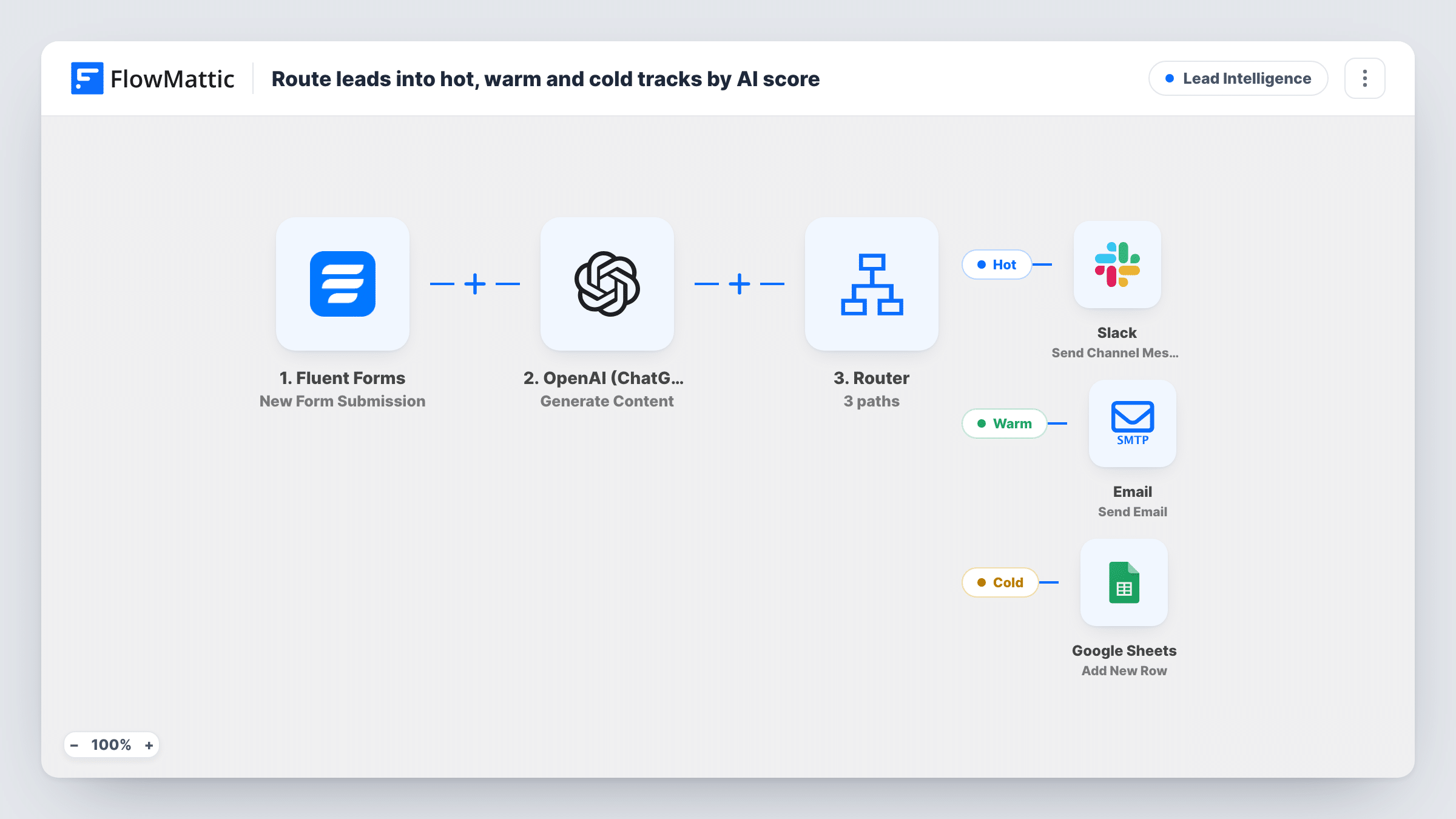
OpenAI labels each Fluent Forms lead HOT, WARM or COLD from their message and budget. Hot leads go to Slack, warm leads get an email, and cold leads are logged in Google Sheets.
 Fluent Forms
 OpenAI (ChatGPT)
 Router
 Slack
Slack
 Email
Email
 Google Sheets
6 steps Setup ~12 min Used on 1.2k sites Growth Free to import
What this workflow does
Not every enquiry deserves the same response time. A lead with a clear need and budget wants a call today, a curious one wants something to read, and a vague one only needs to be recorded. This workflow uses an OpenAI prompt to make that first call and sends each lead down the matching track.
The Fluent Forms trigger starts a run for each submission. The OpenAI (ChatGPT) step asks GPT-4o to reply HOT, WARM or COLD for lead intent, based on the message and budget answers, with a 5-token limit so the reply stays a single word.
A Router then reads that reply. If it contains HOT, the Hot route posts the lead's name and company to Slack. WARM sends the lead an email titled Some resources for you. COLD adds a row to Google Sheets, which ships unmapped, so you choose the sheet and columns after import.
The three words don't contain one another, so a one-word reply takes one route. Capitals don't matter, so a reply of Hot or warm still finds its route. A longer reply is the risk: each route looks for its word anywhere in the text, so "not hot, more warm" would run both the Hot and Warm routes. The warm email body as imported is one sentence, so add your actual resources before going live.
Agency enquiries sorted before the morning stand-up
An agency's contact form asks for budget. Enquiries the model labels HOT are in Slack straight away, so the account lead can call while the prospect is still on the site.
Nurturing early-stage leads by email
A SaaS company sends WARM leads a short email pointing to case studies, instead of booking sales time with them.
A record of low-intent enquiries
Leads labelled COLD go into a Google Sheet the marketing team reviews each month for patterns, without cluttering Slack.
How this workflow runs
What happens at each step once the workflow is on, and what you need before you import it.
 Fluent Forms New Form Submission
Starts a run for every new Fluent Forms submission. The template uses fields named message, budget, name, company and email; adjust them to the field names your own form uses.
- OpenAI (ChatGPT) Generate Content
Asks GPT-4o to reply HOT, WARM or COLD for lead intent, using the message and budget answers. Max tokens is 5, so the response is meant to be just the label.
- Router 3 paths
Sends the lead down the Hot route if the reply contains HOT, Warm for WARM and Cold for COLD. Upper and lower case are treated the same, and a reply with none of the three takes no route.
- Slack Send Channel Message
On the Hot route, posts Hot lead with the person's name and company to a Slack channel. Choose the sales channel after import.
 Email Send Email
On the Warm route, emails the lead with the subject Some resources for you and a one-line body naming their company. Add the links you want them to read before you go live.
- Google Sheets Add New Row
On the Cold route, adds a new row to Google Sheets. The step ships unmapped: pick the spreadsheet and map the name, email, company, budget and message into your columns.
What you need
- FlowMatticCore
- Fluent Forms PluginPlugin
- OpenAI (ChatGPT) AccountAccount
- Slack AccountAccount
- Google Sheets AccountAccount
After importing, map your own data. To keep the template universal, not every step is pre-filled. Open each step in the builder and connect your accounts and fields (channels, lists, sheets, recipients) before you switch the workflow on.
Make it yours
Changes worth making after you import it.
- Add to the OpenAI prompt that the answer must be a single word, HOT, WARM or COLD, with nothing else, since each route looks for its word anywhere in the reply.
- Describe what hot means for your business in the prompt, such as a budget over a figure you choose or a start date this quarter, so the label follows your rules.
- Map the OpenAI label and the date into the Google Sheets row as well, so you can later check how leads were sorted.
Questions about this workflow
What happens if OpenAI replies in lowercase or with extra words?
Lowercase is fine, because the Router ignores capitals, so Warm takes the Warm route. Extra words are the problem: a route runs when its word appears anywhere in the reply, even inside a longer word, so a sentence can trigger two routes. A reply with none of the three takes no route.
Can a Fluent Forms lead go down two routes?
Only if the reply contains two of the labels, because the Router runs every matching route. The 5-token limit and a strict prompt keep the reply to one word.
Do I need an OpenAI account for this workflow?
Yes. The scoring step uses the OpenAI (ChatGPT) app with the GPT-4o model, so connect your own OpenAI API key after import.
Are hot leads saved anywhere besides Slack?
Not as imported. Only cold leads get a Google Sheets row. Add a Google Sheets step to the Hot and Warm routes too, or one before the Router, if you want every lead logged.
More Lead Intelligence workflows
Other ready-to-import templates from the same category.





Import this workflow into your WordPress site
Download the JSON, import it from the Workflows screen and connect your accounts. Every run stays on your server, with no per-task fees.
30-day money-back guarantee Unlimited workflows and runs Self-hosted