

Answer form submissions with AI as the form's success message
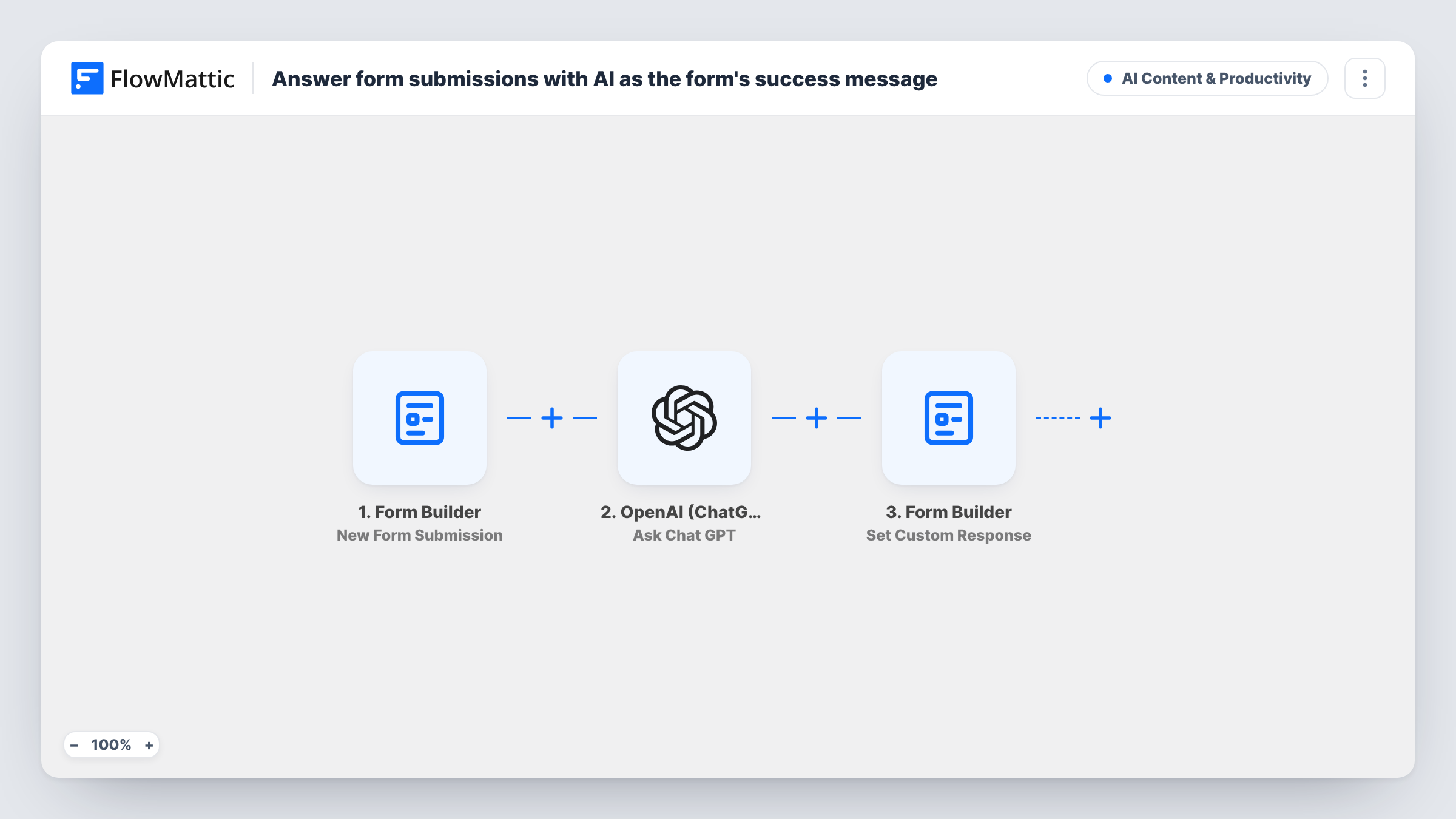
When a visitor submits your FlowMattic form, ChatGPT writes a short, friendly reply to their message, and that reply replaces the form’s success message so the visitor reads it on screen.
 Form Builder
 OpenAI (ChatGPT)
3 steps Setup ~5 min Used on 2.7k sites Content Ops Free to import
What this workflow does
A generic "thanks, we'll be in touch" tells a visitor nothing about their question. Showing a short, specific reply right after they submit gives them something useful while they wait for a person. This workflow uses ChatGPT to write that reply and shows it as the form's success message.
The Form Builder trigger fires whenever the selected FlowMattic form receives a submission. The OpenAI (ChatGPT) step then runs Ask Chat GPT with a fixed prompt: write a short, friendly reply to this enquiry, followed by the form's message field.
Last, Form Builder's Set Custom Response step replaces the form's success message with ChatGPT's response, as plain text. FlowMattic describes this action as ideal for showing an AI-generated result back to the visitor. The reply is written by AI from the message alone, so it can't know your prices, policies or availability unless you put them in the prompt.
Instant acknowledgement for support questions
A visitor describes a problem in your FlowMattic form and sees a friendly reply that restates their issue, instead of a stock thank-you line.
Enquiry forms for service businesses
A landscaper's quote form shows a short AI-written reply to what the visitor asked, while the owner follows up with the actual quote.
Community or club contact forms
A club's question form greets each message with a personal-sounding reply, so members know their note was read.
How this workflow runs
What happens at each step once the workflow is on, and what you need before you import it.
 Form Builder New Form Submission
Starts as soon as a visitor sends the FlowMattic form you selected. Every field, including the message the visitor typed, is exposed as a variable.
- OpenAI (ChatGPT) Ask Chat GPT
Sends ChatGPT the prompt: write a short, friendly reply to this enquiry, followed by the form's message field. Connect your OpenAI account and adjust the prompt to fit your business.
- Form Builder Set Custom Response
Replaces the form's success message with ChatGPT's response, shown as plain text. The visitor sees the AI reply in place of your usual confirmation.
What you need
- FlowMatticCore
- OpenAI (ChatGPT) AccountAccount
After importing, map your own data. To keep the template universal, not every step is pre-filled. Open each step in the builder and connect your accounts and fields (channels, lists, sheets, recipients) before you switch the workflow on.
Make it yours
Changes worth making after you import it.
- Add facts the reply may need, such as opening hours or response times, to the ChatGPT prompt, so the answer doesn't guess them.
- Tell ChatGPT in the prompt not to promise prices, refunds or dates, and to say a person will follow up.
- Add an Email step after Set Custom Response to send the same reply, or the original message, to your team or the visitor.
Questions about this workflow
Will ChatGPT still reply if the form lacks a message field?
ChatGPT then gets the prompt without the enquiry text. Point the prompt at the field your form uses for the question, using the variables from a test submission.
Can the ChatGPT reply on the form include HTML?
The template sets the custom response to plain text. Set Custom Response can show HTML instead, so change that option and ask ChatGPT for HTML if you want formatting.
Does ChatGPT know about my business?
Only what the prompt tells it. As shipped, the prompt contains the visitor's message and an instruction to reply in a short, friendly way, so add any details you want it to use.
Do I need an OpenAI account for the AI form reply?
Yes. The Ask Chat GPT step runs through your OpenAI account, which you connect after import with your own API key or credentials.
More AI Content & Productivity workflows
Other ready-to-import templates from the same category.







Import this workflow into your WordPress site
Download the JSON, import it from the Workflows screen and connect your accounts. Every run stays on your server, with no per-task fees.
30-day money-back guarantee Unlimited workflows and runs Self-hosted