

Send form submissions to Airtable, Slack and email at once
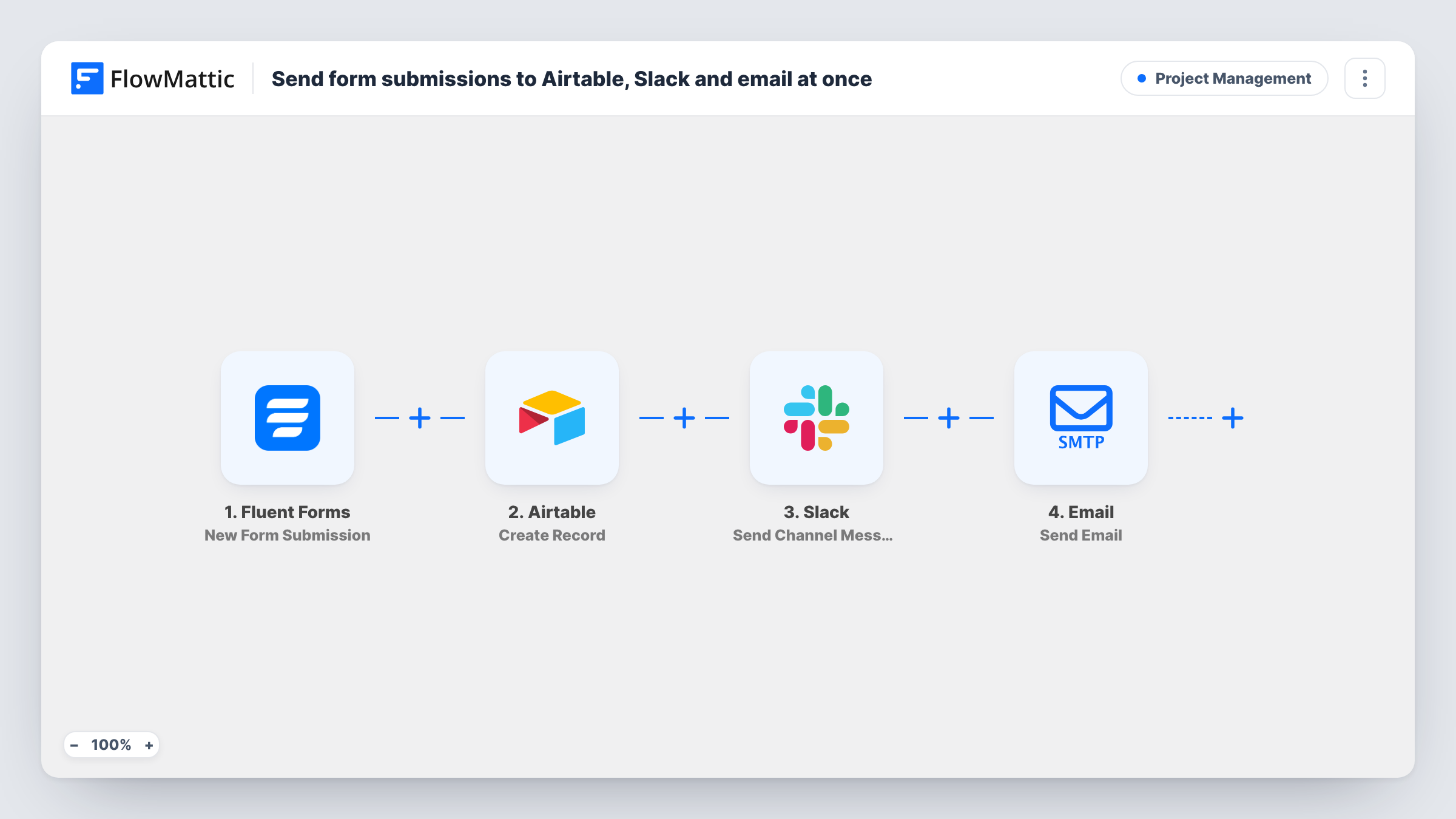
Each Fluent Forms submission becomes an Airtable record, a message in a Slack channel and an email to your team, all in one run, so the entry is stored and the right people hear about it.
 Fluent Forms
 Airtable
 Slack
Slack
 Email
Email4 steps Setup ~8 min Used on 3.2k sites Productivity Free to import
What this workflow does
A form entry often needs three things: a place to be stored, a heads-up for the team, and a copy in someone's inbox. Doing that by hand means opening Airtable, posting in Slack and forwarding an email for every entry. This workflow does all three in sequence each time the form is sent.
The Fluent Forms trigger starts the run when a visitor submits a form on your site. FlowMattic then creates a record in Airtable from the fields you map. Next, it posts to the Slack channel you pick. The template's message reads "New submission from" followed by the name field. Last, the Email step sends a message to [email protected] with the name in the subject line and the form's message field as the body.
The steps run one after another, not side by side. If one returns an error, Task History shows that step's error and the data it received. Replace the placeholder address before you turn the workflow on, and check that your form uses fields named name and message, or remap them.
Project intake for a design studio
Clients fill in a brief on your site. The brief lands as an Airtable record your team tracks, the studio channel in Slack sees who sent it, and the project lead gets the brief text by email.
Volunteer sign-ups for a nonprofit
Each volunteer form fills a row in your Airtable base, the coordinators' Slack channel gets a note with the volunteer's name, and the email keeps a copy in the shared inbox.
Partnership enquiries
Proposals from your partner page are stored in Airtable for review, while Slack and email make sure the people who handle partners see them the same day they arrive.
How this workflow runs
What happens at each step once the workflow is on, and what you need before you import it.
 Fluent Forms New Form Submission
Starts the workflow when a visitor submits a Fluent Forms form on your site. Every answer in the entry is passed on for the Airtable, Slack and email steps to use.
- Airtable Create Record
Creates a new record in Airtable. Connect your Airtable account, choose where the record goes, and map the form answers to the record's fields.
- Slack Send Channel Message
Posts a message to the Slack channel you choose. The template text starts with "New submission from" and inserts the name field from the form. Edit the text to add any other answers.
 Email Send Email
Sends an email to [email protected]. The subject is "New submission:" plus the submitter's name, and the body is the form's message field. Change the address to your own before going live.
What you need
- FlowMatticCore
- Fluent Forms PluginPlugin
- Airtable AccountAccount
- Slack AccountAccount
After importing, map your own data. To keep the template universal, not every step is pre-filled. Open each step in the builder and connect your accounts and fields (channels, lists, sheets, recipients) before you switch the workflow on.
Make it yours
Changes worth making after you import it.
- Put a Filter after the trigger if only some entries need all three actions, for example when a Topic dropdown equals Sales.
- Add more form fields to the Slack message, such as the email address or budget, so the channel has enough to act on without opening Airtable.
- Run one test entry through the form after import. The answers it captures become available to map in the Airtable step, and the Slack and email output shows you exactly what your team will see.
Questions about this workflow
Do Airtable, Slack and the email all receive every Fluent Forms entry?
Yes. The workflow has no Filter, so every submission runs all four steps. Add a Filter after the trigger if you want some entries handled differently.
What if my Fluent Forms field is not called name?
The Slack message and email subject use a field named name, and the email body uses message. If your form names them differently, remap those values in the Slack and Email steps.
Does the email go through my own mail server?
The Email step uses the SMTP connection you set up in FlowMattic, so you choose the server it sends through. Change the recipient from the placeholder address first.
Does the Slack message show all of the Fluent Forms answers?
No. As imported it shows only the submitter's name. The full set of mapped answers goes to Airtable, and the email carries the message field. Add other fields to the Slack text if the channel needs them.
More Project Management workflows
Other ready-to-import templates from the same category.






Import this workflow into your WordPress site
Download the JSON, import it from the Workflows screen and connect your accounts. Every run stays on your server, with no per-task fees.
30-day money-back guarantee Unlimited workflows and runs Self-hosted