

Save form submissions as Notion pages and notify Slack
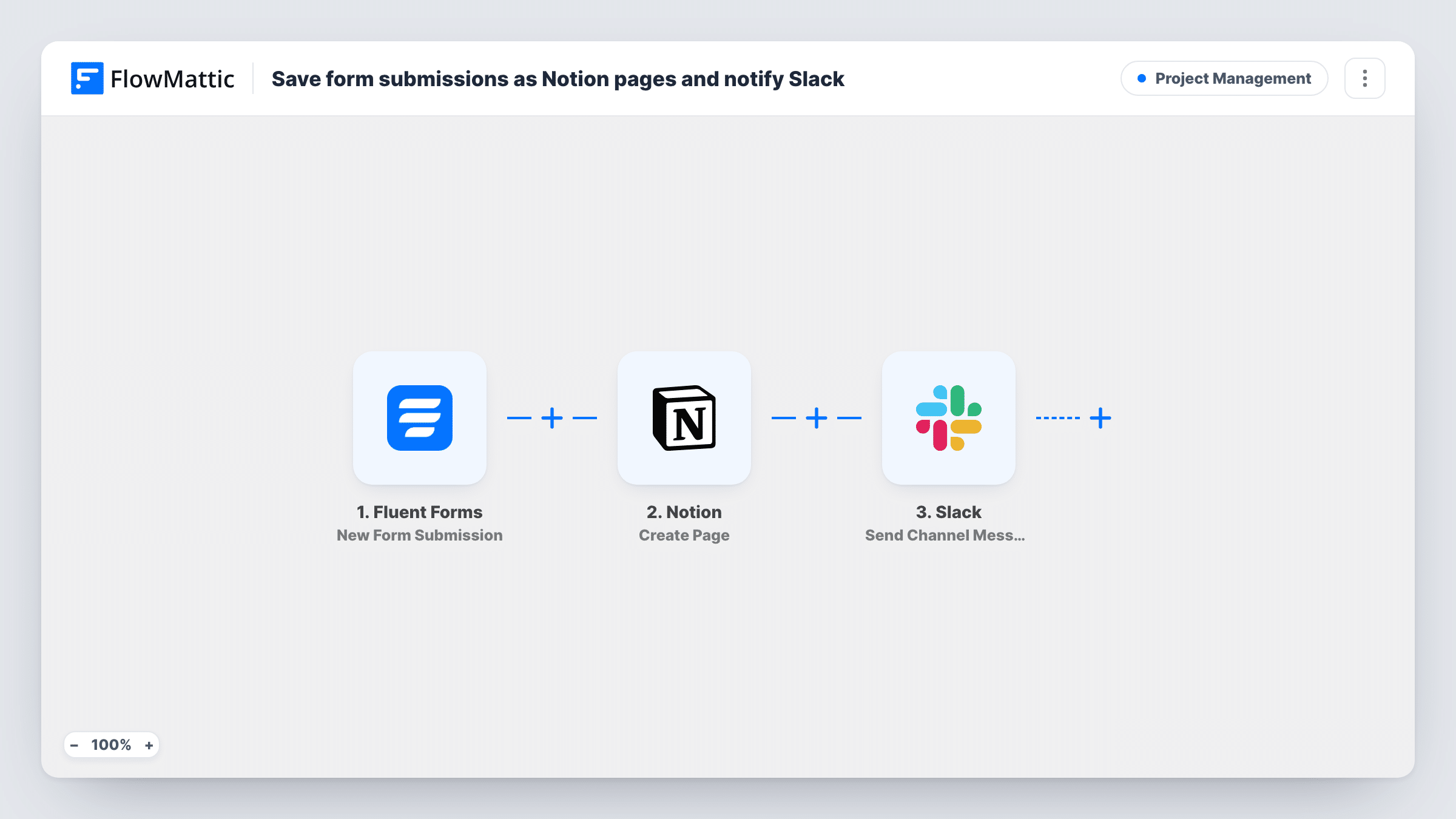
When someone sends a Fluent Forms form, this workflow saves the entry as a new Notion page, using the subject as the title and the message as the content, then posts a short alert in a Slack channel.
 Fluent Forms
 Notion
 Slack
Slack3 steps Setup ~5 min Used on 3.0k sites Productivity Free to import
What this workflow does
Ideas, requests and feedback sent through a website form often sit in an inbox until someone forwards them. If your team plans its work in Notion and talks in Slack, those submissions belong in both places. This workflow files each one in Notion and tells the team about it in the same run.
Each run starts with a Fluent Forms entry arriving on your WordPress site. The template expects three form fields: name, subject and message. The Notion step creates a page whose title is the submitted subject and whose content is the submitted message. Next, the Slack step posts a channel message that reads "New idea from" followed by the sender's name and the subject.
The steps run in order, so the Slack alert goes out after the Notion page is created. Fluent Forms still stores the entry on your site as usual. If your form uses different field names, remap them in both action steps after import, and use Task History to see what each run sent.
Product idea box
Customers suggest features through a Fluent Forms form. Each idea becomes a Notion page your product team can sort, and the Slack post lets them know a new one arrived.
Internal request form for a small team
Staff submit design or content requests on an intranet page. Requests are filed as Notion pages and announced in the team's Slack channel.
Event feedback collection
Attendees send comments after a workshop. Every comment is saved in Notion for review, with a Slack note naming who wrote it and the subject.
How this workflow runs
What happens at each step once the workflow is on, and what you need before you import it.
 Fluent Forms New Form Submission
Starts the workflow whenever a Fluent Forms entry is submitted. The name, subject and message fields are passed on, along with every other answer in the form.
- Notion Create Page
Creates a Notion page with the submitted subject as its title and the submitted message as its content. Connect your Notion account and run a test to confirm where the page is created.
- Slack Send Channel Message
Posts a Slack channel message that says "New idea from" with the sender's name and the subject. Connect your Slack workspace on import and edit the text if your form is not for ideas.
What you need
- FlowMatticCore
- Fluent Forms PluginPlugin
- Notion AccountAccount
- Slack AccountAccount
After importing, map your own data. To keep the template universal, not every step is pre-filled. Open each step in the builder and connect your accounts and fields (channels, lists, sheets, recipients) before you switch the workflow on.
Make it yours
Changes worth making after you import it.
- Rename the field mappings if your form's fields are not called name, subject and message. Otherwise the Notion title, the page content and the Slack text will come through blank.
- Add a Filter after the trigger that continues only when a Type dropdown equals Idea, so other kinds of entries from the same form don't create Notion pages.
- Add the sender's email to the Notion page content as well as the message, so whoever picks up the idea can reply without opening Fluent Forms.
Questions about this workflow
Which Fluent Forms fields does this Notion workflow use?
It maps fields named name, subject and message. Subject becomes the Notion page title, message becomes the page content, and name and subject appear in the Slack text.
Does the Slack message include a link to the new Notion page?
Not as imported. The message text uses only the sender's name and subject. If the Notion step returns a page link in a test run, you can add it to the Slack text yourself.
Can the Slack alert go to a direct message instead of a channel?
This template uses the Send Channel Message action. To message a person instead, replace that step with a different Slack action and map the same name and subject into it.
Will Fluent Forms entries sent before import become Notion pages?
No. The trigger reacts to new submissions only. Entries already stored in Fluent Forms stay there and are not copied to Notion or announced in Slack.
More Project Management workflows
Other ready-to-import templates from the same category.





Import this workflow into your WordPress site
Download the JSON, import it from the Workflows screen and connect your accounts. Every run stays on your server, with no per-task fees.
30-day money-back guarantee Unlimited workflows and runs Self-hosted