

Add a comment to a page in Notion by looking at the rows in Google Sheet on webhook received
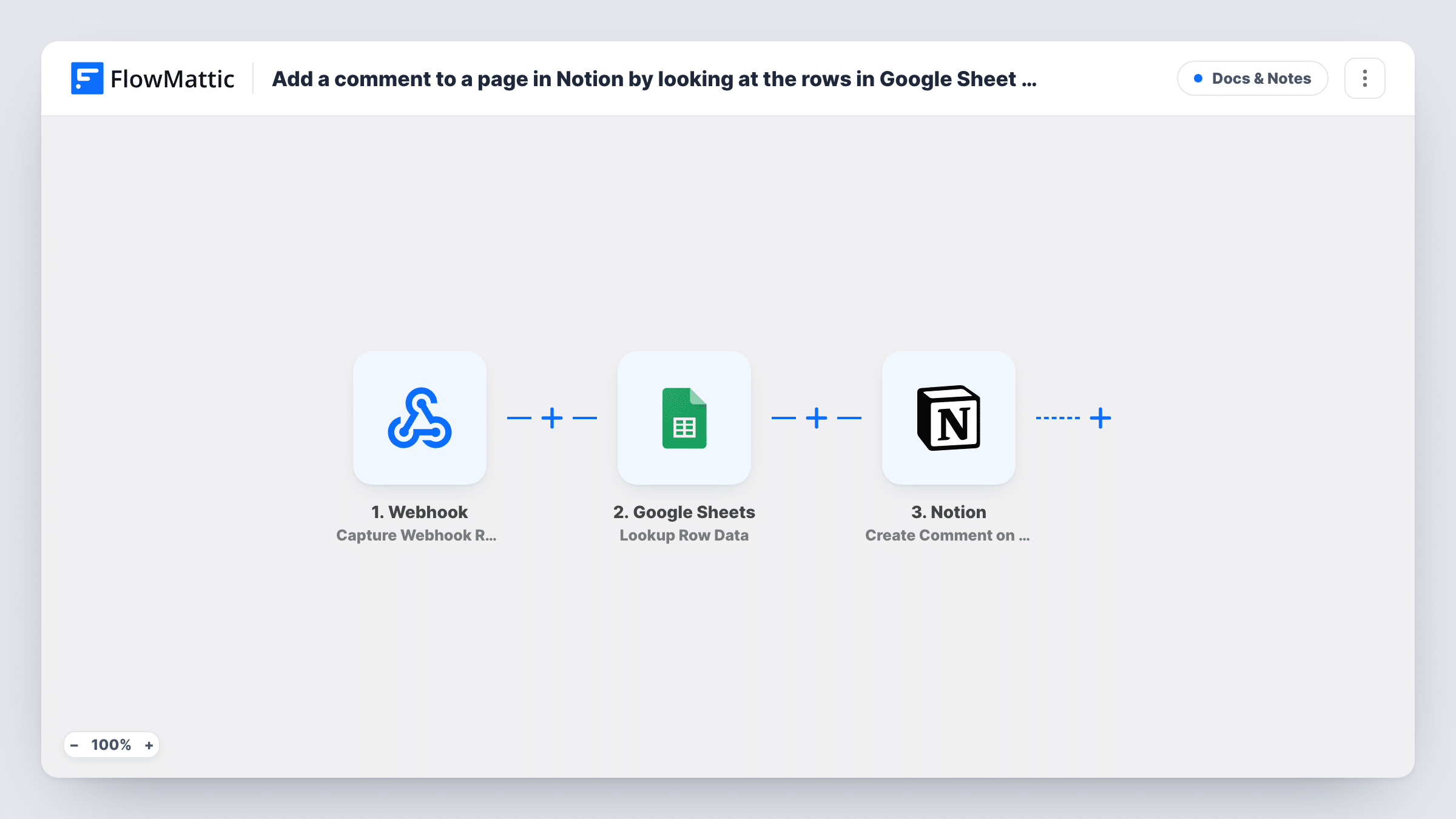
When your webhook URL receives data, this workflow searches a Google Sheets spreadsheet for matching data and posts a text comment on a Notion page using what it found.
 Webhook
 Google Sheets
 Notion
3 steps Setup ~5 min Used on 523 sites Free to import
What this workflow does
Sometimes the event that should leave a note in Notion happens in another system, and the details worth noting live in a spreadsheet. Copying a value from the sheet and pasting it into a Notion comment by hand is slow and easy to forget. This workflow joins the three pieces whenever data arrives at a webhook.
FlowMattic gives you a Webhook URL that any app or script can post to. Whatever data the sender includes becomes available to the next steps. Google Sheets Lookup Row Data then searches the spreadsheet you set up, typically for a value sent in the webhook, and returns what it finds. Finally, the Notion Create Comment on page action adds a text comment to a page, built from the webhook data, the sheet data or both.
The Notion step needs to know which page to comment on, so either the webhook payload or the matched row must carry that page's ID. Test with a known row and page before relying on it. Unless authentication is on for the webhook, anyone who has the URL can start a run, so keep it private or turn that setting on.
Status notes on project pages
Your build server posts a project code to the webhook. The sheet maps project codes to Notion page IDs and owners, and the comment records the event on the right project page.
Client context for account pages
A billing tool sends a customer ID when an invoice is paid. The sheet holds each customer's Notion page and plan, and the comment notes the payment on that page.
Inventory alerts for a product wiki
A stock script posts a SKU when levels drop. The lookup finds the product's row with its supplier, and a comment on the product's Notion page flags the low stock.
How this workflow runs
What happens at each step once the workflow is on, and what you need before you import it.
 Webhook Capture Webhook Response
Listens on the webhook URL FlowMattic creates for this workflow. When an app or script sends data there, the workflow starts and the payload fields become available to map in the next steps.
- Google Sheets Lookup Row Data
Searches your Google Sheets spreadsheet for data, usually using a value sent in the webhook payload. Do a test run to see what it returns, then map those values into the Notion comment.
- Notion Create Comment on page
Adds a text comment to a Notion page. Point it at the page using an ID from the webhook or the sheet, and build the comment text from the values you want recorded.
What you need
- FlowMatticCore
- Google Sheets AccountAccount
- Notion AccountAccount
After importing, map your own data. To keep the template universal, not every step is pre-filled. Open each step in the builder and connect your accounts and fields (channels, lists, sheets, recipients) before you switch the workflow on.
Make it yours
Changes worth making after you import it.
- Add a Filter between Lookup Row Data and Notion that continues only when the lookup returned a page ID, so runs with no matching row stop before Notion.
- Turn on the webhook's "Require authentication on incoming requests" setting and give the sender the key, so only your own system can start runs.
- If the comment should go to different Notion pages by type of event, add a Router after the lookup with conditions on an event field that can't match more than one route.
Questions about this workflow
Where does the Notion page ID come from?
From your data. Either the app posting to the webhook sends it, or a column in the Google Sheets row holds it. Map it into the Create Comment on page step and test with a page you know.
What happens if Lookup Row Data finds no matching row in Google Sheets?
The run still continues to Notion, because the template has no Filter. Without a page ID or comment text the Notion step returns an error, which you can see in Task History.
Does the Notion integration need access to the page?
Yes. Notion only lets an integration comment on pages it has been given access to, so share the target pages with the connection you use in FlowMattic.
Which apps can send data to this webhook?
Any app or script that can make an HTTP request to a URL. Send a test request after import so FlowMattic captures the payload fields for mapping.
More Docs & Notes workflows
Other ready-to-import templates from the same category.



Import this workflow into your WordPress site
Download the JSON, import it from the Workflows screen and connect your accounts. Every run stays on your server, with no per-task fees.
30-day money-back guarantee Unlimited workflows and runs Self-hosted