

Add items to repeater field in a post when CSV is uploaded to WordPress media library
Upload a CSV file to the WordPress media library and FlowMattic reads it row by row, adding each row as a new item in a Voxel repeater field, so you fill long lists without typing them into the post editor.
 WordPress
 Filter
 CSV Parser by FlowMattic
 Iterator
 Voxel
5 steps Setup ~8 min Used on 3.0k sites Free to import
What this workflow does
Repeater fields are handy for menus, price lists, schedules and features, but entering dozens of rows by hand in a Voxel post is slow. This workflow lets you keep the list in a spreadsheet, export it as CSV and upload it to WordPress. FlowMattic does the row-by-row entry.
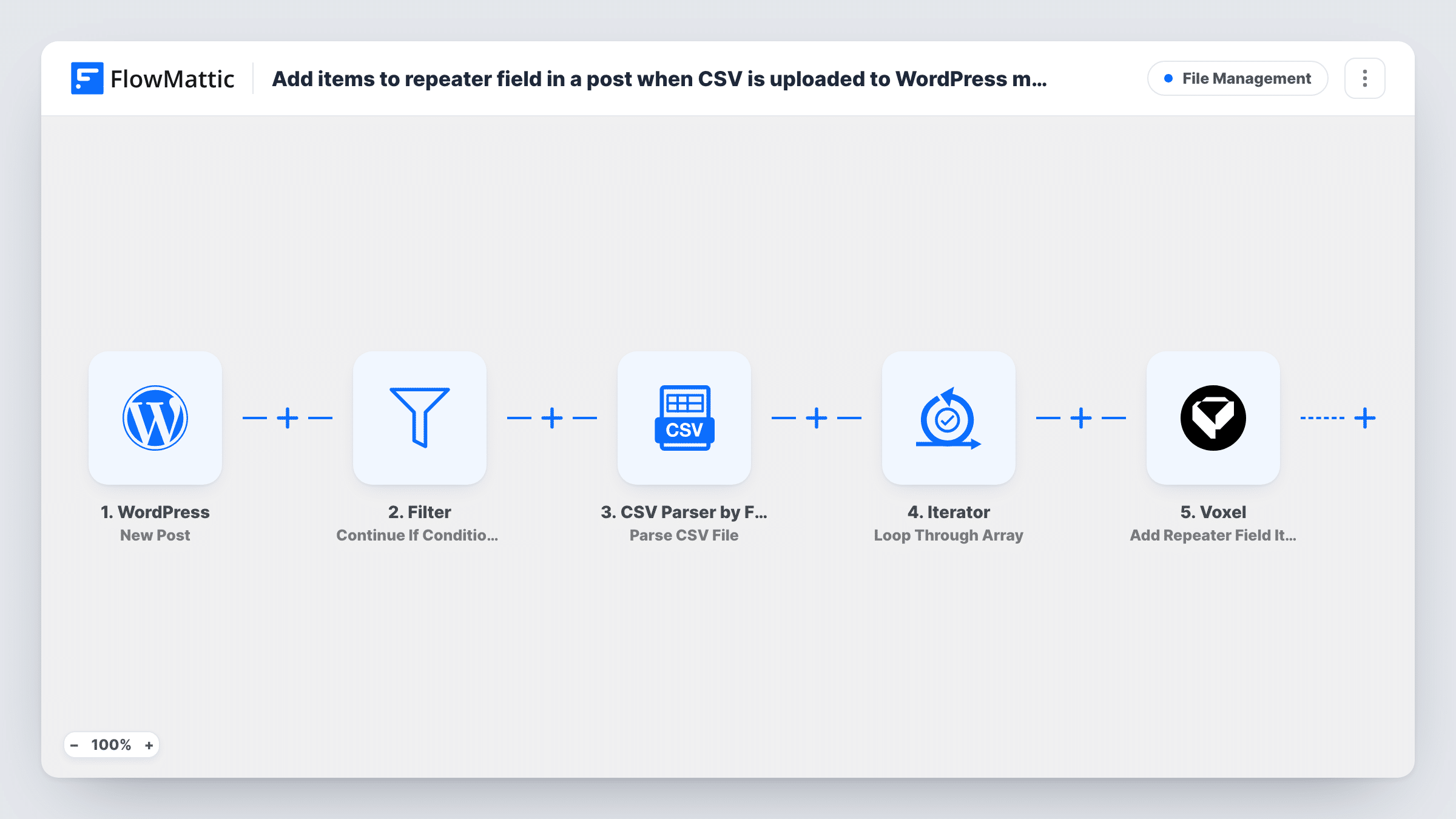
The WordPress New Media trigger fires for every file added to the media library. A Filter right after it continues only when the file's URL contains .csv (case is ignored), so images and PDFs stop there. The CSV Parser step then reads the file from that URL, treating the first line as column headers, and returns the rows as data.
An Iterator loops through those rows, and for each one the Voxel Add Repeater Field Item step adds an item to a repeater field. That step ships unmapped. After import, connect Voxel, tell the step which post and repeater field to use, and map your CSV columns into the item's fields. A column in the CSV that holds the post ID lets one file feed several posts.
Uploading the same CSV twice adds its rows twice. Test with a short file first and check Task History to see each row the Iterator passed to Voxel.
Restaurant menus on directory listings
A food directory keeps each venue's dishes and prices in a spreadsheet and uploads the CSV to fill the menu repeater on that venue's Voxel listing.
Event schedules with many sessions
An event site lists talk times, speakers and rooms in a sheet, then fills the agenda repeater on the event post from one CSV upload.
Feature lists for rental properties
A property portal adds amenities to each rental listing's repeater from a CSV that includes a post ID column for every row.
How this workflow runs
What happens at each step once the workflow is on, and what you need before you import it.
 WordPress New Media
Fires whenever a new file is uploaded to the WordPress media library, whatever its type. The file's URL is passed on to the Filter and the CSV Parser.
- Filter Continue If Condition Meet
Continues only if the uploaded file's URL contains .csv, ignoring case. Images, documents and other uploads stop at this step, so nothing after it runs for them.
- CSV Parser by FlowMattic Parse CSV File
Reads the CSV from its media library URL with headers turned on, so the first line names the columns. It returns every row as structured data for the Iterator.
- Iterator Loop Through Array
Loops through the parsed rows from the CSV Parser and runs the Voxel step once per row, so a file of 40 rows means 40 repeater items.
 Voxel Add Repeater Field Item
Adds one item to a Voxel repeater field per CSV row. The step comes unmapped: choose the post and repeater field, then map the row's columns into the item. Test with a known post first.
What you need
- FlowMatticCore
- Voxel AccountAccount
After importing, map your own data. To keep the template universal, not every step is pre-filled. Open each step in the builder and connect your accounts and fields (channels, lists, sheets, recipients) before you switch the workflow on.
Make it yours
Changes worth making after you import it.
- Match your CSV headers to the repeater's sub-field names before exporting, so mapping each column in the Voxel step is quick to check.
- Upload CSVs only when you mean to import them, or narrow the Filter to a file name pattern such as -repeater.csv, so other CSV uploads don't add items.
- Keep a post ID column in the CSV and map it into the Voxel step to fill repeaters on several listings from one file.
Questions about this workflow
What happens when I upload an image instead of a CSV?
The New Media trigger still starts a run, but the Filter stops it because the file URL doesn't contain .csv. The parser and Voxel steps don't run for that upload.
Will uploading the same CSV again duplicate the Voxel repeater items?
Yes. The workflow adds items and doesn't compare them with what the repeater already holds, so a second upload of the same rows adds them again.
Does the CSV need a header row?
Yes. The CSV Parser step is set to treat the first line as headers, and those names are what you pick from when mapping each row into the Voxel item.
Can one CSV fill repeaters on several Voxel posts?
It can if the file carries the target post for each row, for example a post ID column, and you map that column into the Voxel step. Test on a known post before a full import.
More File Management workflows
Other ready-to-import templates from the same category.




Import this workflow into your WordPress site
Download the JSON, import it from the Workflows screen and connect your accounts. Every run stays on your server, with no per-task fees.
30-day money-back guarantee Unlimited workflows and runs Self-hosted