

Assign leads to different teams on Slack with round-robin scheduling algorithm on new leads generated through NewOaks AI
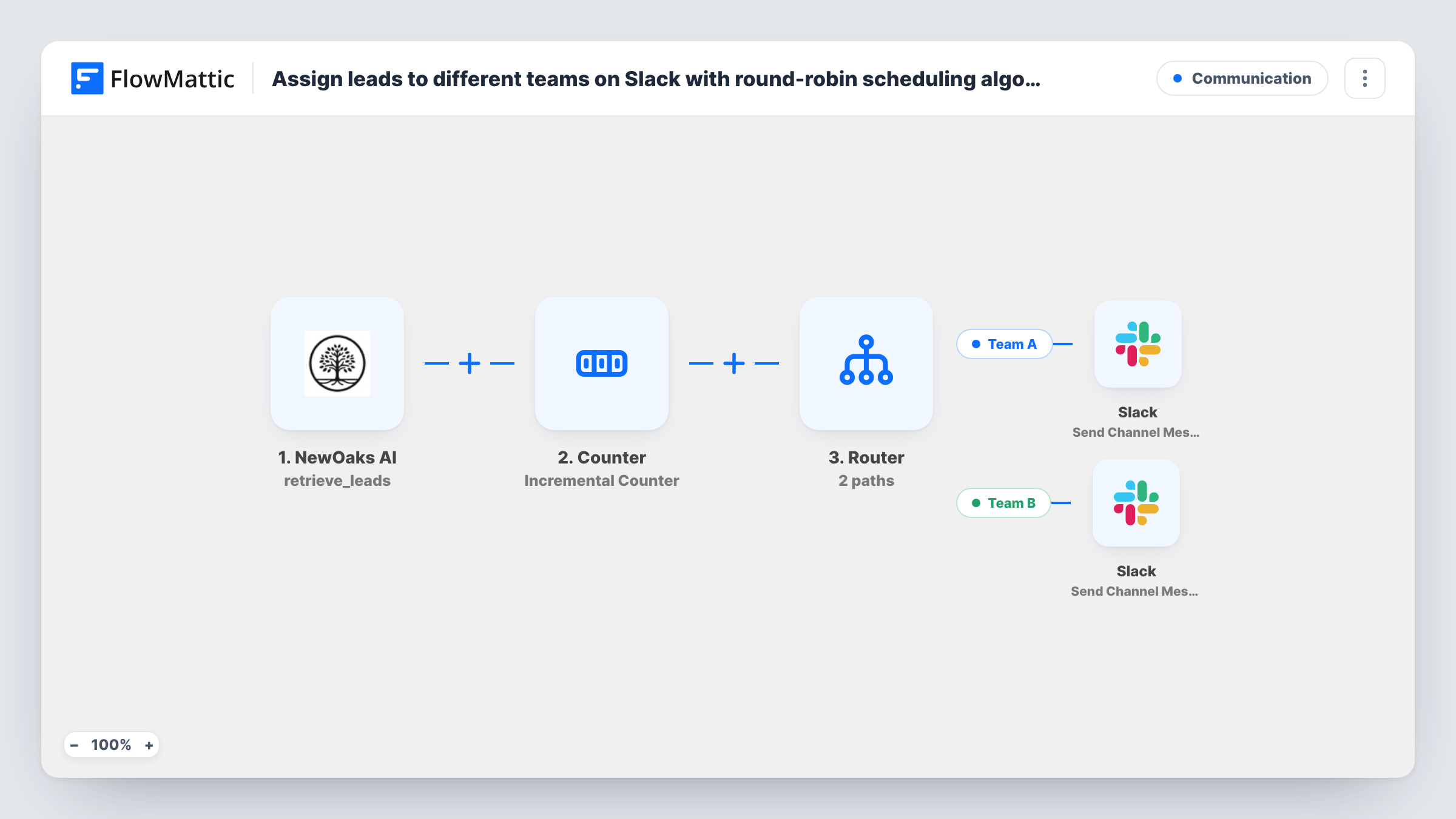
New leads from your NewOaks AI chatbot are shared out in turn between two teams: a Counter alternates between 1 and 2, and a Router posts each lead to Team 1’s or Team 2’s Slack channel.
 NewOaks AI
 Counter
 Router
 Slack
Slack5 steps Setup ~8 min Used on 3.5k sites Free to import
What this workflow does
When one chatbot feeds leads to two sales teams, someone usually ends up deciding by hand who takes the next one. This workflow does it in strict turns, so both teams get an even share and nobody has to keep score.
The NewOaks AI trigger fires when a lead is generated and passes the lead's details on. A FlowMattic Counter step then keeps a stored number for this workflow. It is set to change by 1 and to reset after 2, so the value it returns as final_value alternates between 2 and 1 from one lead to the next. Starting from the template's initial value of 1, the first lead after import gets 2.
A Router with two routes reads that value. The Team 1 route continues only when the counter matches 1, and the Team 2 route only when it matches 2. The two conditions can't both match, so each lead follows exactly one route.
Each route ends in a Slack Send Channel Message step. Both ship unmapped: after import, pick each team's channel and write the message, mapping lead details such as the name and contact info from NewOaks AI. Test with a couple of leads and check Task History to see which route each one took.
Two sales pods sharing website leads
A real estate agency splits chatbot enquiries between its north and south office teams, each with its own Slack channel, so both get a fair number of new prospects.
Two callback teams with even queues
A service business alternates new chatbot leads between two callback teams, so neither queue grows faster than the other.
Testing two follow-up approaches
A marketing team sends every other lead to a team trying a different follow-up script, then compares the two groups in their CRM.
How this workflow runs
What happens at each step once the workflow is on, and what you need before you import it.
 NewOaks AI Lead Generated
Starts a run each time NewOaks AI generates a lead. The lead's details from the chatbot are passed on so the Slack messages can include them.
- Counter Incremental Counter
Changes a stored number for this workflow by 1 and resets it after it reaches 2, so the final_value it returns alternates between 2 and 1 for each new lead. The first lead after import gets 2.
- Router 2 paths
Splits the run into two routes. Team 1 continues when the counter's final value matches 1, Team 2 when it matches 2. Only one condition can match, so every lead follows a single route.
- Slack Send Channel Message
On the Team 1 route, posts a message to a Slack channel. The step ships unmapped: choose Team 1's channel and write the message, mapping lead details from the NewOaks AI trigger.
- Slack Send Channel Message
On the Team 2 route, posts a message to the Slack channel you choose for Team 2. Like the first Slack step, it ships empty, so set the channel and map the lead details you want the team to see.
What you need
- FlowMatticCore
- NewOaks AI AccountAccount
- Slack AccountAccount
After importing, map your own data. To keep the template universal, not every step is pre-filled. Open each step in the builder and connect your accounts and fields (channels, lists, sheets, recipients) before you switch the workflow on.
Make it yours
Changes worth making after you import it.
- For a third team, set the Counter's reset value to 3, add a third Router route that continues when the counter matches 3, and give that route its own Slack step.
- If a team works in a private Slack channel, swap that route's step for Slack's Send Private Channel Message action, since Send Channel Message is the one meant for regular channels.
- Mention a team member with their Slack user tag in each route's message so someone on that team is notified directly about the lead.
Questions about this workflow
Which Slack channel gets the first NewOaks AI lead?
Team 2's. The Counter starts from its initial value of 1 and adds 1 on the first run, which gives 2. After that it resets to 1, then goes back to 2, alternating with each lead.
Can a lead be posted to both Slack channels?
No. The Router runs every route whose condition matches, but the routes check for 1 and for 2, and the counter returns one value per run, so only one route runs.
Do I need to write the Slack messages myself?
Yes. Both Send Channel Message steps ship without a channel or text. Pick each team's channel and write the message with the lead details you want to show.
Does the counter remember its position between leads?
Yes. The Counter stores its number for this workflow and reads it on the next run, so the turn order carries on from lead to lead.
More Communication workflows
Other ready-to-import templates from the same category.





Import this workflow into your WordPress site
Download the JSON, import it from the Workflows screen and connect your accounts. Every run stays on your server, with no per-task fees.
30-day money-back guarantee Unlimited workflows and runs Self-hosted