

Copy new Dropbox files to Google Drive
When a new file is added to a Dropbox folder you watch, this workflow uploads a copy to Google Drive, so people who work in Drive get the file without downloading and re-uploading it.
 Dropbox
 Google Drive
2 steps Setup ~5 min Used on 1.3k sites Free to import
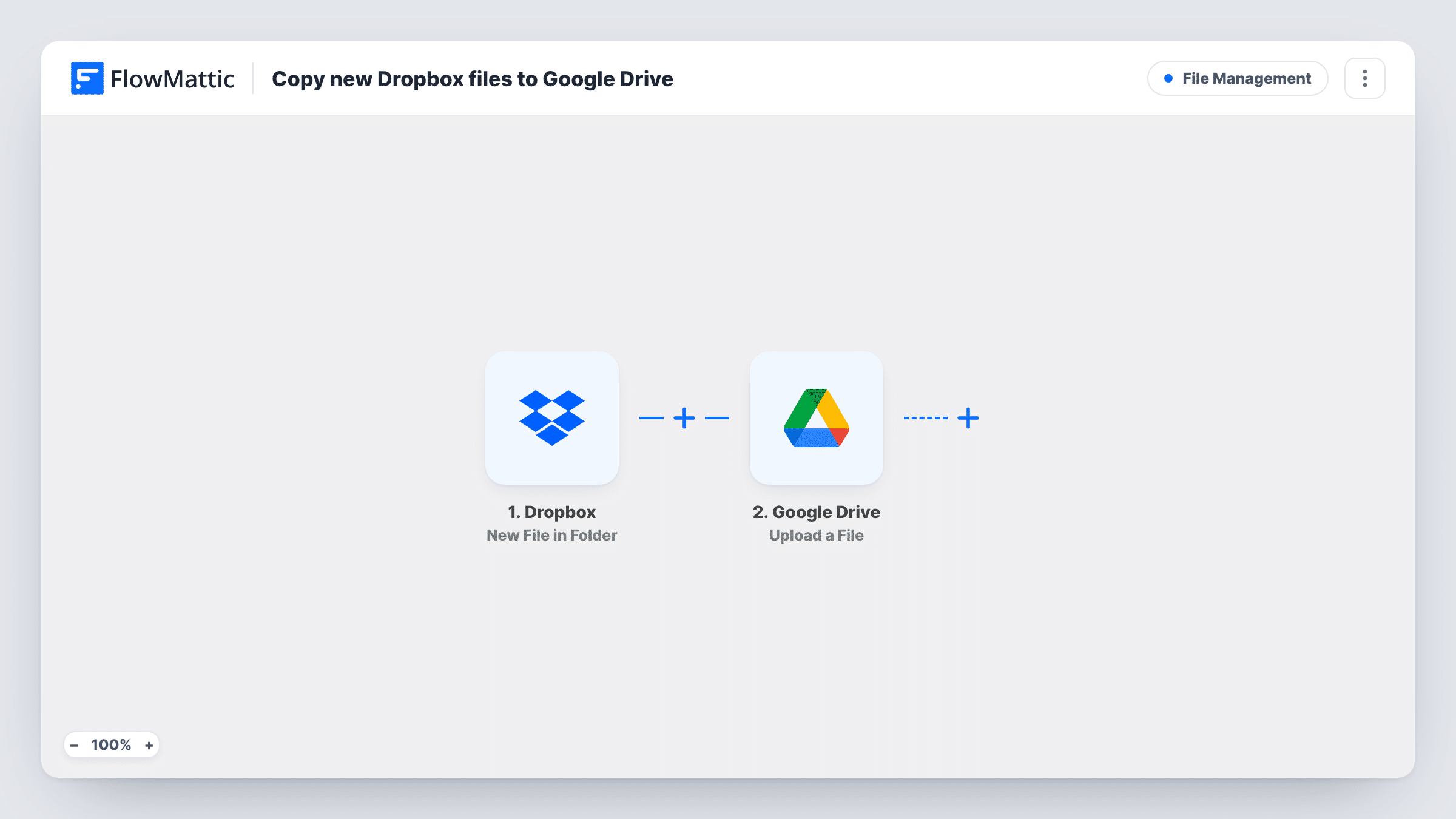
What this workflow does
Many teams end up split across two storage services. Clients or suppliers drop files into Dropbox, while your own staff live in Google Drive. Moving each file by hand is slow and easy to forget. This workflow makes the copy for you whenever a file arrives.
The Dropbox trigger watches a folder and fires when a new file is added to it. FlowMattic passes the file's details on to the Google Drive step, which uploads the file to the Drive folder you select. You map the file from the Dropbox step into the upload after import.
This is a one-way copy of new files. Editing, renaming or deleting a file in Dropbox later does not change the copy in Drive, and files already in the folder before you turn the workflow on are not moved. The Dropbox original stays where it is. If an upload fails, Task History shows the error on the Google Drive step for that run.
Client deliverables arriving by Dropbox
A design client sends assets to a shared Dropbox folder. Each file is uploaded to the project's Drive folder, where your team already keeps briefs and drafts.
Scanned receipts for the bookkeeper
Your scanner app saves to Dropbox, but your bookkeeper works in Google Drive. New scans land in the Drive folder they check each month.
A second copy for important uploads
Keep contracts or signed forms in two services. Each new file dropped into the Dropbox contracts folder also gets an upload to Drive.
How this workflow runs
What happens at each step once the workflow is on, and what you need before you import it.
 Dropbox New File in Folder
Runs when a new file is added to the Dropbox folder you pick. The file's details are passed on so the Google Drive step can upload it.
- Google Drive Upload a File
Puts a copy of the new Dropbox file into a Drive folder of your choosing. Map the file from the Dropbox trigger into this step and connect your Google account.
What you need
- FlowMatticCore
- Dropbox AccountAccount
- Google Drive AccountAccount
After importing, map your own data. To keep the template universal, not every step is pre-filled. Open each step in the builder and connect your accounts and fields (channels, lists, sheets, recipients) before you switch the workflow on.
Make it yours
Changes worth making after you import it.
- Add a Filter after the Dropbox trigger that continues only when the file name ends in .pdf, so only documents are copied and images or drafts stay in Dropbox.
- Use a Router with routes for distinct file extensions, each ending in its own Google Drive upload, to sort PDFs and spreadsheets into separate Drive folders.
- Drop a small test file into the Dropbox folder after import so FlowMattic captures a real event. Then map the file in the Drive step and run the workflow once to check the copy arrives.
Questions about this workflow
Does deleting a file in Dropbox remove it from Google Drive?
No. The workflow only reacts to new files, so later changes or deletions in Dropbox are not carried over to the copy in Drive.
Will files already in the Dropbox folder be copied to Drive?
No. Only files added after the workflow is on reach Google Drive. Move older files across by hand once, or re-add them to the folder.
Is the file removed from Dropbox after the upload to Drive?
No. The Dropbox file stays in place. The workflow makes a copy in Google Drive and changes nothing in Dropbox.
Can I watch more than one Dropbox folder?
The trigger watches the folder you pick. To cover a second folder, duplicate the workflow and point the copy's Dropbox trigger at that folder.
More File Management workflows
Other ready-to-import templates from the same category.




Import this workflow into your WordPress site
Download the JSON, import it from the Workflows screen and connect your accounts. Every run stays on your server, with no per-task fees.
30-day money-back guarantee Unlimited workflows and runs Self-hosted