

When new contract is uploaded in Gravity Forms, pause for legal team approval then save approved contract to WordPress media library
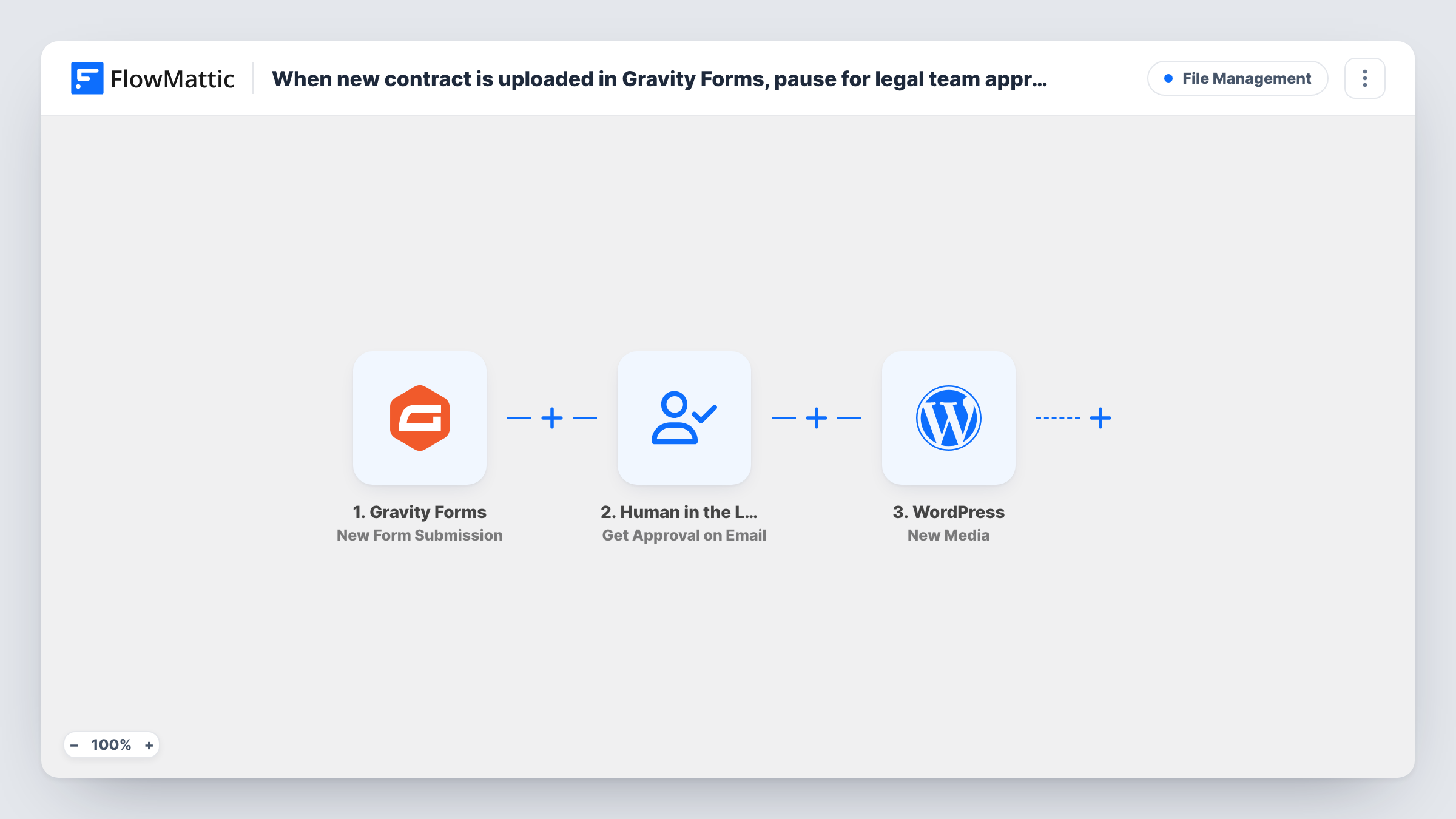
When a contract arrives through a Gravity Forms submission, this workflow emails your legal team an approval request and waits. Only an approved contract is added to the WordPress media library; a rejection ends the run.
 Gravity Forms
 Human in the Loop
 WordPress
3 steps Setup ~5 min Used on 3.1k sites Free to import
What this workflow does
Contracts sent through a website form should not sit next to your other files until someone on the legal side has read them. This workflow puts a review in the middle. Each submission waits for a yes or no, and only a yes adds the file to your site's media library.
The Gravity Forms trigger runs on each new submission, so connect it to the form you keep for contract uploads. The Human in the Loop step then sends an approval request by email and pauses the run. When the reviewer approves, the run resumes and the WordPress step creates a new media item from the uploaded file. When the reviewer rejects it, the run ends there and the New Media step never runs.
One setting needs your attention before you go live. If nobody answers before the wait time runs out, the default timeout action is Skip and Continue to Next Step, which lets the run carry on to New Media without approval. Set the timeout action to End Workflow so an unanswered request adds nothing. Task History shows where each run stopped and why.
Vendor agreements sent in by suppliers
Suppliers upload signed agreements on a Gravity Forms page. Your counsel gets an email for each one, and only the agreements counsel approves land in the media library for the purchasing team.
Freelancer contracts for an agency
New freelancers return their contract through a form. The agency's legal contact reviews each file from the approval email before it is stored on the site with the other onboarding documents.
Venue or sponsor contracts for an event
Sponsors upload their signed terms ahead of an event. Each upload is held for approval, so the media library only holds the contracts your legal team accepted.
How this workflow runs
What happens at each step once the workflow is on, and what you need before you import it.
 Gravity Forms New Form Submission
Runs each time a Gravity Forms form is submitted, passing every field, including the uploaded contract, to the next steps. Use the form that collects contracts, since every submission it receives is sent for approval.
- Human in the Loop Get Approval on Email
Emails an approval request to your reviewer and pauses the run until they respond. Map the submission details, such as the file link and the sender's name, into the request. A rejection ends the run. Set the timeout action to End Workflow, because the default, Skip and Continue to Next Step, lets an unanswered request continue.
- WordPress New Media
Runs only after approval. Creates a new item in your WordPress media library from the uploaded contract. Map the file from the Gravity Forms submission into this step, then send a test entry to confirm the file appears in the library.
What you need
- FlowMatticCore
- Gravity Forms PluginPlugin
After importing, map your own data. To keep the template universal, not every step is pre-filled. Open each step in the builder and connect your accounts and fields (channels, lists, sheets, recipients) before you switch the workflow on.
Make it yours
Changes worth making after you import it.
- Change the Human in the Loop timeout action to End Workflow before you turn the workflow on. With the default, Skip and Continue to Next Step, a request nobody answers still adds the contract to the media library.
- Put the uploaded file's link and the submitter's details in the approval request, so the reviewer can open the contract from the email before deciding.
- Add a Filter after the trigger that continues only when the file upload field is not empty. Submissions without a contract then never reach your legal team.
Questions about this workflow
Does a rejected contract still reach the WordPress media library?
No. When the reviewer rejects the request, the run ends at the Human in the Loop step and the New Media step does not run. You don't need a Filter or Router to stop rejected contracts.
What if the legal team never answers the approval email?
That depends on the timeout action. The default, Skip and Continue to Next Step, lets the run go on and adds the file without approval. Set it to End Workflow so an unanswered request adds nothing, or use Reassign to pass the request to someone else.
Is the contract removed from Gravity Forms when it is rejected?
No. The workflow only decides whether the file is added to the media library. The Gravity Forms entry stays as it was, so you can delete it there if you don't want to keep it.
Will every Gravity Forms submission be sent for approval?
Every submission the trigger receives is sent. Connect the trigger to the form you use for contracts, and send one test entry after import to check which submissions reach the approval step.
More File Management workflows
Other ready-to-import templates from the same category.




Import this workflow into your WordPress site
Download the JSON, import it from the Workflows screen and connect your accounts. Every run stays on your server, with no per-task fees.
30-day money-back guarantee Unlimited workflows and runs Self-hosted