

Create new blog post using OpenAI ChatGPT in WordPress, when new record added to Airtable
Add a record to Airtable and this workflow sends your prompt to OpenAI to write the text, then creates a WordPress post from the result, so a content plan in Airtable turns into posts on your site.
 Airtable
 OpenAI (ChatGPT)
 WordPress
3 steps Setup ~5 min Used on 3.4k sites Free to import
What this workflow does
Many teams plan articles in an Airtable base: a topic, a few keywords, maybe a target audience per record. Turning each idea into a first draft is the slow part. This workflow takes every new record, asks OpenAI to write from it, and places the output on your WordPress site as a post.
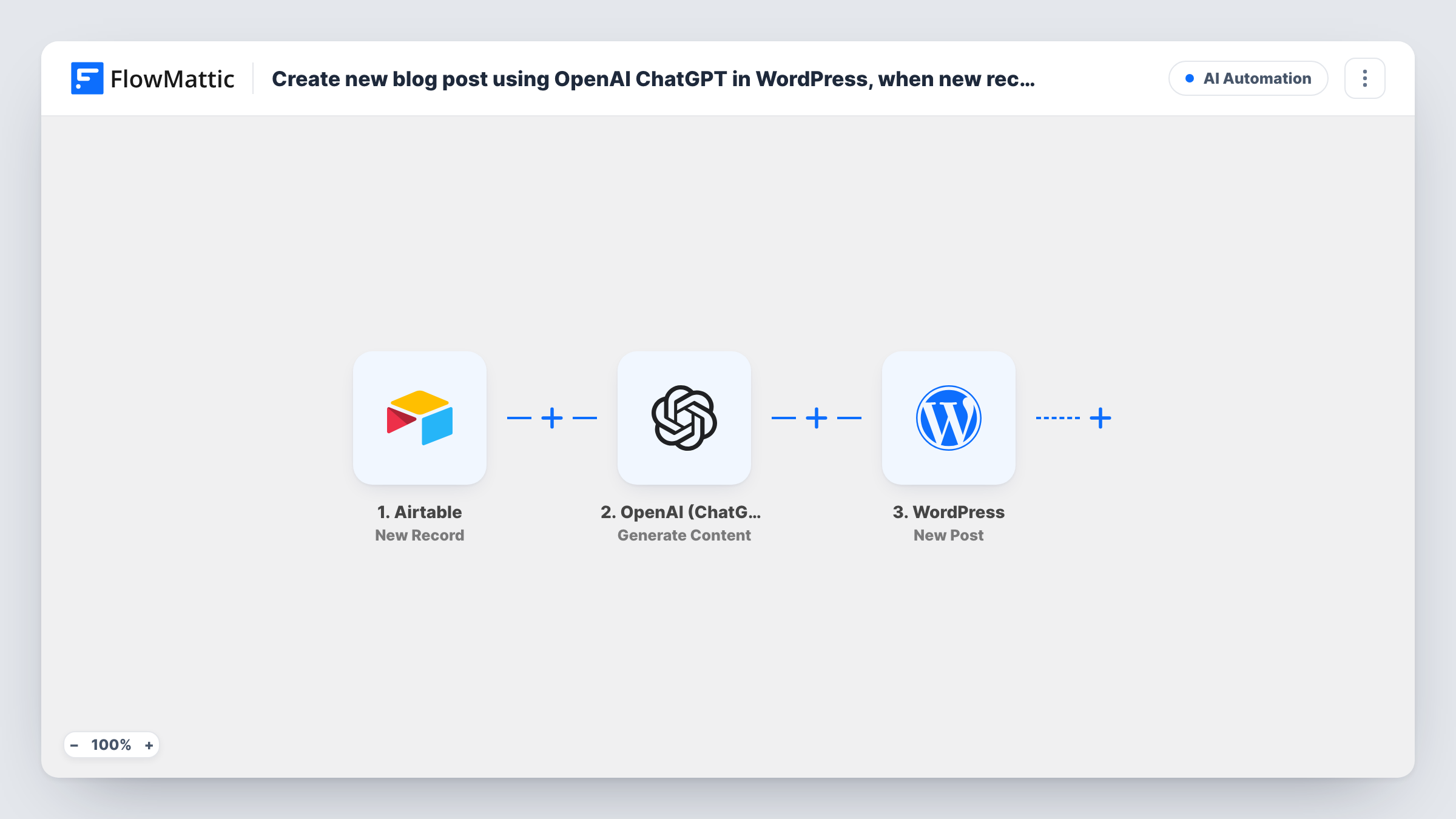
The Airtable trigger fires when a record is created, passing each of its fields along. The OpenAI (ChatGPT) step uses Generate Content: you write the prompt and drop in Airtable values, for example "Write a 600-word article about" followed by the topic field. OpenAI returns the generated text. The final step uses WordPress New Post to create a post with the title and content you map.
Every new record produces one post, since there is no Filter or approval step. Read AI text before it reaches readers: run a test record and check whether the post comes out as a draft or goes live, then adjust the WordPress step if needed.
Editorial calendar kept in Airtable
Writers add topics to the calendar table. Each new topic arrives in WordPress as a post with AI-written body text for an editor to review.
Product how-to articles
A support lead adds a record per common question. The workflow writes a how-to post for each, which you then check against the product.
Local landing pages
Each record holds a service and a town. The prompt combines both, giving you one post per location to edit before it goes out.
How this workflow runs
What happens at each step once the workflow is on, and what you need before you import it.
 Airtable New Record
Fires when a new record is created in Airtable. All of the record's fields, such as topic or keywords, are passed on for the prompt and the post.
- OpenAI (ChatGPT) Generate Content
Sends your prompt to OpenAI and returns the generated text. Build the prompt from fixed instructions plus Airtable fields, and connect your OpenAI API key.
- WordPress New Post
Turns the generated article into a WordPress post. Map the Airtable topic to the post title and the OpenAI output to the content.
What you need
- FlowMatticCore
- Airtable AccountAccount
- OpenAI (ChatGPT) AccountAccount
After importing, map your own data. To keep the template universal, not every step is pre-filled. Open each step in the builder and connect your accounts and fields (channels, lists, sheets, recipients) before you switch the workflow on.
Make it yours
Changes worth making after you import it.
- Rows typed straight into the Airtable grid can exist before the topic is filled in. Add a Filter after the trigger that continues only when the topic field is not empty, or add ideas through an Airtable form.
- Want a separate SEO title or excerpt? Add a second OpenAI Generate Content step with its own prompt and map its output to the matching post field.
- Insert a Human in the Loop approval step before WordPress New Post if someone must sign off on each draft, and set its timeout action to End Workflow so an unanswered request creates no post.
Questions about this workflow
Will the OpenAI article be published on my WordPress site straight away?
That depends on how the WordPress step is set up. Send a test record first and check the new post's status in WordPress. Keep posts as drafts if you want to edit the AI text before readers see it.
Do I need an OpenAI account for this Airtable to WordPress workflow?
Yes. The Generate Content step runs through the OpenAI API with your own API key, so usage is billed to your OpenAI account.
What happens when I edit an Airtable record later?
Nothing. The trigger fires only for new records, so changing a record doesn't rewrite or update the WordPress post.
Can OpenAI also write the post title?
Not in the imported version, which has one OpenAI step for the body. Map an Airtable field to the title, or add a second Generate Content step that asks for a headline and map its output to the title.
More AI Automation workflows
Other ready-to-import templates from the same category.







Import this workflow into your WordPress site
Download the JSON, import it from the Workflows screen and connect your accounts. Every run stays on your server, with no per-task fees.
30-day money-back guarantee Unlimited workflows and runs Self-hosted