

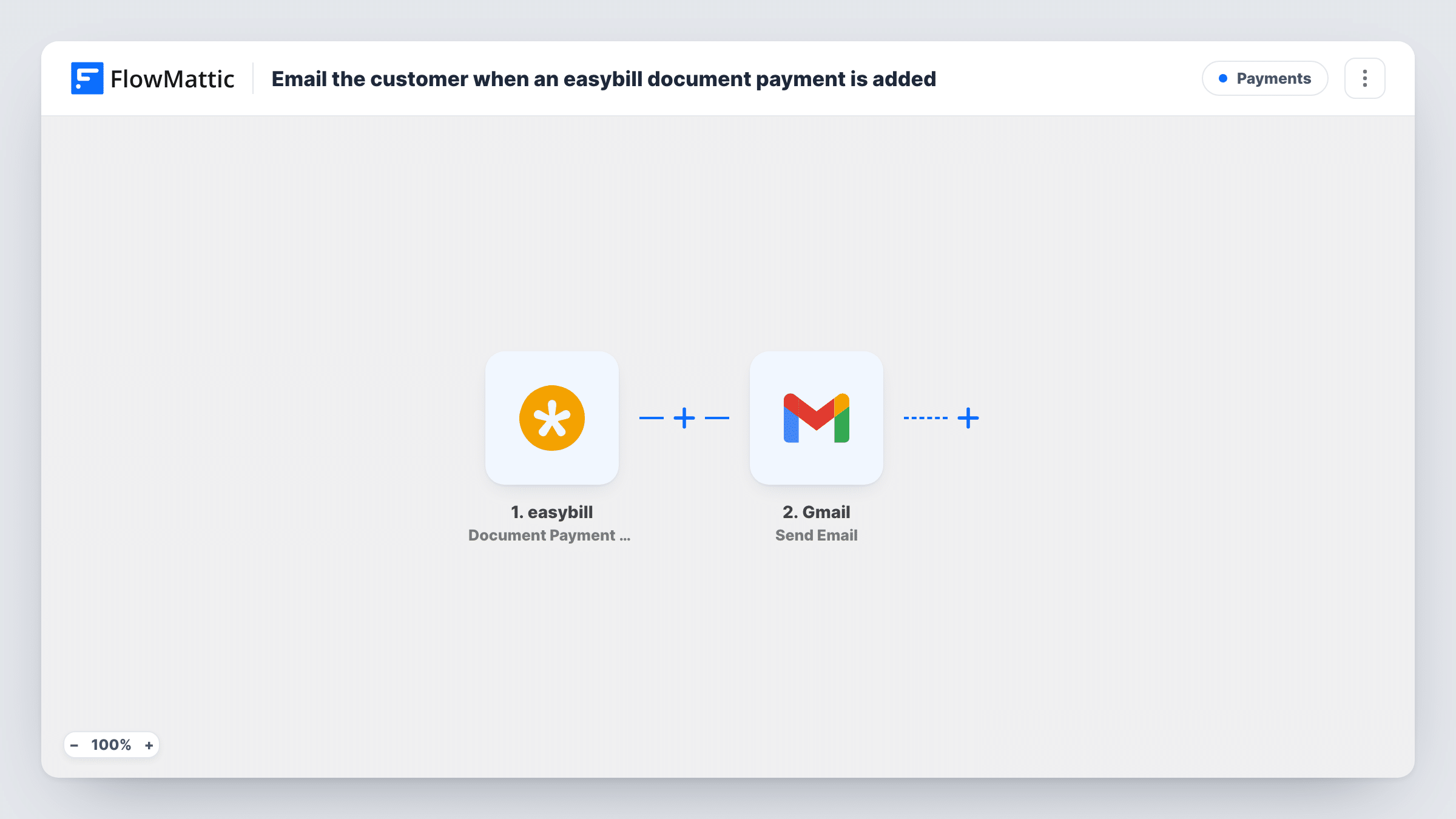
Send a Gmail notification when an easybill document payment is added
When a payment is recorded against an easybill document, FlowMattic sends an email from your Gmail account to the address you choose, with the document and payment details you map.
 easybill
 Gmail
Gmail2 steps Setup ~5 min Used on 2.7k sites Free to import
What this workflow does
Knowing that an invoice has been paid matters to more people than the bookkeeper. Sales staff want to thank the client, project leads want to start work, and owners just like to know. This workflow sends a Gmail message each time easybill records a payment, so nobody has to watch the payment list.
The easybill Document Payment Add trigger fires when a new payment is received for a document and passes the payment data on. Partial payments count as payments too, so an invoice paid in two parts produces two emails. Run a test payment to see which values easybill sends, such as the amount, the date and the document it belongs to.
The Gmail Send Email step then sends a message from the Google account you connect. It ships empty, so you decide who gets it. Most people send it to their own team or accountant. If you want to thank the customer instead, map their email address, but check first that the payment data includes it; you may need the document's customer details for that.
Write a subject and body with the amount and document number mapped in. Task History lists each payment and the email that went out.
Paid-invoice alerts for a small agency
An agency owner gets a Gmail message each time a client payment lands on an easybill invoice, without opening easybill.
Start work once the deposit is in
A workshop team receives an email when the deposit on a quote-turned-invoice is recorded, so they can schedule the job.
Note to the accountant
A freelancer copies their accountant on every payment recorded in easybill, with the amount and document number in the subject.
How this workflow runs
What happens at each step once the workflow is on, and what you need before you import it.
 easybill Document Payment Add
Fires when easybill records a new payment for a document, including partial payments. The payment details are passed on; a test payment shows the exact values you can map.
- Gmail Send Email
Emails the payment notice through your linked Gmail account. The step ships empty: set the recipient, write the subject and map the payment amount and document number into the message.
What you need
- FlowMatticCore
- easybill AccountAccount
- Gmail AccountAccount
After importing, map your own data. To keep the template universal, not every step is pre-filled. Open each step in the builder and connect your accounts and fields (channels, lists, sheets, recipients) before you switch the workflow on.
Make it yours
Changes worth making after you import it.
- Put the payment amount and the document number in the subject line, so you can scan your inbox for a particular invoice later.
- If only larger payments need an email, add a Filter between the easybill trigger and the Gmail step on the amount. Set the threshold to suit your business.
- Map the payment date and the outstanding balance, if easybill sends one, into the body, so the reader knows whether the invoice is now fully paid.
Questions about this workflow
Who receives the easybill payment email?
The address you put in the Gmail step. The template leaves it blank, so after import choose your team, your accountant, or the customer's email if the payment data carries it.
Do partial payments on an easybill invoice send an email?
Yes. Each payment added to a document is its own Document Payment Add event, so every part payment sends a separate email.
Does easybill still send its own payment confirmation?
This workflow doesn't change anything in easybill. Whatever easybill sends on its own carries on, and this Gmail message is sent as well.
Does removing a payment in easybill send an email too?
No. Only Document Payment Add starts this workflow. Deleting a payment receipt is a separate easybill event, Document Payment Delete, which needs its own workflow.
More Payments workflows
Other ready-to-import templates from the same category.





Import this workflow into your WordPress site
Download the JSON, import it from the Workflows screen and connect your accounts. Every run stays on your server, with no per-task fees.
30-day money-back guarantee Unlimited workflows and runs Self-hosted