

Get Meta Tags of the URL received in FluentForm submission and add to Airtable record
When a Fluent Forms submission includes a web address, FlowMattic reads that page’s meta tags and saves them with the entry as a new Airtable record, so you can see what each submitted site says about itself.
 Fluent Forms
 Webpage Parser by FlowMattic
 Airtable
3 steps Setup ~5 min Used on 3.5k sites Free to import
What this workflow does
Forms that ask for a website, such as audit requests, directory listings or partner applications, give you a bare URL. To know what the site is, you open it and read its title and description yourself. This workflow fetches that information for you and files it next to the rest of the entry.
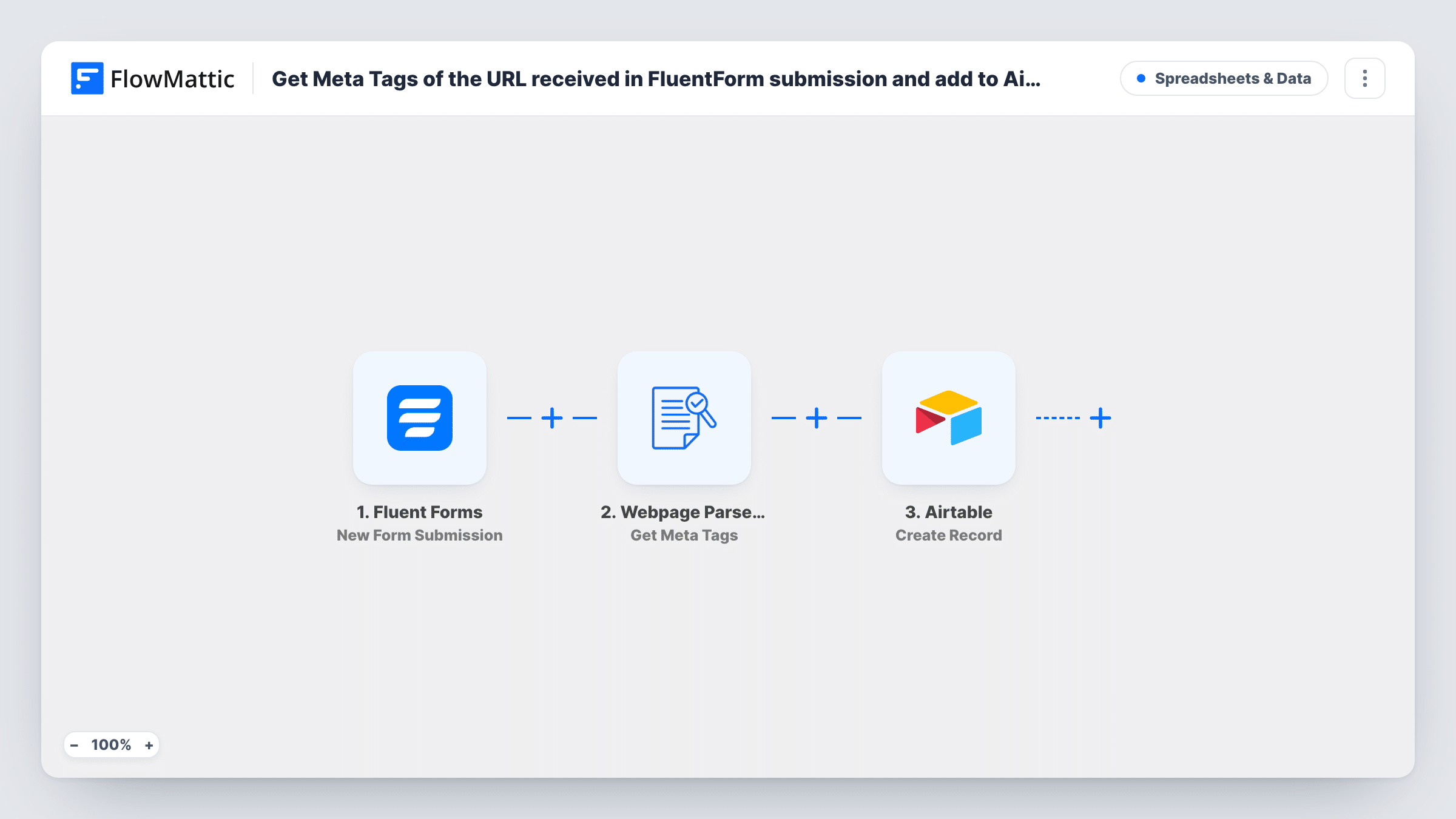
The Fluent Forms trigger picks up each entry the moment a visitor sends the form. You map the form's URL field into the Webpage Parser step, which uses Get Meta Tags to read the meta tags of that page. Its output, along with the form answers, is then available to the last step, where Airtable creates a new record in the base and table you pick.
Every submission creates its own record, so a person who sends the form twice appears twice. Which meta tags a page returns depends on how that site was built. Run a test with a real address after import to see the output, then map the values you want into your Airtable fields.
SEO audit request form
Prospects submit their site URL on a Fluent Forms audit form. Each Airtable record arrives with the page's current meta tags, so you can review them before the first call.
Business directory submissions
Companies apply to be listed in your directory. The Airtable base holds their answers plus the description their own homepage publishes, ready to edit into a listing.
Guest post and partner pitches
Bloggers pitching a collaboration enter their site address. Your editorial table shows how each site describes itself without anyone opening the links one by one.
How this workflow runs
What happens at each step once the workflow is on, and what you need before you import it.
 Fluent Forms New Form Submission
Starts the workflow each time a visitor submits a Fluent Forms form on your site. The URL field and every other answer become available to the next two steps.
- Webpage Parser by FlowMattic Get Meta Tags
Webpage Parser fetches the page at the address you map from the form and returns its meta tags. Map the form's URL field here, then run a test to see which values come back for a real site.
- Airtable Create Record
Adds a fresh record to the Airtable table you select. Map form answers and the meta tag values from the previous step to your table's fields, and connect your Airtable account.
What you need
- FlowMatticCore
- Fluent Forms PluginPlugin
- Airtable AccountAccount
After importing, map your own data. To keep the template universal, not every step is pre-filled. Open each step in the builder and connect your accounts and fields (channels, lists, sheets, recipients) before you switch the workflow on.
Make it yours
Changes worth making after you import it.
- Make the URL field required in your Fluent Forms form so every run gives the Webpage Parser an address to read.
- Add a Filter after the trigger that continues only when the URL field is not empty, if the field is optional on your form. Entries without an address then skip the parser and Airtable.
- Keep a column in Airtable for the submitted URL itself, next to the meta tag values, so you can open the page later and compare what it says now.
Questions about this workflow
Which meta tags end up in Airtable?
Only the ones you map. The Webpage Parser returns what the submitted page publishes, and you choose which values go into which Airtable fields. A test run shows the exact output for a real address.
What if the submitted URL is wrong or the site is down?
The Webpage Parser step has nothing to read, so its output will be empty or an error that Task History shows. The Airtable step still runs, so the record is created with whatever data it does have.
Does this update an existing Airtable record for the same site?
No. The Airtable step uses Create Record, so every Fluent Forms submission adds a new record, even when the URL has been submitted before.
Do I need anything extra to use the Webpage Parser?
It is a FlowMattic app, so there is no separate account to connect. You need Fluent Forms on the same WordPress site as FlowMattic and an Airtable account.
More Spreadsheets & Data workflows
Other ready-to-import templates from the same category.



Import this workflow into your WordPress site
Download the JSON, import it from the Workflows screen and connect your accounts. Every run stays on your server, with no per-task fees.
30-day money-back guarantee Unlimited workflows and runs Self-hosted