

Log new Zcal events in a Google Sheets spreadsheet
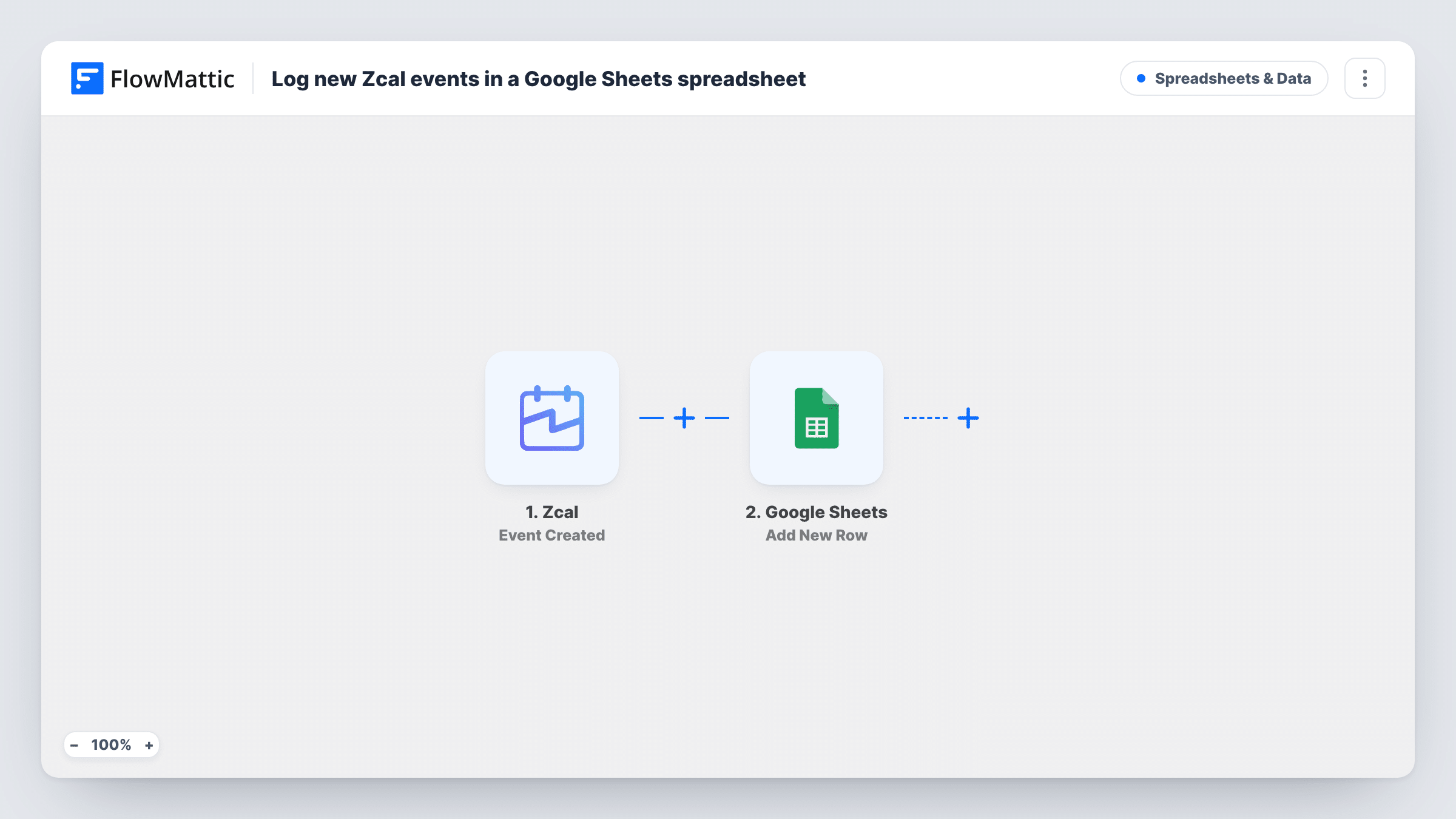
Each time a new event is created in Zcal, this workflow adds a row to the Google Sheets spreadsheet you choose, giving you a running list of meetings to sort, count or share outside your calendar.
 Zcal
 Google Sheets
2 steps Setup ~5 min Used on 2.2k sites Free to import
What this workflow does
Zcal makes booking meetings easy, but a calendar is a poor place to review them. Counting calls per week, seeing who booked which meeting type, or passing a list to a colleague all go faster in a spreadsheet. This workflow writes one row for each new Zcal event.
The Zcal trigger fires when an event is created, typically when someone books time with you. FlowMattic collects the event details Zcal sends and runs Add New Row in Google Sheets. You pick the spreadsheet and worksheet, then decide which column holds the invitee, the time, the meeting type or any other value Zcal provides.
Rescheduled and cancelled meetings are separate Zcal events, so they don't add or change rows here. The sheet shows each event as it was first created. Task History records every run, which is handy while you get the column mapping right.
Weekly sales call report
A sales rep shares a Zcal link with prospects. The sheet lists every booked call, and a manager filters it by week for the Monday review.
Consultant billing prep
An independent consultant logs each Zcal booking in Google Sheets and adds an hours column at month end to prepare invoices.
Office hours attendance
A lecturer offers student office hours through Zcal and keeps a sheet of who booked a slot across the term.
How this workflow runs
What happens at each step once the workflow is on, and what you need before you import it.
 Zcal Event Created
Fires when a new event is created in Zcal, such as a meeting someone books through your link. The event details are passed on for the spreadsheet.
- Google Sheets Add New Row
Adds a row to your chosen Google Sheets worksheet with the Zcal values you map. Set up a header row first so each column has a clear target, and connect your Google account.
What you need
- FlowMatticCore
- Zcal AccountAccount
- Google Sheets AccountAccount
After importing, map your own data. To keep the template universal, not every step is pre-filled. Open each step in the builder and connect your accounts and fields (channels, lists, sheets, recipients) before you switch the workflow on.
Make it yours
Changes worth making after you import it.
- Book a test meeting through your Zcal link after import, then use Task History to see the event fields before you map the sheet's columns.
- To track cancellations as well, build a second workflow on Zcal's Event Cancelled trigger that writes to another worksheet in the same spreadsheet.
- Add a Filter before the Google Sheets step if only one meeting type belongs in this sheet, matching on the event name or type value that Zcal sends.
Questions about this workflow
Does the row change when a Zcal meeting is rescheduled?
No. Reschedules are a separate Zcal trigger. This workflow only adds a row when the event is first created and never edits rows afterwards.
Are meetings booked before I import this added to the sheet?
No. Only Zcal events created while the workflow is on produce rows. Add earlier meetings to the sheet by hand if you need a full history.
Which Zcal details can go into Google Sheets?
Any value the Event Created trigger passes, mapped to the column you choose. Run a test booking to see the full list before you set up the row.
Can cancelled Zcal meetings be removed from the sheet automatically?
Not with this template, which only adds rows. Cancellations come through Zcal's Event Cancelled trigger, which you can use in a separate workflow to log them.
More Spreadsheets & Data workflows
Other ready-to-import templates from the same category.



Import this workflow into your WordPress site
Download the JSON, import it from the Workflows screen and connect your accounts. Every run stays on your server, with no per-task fees.
30-day money-back guarantee Unlimited workflows and runs Self-hosted